Ollama 的网络搜索 API 可用于为模型补充最新的信息,以减少幻觉并提高准确性。
网络搜索作为 REST API 提供,并在 Python 和 JavaScript 库中提供更深层次的工具集成。这还支持像 OpenAI 的 gpt-oss 模型执行耗时较长的研究任务。
身份验证
要访问 Ollama 的网络搜索 API,请创建一个 API key。需要一个免费的 Ollama 账户。
Web 搜索 API
执行单次查询的 Web 搜索并返回相关结果。
请求
POST https://ollama.com/api/web_search
query(string, required): 搜索查询字符串max_results(integer, optional): 要返回的最大结果数量(默认 5,最大 10)
响应
返回包含以下内容的对象:
results(array): 搜索结果对象数组,每个对象包含:title(string): 网页标题url(string): 网页 URLcontent(string): 来自网页的相关内容片段
示例
注意
确保已设置 OLLAMA_API_KEY,或者必须在 Authorization 请求头中传递。
cURL 请求
bash
curl https://ollama.com/api/web_search \
  --header "Authorization: Bearer $OLLAMA_API_KEY" \
	-d '{
	  "query":"what is ollama?"
	}'
响应
json
{
  "results": [
    {
      "title": "Ollama",
      "url": "https://ollama.com/",
      "content": "Cloud models are now available..."
    },
    {
      "title": "What is Ollama? Introduction to the AI model management tool",
      "url": "https://www.hostinger.com/tutorials/what-is-ollama",
      "content": "Ariffud M. 6min Read..."
    },
    {
      "title": "Ollama Explained: Transforming AI Accessibility and Language ...",
      "url": "https://www.geeksforgeeks.org/artificial-intelligence/ollama-explained-transforming-ai-accessibility-and-language-processing/",
      "content": "Data Science Data Science Projects Data Analysis..."
    }
  ]
}
Python 库
python
response = ollama.web_search("What is Ollama?")
print(response)
示例输出
python
results = [
    {
        "title": "Ollama",
        "url": "https://ollama.com/",
        "content": "Cloud models are now available in Ollama..."
    },
    {
        "title": "What is Ollama? Features, Pricing, and Use Cases - Walturn",
        "url": "https://www.walturn.com/insights/what-is-ollama-features-pricing-and-use-cases",
        "content": "Our services..."
    },
    {
        "title": "Complete Ollama Guide: Installation, Usage & Code Examples",
        "url": "https://collabnix.com/complete-ollama-guide-installation-usage-code-examples",
        "content": "Join our Discord Server..."
    }
]
更多 Ollama Python 示例
JavaScript 库
tsx
const client = new Ollama();
const results = await client.webSearch("what is ollama?");
console.log(JSON.stringify(results, null, 2));
示例输出
json
{
  "results": [
    {
      "title": "Ollama",
      "url": "https://ollama.com/",
      "content": "Cloud models are now available..."
    },
    {
      "title": "What is Ollama? Introduction to the AI model management tool",
      "url": "https://www.hostinger.com/tutorials/what-is-ollama",
      "content": "Ollama is an open-source tool..."
    },
    {
      "title": "Ollama Explained: Transforming AI Accessibility and Language Processing",
      "url": "https://www.geeksforgeeks.org/artificial-intelligence/ollama-explained-transforming-ai-accessibility-and-language-processing/",
      "content": "Ollama is a groundbreaking..."
    }
  ]
}
更多 Ollama JavaScript 示例
Web 获取 API
通过 URL 获取单个网页并返回其内容。
请求
POST https://ollama.com/api/web_fetch
url(string, required): 要获取的 URL
响应
返回包含以下内容的对象:
title(string): 网页标题content(string): 网页主要内容links(array): 在页面上找到的链接数组
示例
cURL 请求
python
curl --request POST \
  --url https://ollama.com/api/web_fetch \
  --header "Authorization: Bearer $OLLAMA_API_KEY" \
  --header 'Content-Type: application/json' \
  --data '{
      "url": "ollama.com"
  }'
响应
json
{
  "title": "Ollama",
  "content": "[Cloud models](https://ollama.com/blog/cloud-models) are now available in Ollama...",
  "links": [
    "http://ollama.com/",
    "http://ollama.com/models",
    "https://github.com/ollama/ollama"
  ]
Python SDK
python
from ollama import web_fetch

result = web_fetch('https://ollama.com')
print(result)
结果
python
WebFetchResponse(
    title='Ollama',
    content='[Cloud models](https://ollama.com/blog/cloud-models) are now available in Ollama\n\n**Chat & build
with open models**\n\n[Download](https://ollama.com/download) [Explore
models](https://ollama.com/models)\n\nAvailable for macOS, Windows, and Linux',
    links=['https://ollama.com/', 'https://ollama.com/models', 'https://github.com/ollama/ollama']
)
JavaScript SDK
tsx
const client = new Ollama();
const fetchResult = await client.webFetch("https://ollama.com");
console.log(JSON.stringify(fetchResult, null, 2));
结果
json
{
  "title": "Ollama",
  "content": "[Cloud models](https://ollama.com/blog/cloud-models) are now available in Ollama...",
  "links": [
    "https://ollama.com/",
    "https://ollama.com/models",
    "https://github.com/ollama/ollama"
  ]
}
构建搜索代理 (Agent)
将 Ollama 的 Web 搜索 API 作为工具来构建一个小型搜索代理。
此示例使用阿里巴巴的 Qwen 3 模型(4B 参数)。
bash
ollama pull qwen3:4bpython
from ollama import chat, web_fetch, web_search

available_tools = {'web_search': web_search, 'web_fetch': web_fetch}

messages = [{'role': 'user', 'content': "what is ollama's new engine"}]

while True:
  response = chat(
    model='qwen3:4b',
    messages=messages,
    tools=[web_search, web_fetch],
    think=True
    )
  if response.message.thinking:
    print('Thinking: ', response.message.thinking)
  if response.message.content:
    print('Content: ', response.message.content)
  messages.append(response.message)
  if response.message.tool_calls:
    print('Tool calls: ', response.message.tool_calls)
    for tool_call in response.message.tool_calls:
      function_to_call = available_tools.get(tool_call.function.name)
      if function_to_call:
        args = tool_call.function.arguments
        result = function_to_call(**args)
        print('Result: ', str(result)[:200]+'...')
        # Result is truncated for limited context lengths
        messages.append({'role': 'tool', 'content': str(result)[:2000 * 4], 'tool_name': tool_call.function.name})
      else:
        messages.append({'role': 'tool', 'content': f'Tool {tool_call.function.name} not found', 'tool_name': tool_call.function.name})
  else:
    break
结果
Thinking:  Okay, the user is asking about Ollama's new engine. I need to figure out what they're referring to. Ollama is a company that develops large language models, so maybe they've released a new model or an updated version of their existing engine....

Tool calls:  [ToolCall(function=Function(name='web_search', arguments={'max_results': 3, 'query': 'Ollama new engine'}))]
Result:  results=[WebSearchResult(content='# New model scheduling\n\n## September 23, 2025\n\nOllama now includes a significantly improved model scheduling system. Ahead of running a model, Ollama’s new engine

Thinking:  Okay, the user asked about Ollama's new engine. Let me look at the search results.

First result is from September 23, 2025, talking about new model scheduling. It mentions improved memory management, reduced crashes, better GPU utilization, and multi-GPU performance. Examples show speed improvements and accurate memory reporting. Supported models include gemma3, llama4, qwen3, etc...

Content:  Ollama has introduced two key updates to its engine, both released in 2025:

1. **Enhanced Model Scheduling (September 23, 2025)**
   - **Precision Memory Management**: Exact memory allocation reduces out-of-memory crashes and optimizes GPU utilization.
   - **Performance Gains**: Examples show significant speed improvements (e.g., 85.54 tokens/s vs 52.02 tokens/s) and full GPU layer utilization.
   - **Multi-GPU Support**: Improved efficiency across multiple GPUs, with accurate memory reporting via tools like `nvidia-smi`.
   - **Supported Models**: Includes `gemma3`, `llama4`, `qwen3`, `mistral-small3.2`, and more.

2. **Multimodal Engine (May 15, 2025)**
   - **Vision Support**: First-class support for vision models, including `llama4:scout` (109B parameters), `gemma3`, `qwen2.5vl`, and `mistral-small3.1`.
   - **Multimodal Tasks**: Examples include identifying animals in multiple images, answering location-based questions from videos, and document scanning.

These updates highlight Ollama's focus on efficiency, performance, and expanded capabilities for both text and vision tasks.
上下文长度与代理 (Agents)
Web 搜索结果可能包含数千个 token。建议将模型的上下文长度增加到至少 ~32,000 个 token。搜索代理在全量上下文长度下表现最佳。Ollama 的云模型 在全量上下文长度下运行。
MCP 服务器
您可以通过 Python MCP 服务器 在任何 MCP 客户端中启用 Web 搜索。
Cline
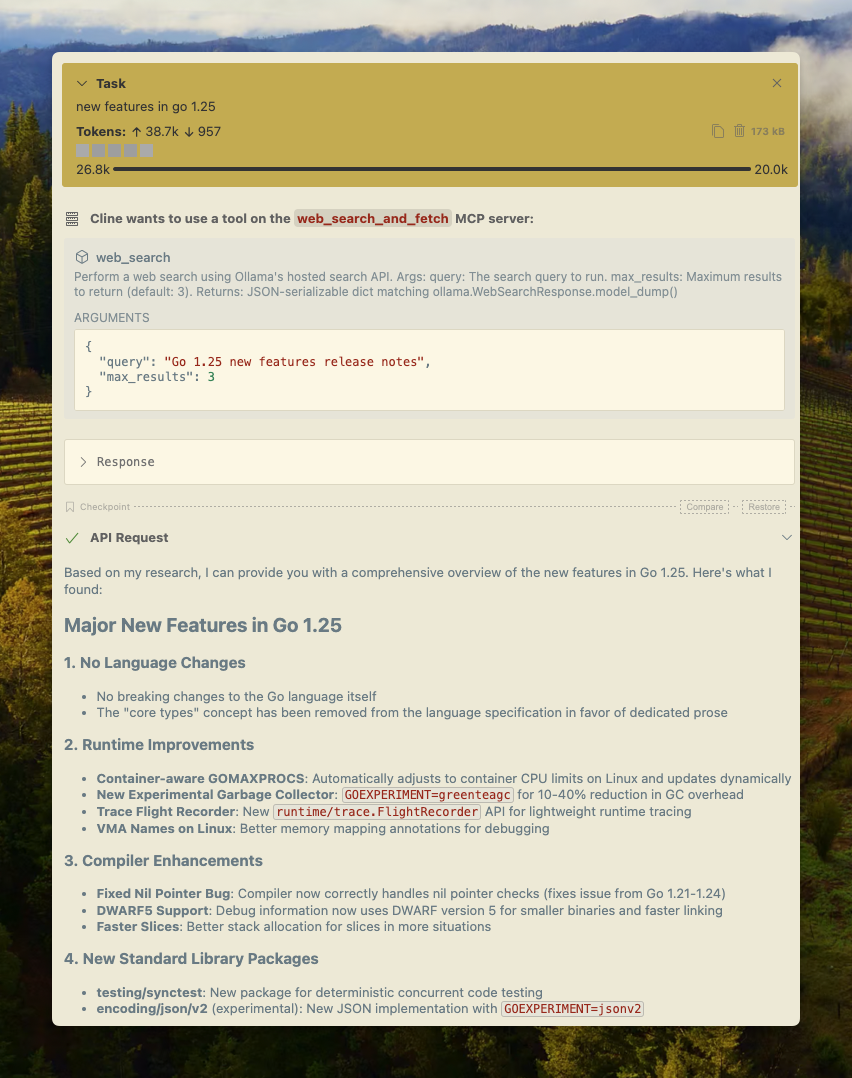
可以利用 MCP 服务器配置轻松地将 Ollama 的 Web 搜索集成到 Cline 中。
Manage MCP Servers > Configure MCP Servers > 添加以下配置:
json
{
  "mcpServers": {
    "web_search_and_fetch": {
      "type": "stdio",
      "command": "uv",
      "args": ["run", "path/to/web-search-mcp.py"],
      "env": { "OLLAMA_API_KEY": "your_api_key_here" }
    }
  }
}
Codex
Ollama 与 OpenAI 的 Codex 工具配合良好。
将以下配置添加到 ~/.codex/config.toml
python
[mcp_servers.web_search]
command = "uv"
args = ["run", "path/to/web-search-mcp.py"]
env = { "OLLAMA_API_KEY" = "your_api_key_here" }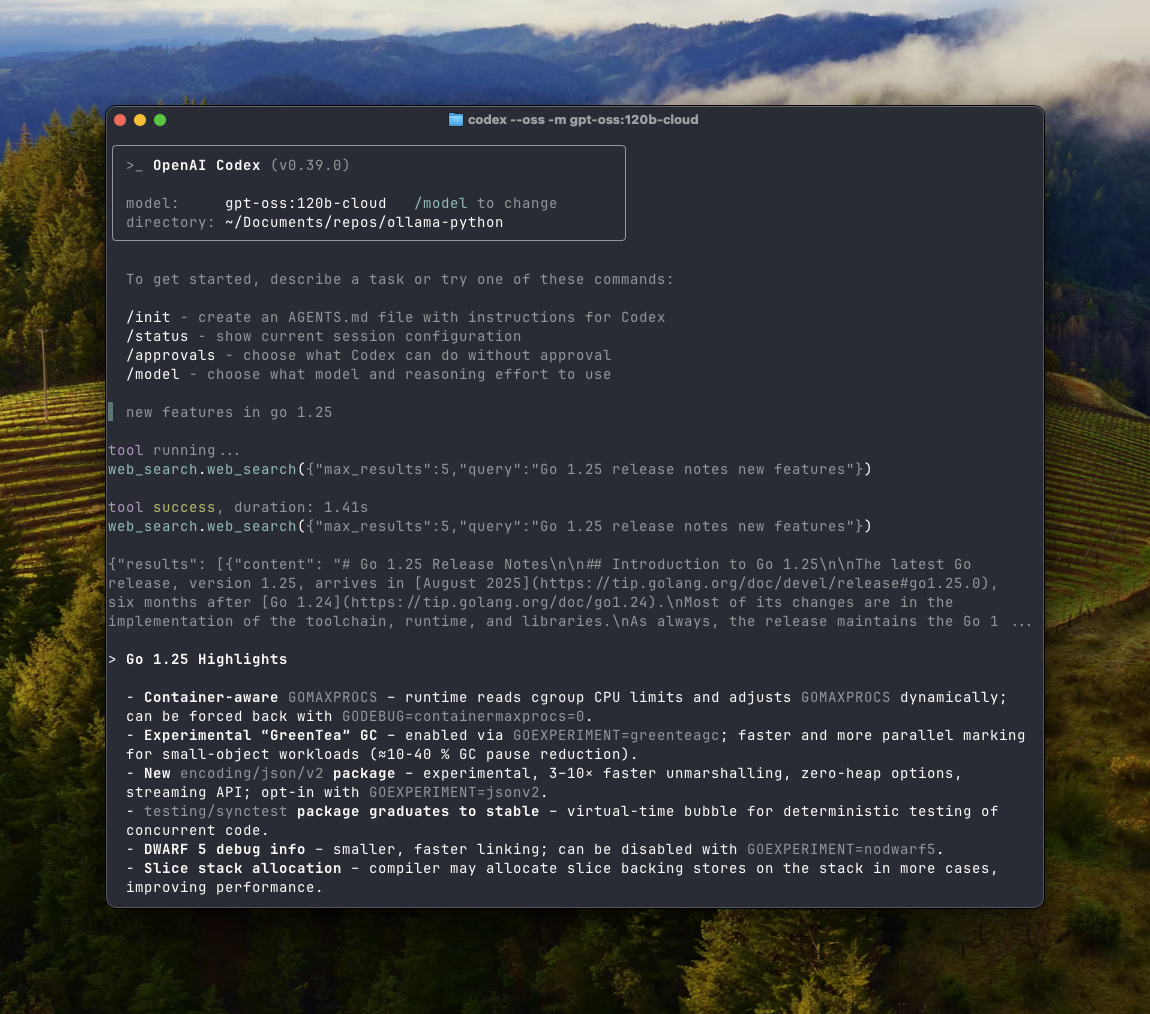
Goose
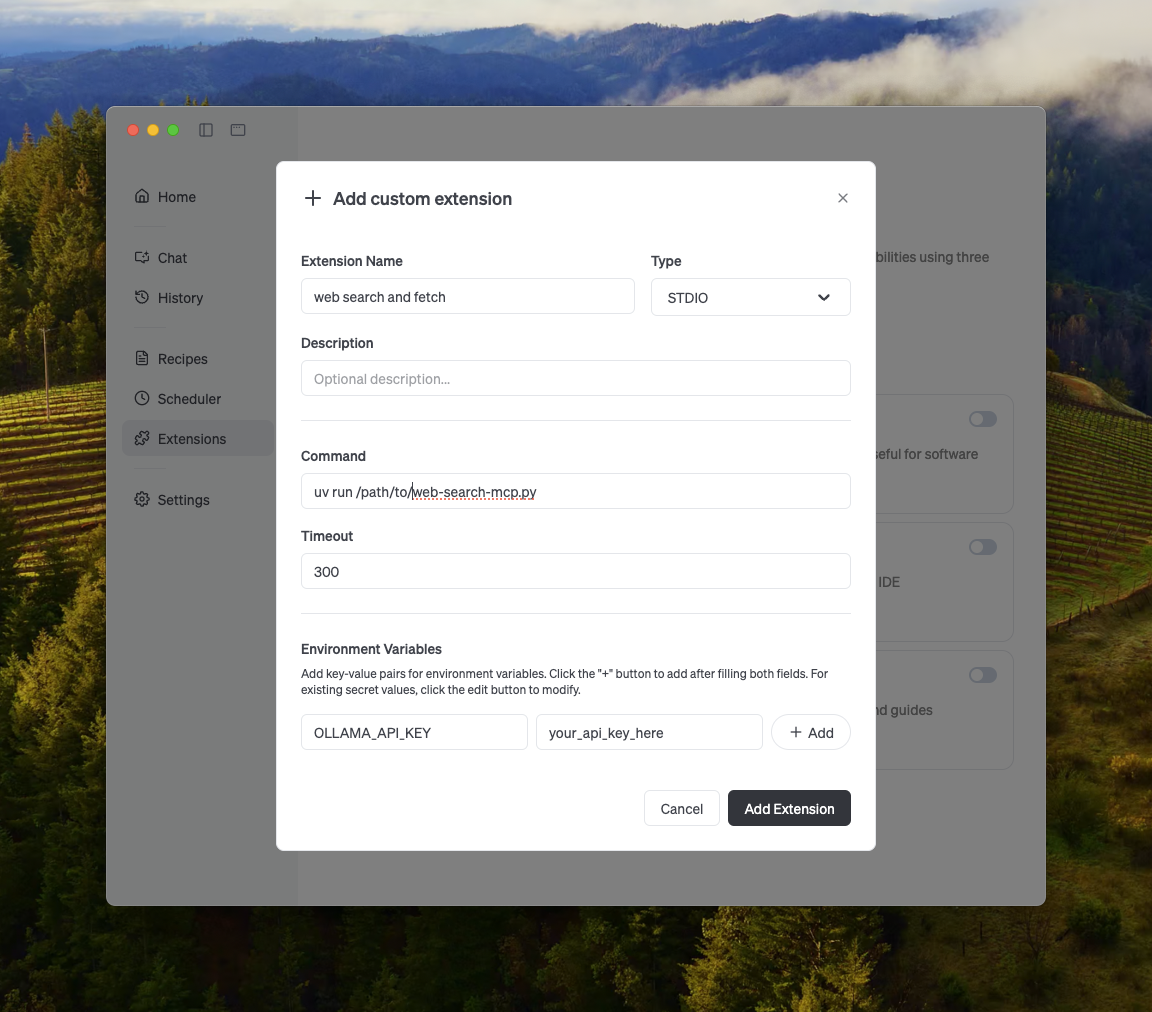
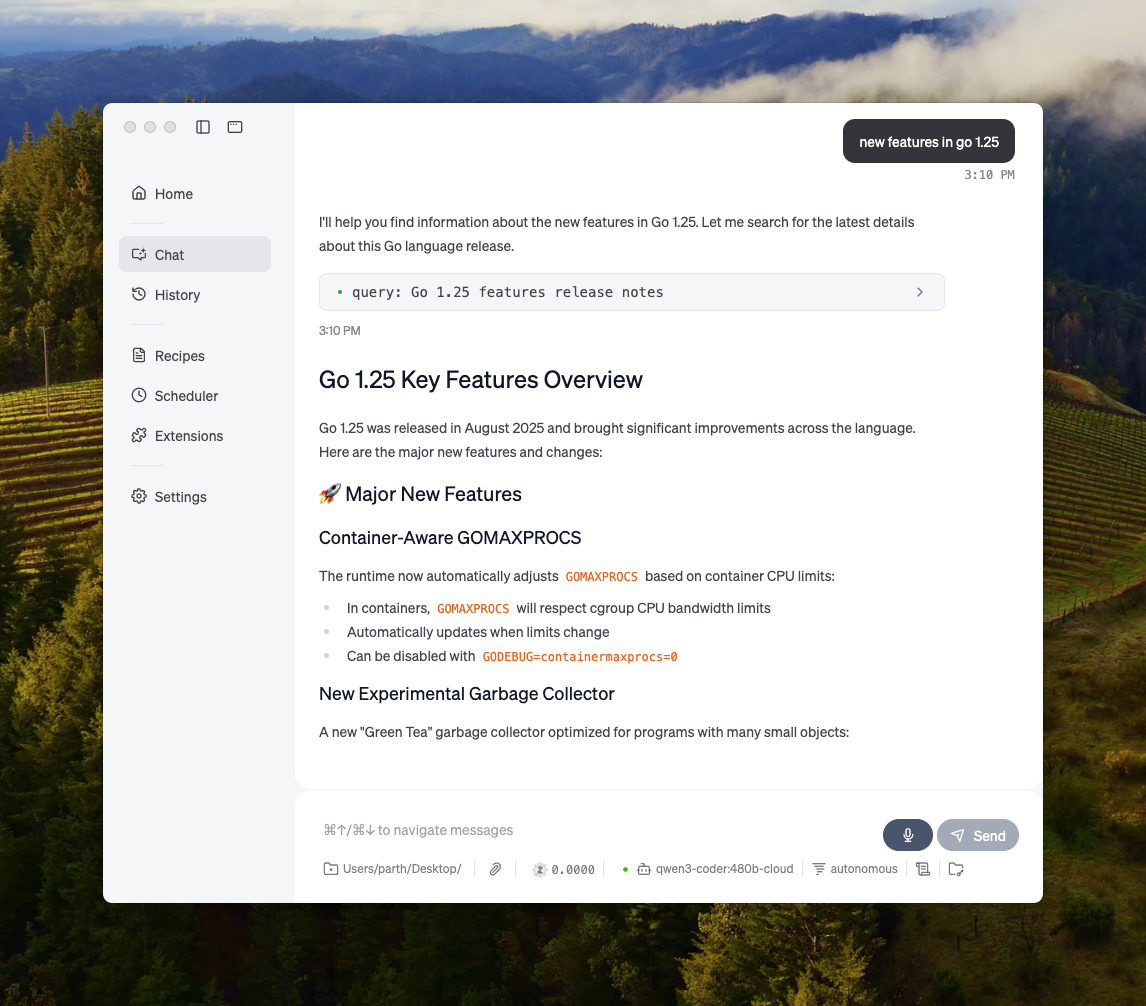
Ollama 可以通过其 MCP 功能与 Goose 集成。
其他集成
Ollama 可以通过直接集成 Ollama 的 API、Python / JavaScript 库、兼容 OpenAI 的 API 以及 MCP 服务器集成,融入到大多数现有的工具中。