Die Websuche-API von Ollama kann verwendet werden, um Modelle mit aktuellen Informationen anzureichern, Halluzinationen zu reduzieren und die Genauigkeit zu verbessern.
Die Websuche wird als REST-API bereitgestellt, mit tieferen Tool-Integrationen in den Python- und JavaScript-Bibliotheken. Dies ermöglicht es auch Modellen wie den gpt-oss-Modellen von OpenAI, langwierige Rechercheaufgaben durchzuführen.
Authentifizierung
Für den Zugriff auf die Websuche-API von Ollama erstellen Sie einen API-Schlüssel. Ein kostenloses Ollama-Konto ist erforderlich.
Websuche-API
Führt eine Websuche für eine einzelne Abfrage durch und gibt relevante Ergebnisse zurück.
Anfrage
POST https://ollama.com/api/web_search
query(Zeichenkette, erforderlich): die Suchabfragezeichenkettemax_results(Ganzzahl, optional): maximale Anzahl zurückzugebender Ergebnisse (Standard 5, Maximum 10)
Antwort
Gibt ein Objekt zurück, das Folgendes enthält:
results(Array): Array von Suchergebnisobjekten, die jeweils Folgendes enthalten:title(Zeichenkette): der Titel der Webseiteurl(Zeichenkette): die URL der Webseitecontent(Zeichenkette): relevanter Inhaltsausschnitt von der Webseite
Beispiele
Hinweis
Stellen Sie sicher, dass OLLAMA_API_KEY gesetzt ist, oder er muss im Authorization-Header übergeben werden.
cURL-Anfrage
bash
curl https://ollama.com/api/web_search \
  --header "Authorization: Bearer $OLLAMA_API_KEY" \
	-d '{
	  "query":"what is ollama?"
	}'
Antwort
json
{
  "results": [
    {
      "title": "Ollama",
      "url": "https://ollama.com/",
      "content": "Cloud models are now available..."
    },
    {
      "title": "What is Ollama? Introduction to the AI model management tool",
      "url": "https://www.hostinger.com/tutorials/what-is-ollama",
      "content": "Ariffud M. 6min Read..."
    },
    {
      "title": "Ollama Explained: Transforming AI Accessibility and Language ...",
      "url": "https://www.geeksforgeeks.org/artificial-intelligence/ollama-explained-transforming-ai-accessibility-and-language-processing/",
      "content": "Data Science Data Science Projects Data Analysis..."
    }
  ]
}
Python-Bibliothek
python
response = ollama.web_search("What is Ollama?")
print(response)
Beispielausgabe
python
results = [
    {
        "title": "Ollama",
        "url": "https://ollama.com/",
        "content": "Cloud models are now available in Ollama..."
    },
    {
        "title": "What is Ollama? Features, Pricing, and Use Cases - Walturn",
        "url": "https://www.walturn.com/insights/what-is-ollama-features-pricing-and-use-cases",
        "content": "Our services..."
    },
    {
        "title": "Complete Ollama Guide: Installation, Usage & Code Examples",
        "url": "https://collabnix.com/complete-ollama-guide-installation-usage-code-examples",
        "content": "Join our Discord Server..."
    }
]
Weitere Ollama-Python-Beispiele
JavaScript-Bibliothek
tsx
const client = new Ollama();
const results = await client.webSearch("what is ollama?");
console.log(JSON.stringify(results, null, 2));
Beispielausgabe
json
{
  "results": [
    {
      "title": "Ollama",
      "url": "https://ollama.com/",
      "content": "Cloud models are now available..."
    },
    {
      "title": "What is Ollama? Introduction to the AI model management tool",
      "url": "https://www.hostinger.com/tutorials/what-is-ollama",
      "content": "Ollama is an open-source tool..."
    },
    {
      "title": "Ollama Explained: Transforming AI Accessibility and Language Processing",
      "url": "https://www.geeksforgeeks.org/artificial-intelligence/ollama-explained-transforming-ai-accessibility-and-language-processing/",
      "content": "Ollama is a groundbreaking..."
    }
  ]
}
Weitere Ollama-JavaScript-Beispiele
Web-Abruf-API
Ruft eine einzelne Webseite anhand ihrer URL ab und gibt deren Inhalt zurück.
Anfrage
POST https://ollama.com/api/web_fetch
url(Zeichenkette, erforderlich): die abzurufende URL
Antwort
Gibt ein Objekt zurück, das Folgendes enthält:
title(Zeichenkette): der Titel der Webseitecontent(Zeichenkette): der Hauptinhalt der Webseitelinks(Array): Array von auf der Seite gefundenen Links
Beispiele
cURL-Anfrage
python
curl --request POST \
  --url https://ollama.com/api/web_fetch \
  --header "Authorization: Bearer $OLLAMA_API_KEY" \
  --header 'Content-Type: application/json' \
  --data '{
      "url": "ollama.com"
  }'
Antwort
json
{
  "title": "Ollama",
  "content": "[Cloud models](https://ollama.com/blog/cloud-models) are now available in Ollama...",
  "links": [
    "http://ollama.com/",
    "http://ollama.com/models",
    "https://github.com/ollama/ollama"
  ]

}
Python-SDK
python
from ollama import web_fetch

result = web_fetch('https://ollama.com')
print(result)
Ergebnis
python
WebFetchResponse(
    title='Ollama',
    content='[Cloud models](https://ollama.com/blog/cloud-models) are now available in Ollama\n\n**Chat & build
with open models**\n\n[Download](https://ollama.com/download) [Explore
models](https://ollama.com/models)\n\nAvailable for macOS, Windows, and Linux',
    links=['https://ollama.com/', 'https://ollama.com/models', 'https://github.com/ollama/ollama']
)
JavaScript-SDK
tsx
const client = new Ollama();
const fetchResult = await client.webFetch("https://ollama.com");
console.log(JSON.stringify(fetchResult, null, 2));
Ergebnis
json
{
  "title": "Ollama",
  "content": "[Cloud models](https://ollama.com/blog/cloud-models) are now available in Ollama...",
  "links": [
    "https://ollama.com/",
    "https://ollama.com/models",
    "https://github.com/ollama/ollama"
  ]
}
Einen Such-Agenten erstellen
Verwenden Sie die Websuche-API von Ollama als Tool, um einen kleinen Such-Agenten zu erstellen.
Dieses Beispiel verwendet das Qwen-3-Modell von Alibaba mit 4B Parametern.
bash
ollama pull qwen3:4bpython
from ollama import chat, web_fetch, web_search

available_tools = {'web_search': web_search, 'web_fetch': web_fetch}

messages = [{'role': 'user', 'content': "what is ollama's new engine"}]

while True:
  response = chat(
    model='qwen3:4b',
    messages=messages,
    tools=[web_search, web_fetch],
    think=True
    )
  if response.message.thinking:
    print('Thinking: ', response.message.thinking)
  if response.message.content:
    print('Content: ', response.message.content)
  messages.append(response.message)
  if response.message.tool_calls:
    print('Tool calls: ', response.message.tool_calls)
    for tool_call in response.message.tool_calls:
      function_to_call = available_tools.get(tool_call.function.name)
      if function_to_call:
        args = tool_call.function.arguments
        result = function_to_call(**args)
        print('Result: ', str(result)[:200]+'...')
        # Ergebnis wird aufgrund begrenzter Kontextlängen gekürzt
        messages.append({'role': 'tool', 'content': str(result)[:2000 * 4], 'tool_name': tool_call.function.name})
      else:
        messages.append({'role': 'tool', 'content': f'Tool {tool_call.function.name} not found', 'tool_name': tool_call.function.name})
  else:
    break
Ergebnis
Thinking:  Okay, the user is asking about Ollama's new engine. I need to figure out what they're referring to. Ollama is a company that develops large language models, so maybe they've released a new model or an updated version of their existing engine....

Tool calls:  [ToolCall(function=Function(name='web_search', arguments={'max_results': 3, 'query': 'Ollama new engine'}))]
Result:  results=[WebSearchResult(content='# New model scheduling\n\n## September 23, 2025\n\nOllama now includes a significantly improved model scheduling system. Ahead of running a model, Ollama’s new engine

Thinking:  Okay, the user asked about Ollama's new engine. Let me look at the search results.

First result is from September 23, 2025, talking about new model scheduling. It mentions improved memory management, reduced crashes, better GPU utilization, and multi-GPU performance. Examples show speed improvements and accurate memory reporting. Supported models include gemma3, llama4, qwen3, etc...

Content:  Ollama has introduced two key updates to its engine, both released in 2025:

1. **Enhanced Model Scheduling (September 23, 2025)**
   - **Precision Memory Management**: Exact memory allocation reduces out-of-memory crashes and optimizes GPU utilization.
   - **Performance Gains**: Examples show significant speed improvements (e.g., 85.54 tokens/s vs 52.02 tokens/s) and full GPU layer utilization.
   - **Multi-GPU Support**: Improved efficiency across multiple GPUs, with accurate memory reporting via tools like `nvidia-smi`.
   - **Supported Models**: Includes `gemma3`, `llama4`, `qwen3`, `mistral-small3.2`, and more.

2. **Multimodal Engine (May 15, 2025)**
   - **Vision Support**: First-class support for vision models, including `llama4:scout` (109B parameters), `gemma3`, `qwen2.5vl`, and `mistral-small3.1`.
   - **Multimodal Tasks**: Examples include identifying animals in multiple images, answering location-based questions from videos, and document scanning.

These updates highlight Ollama's focus on efficiency, performance, and expanded capabilities for both text and vision tasks.
Kontextlänge und Agenten
Websuche-Ergebnisse können Tausende von Tokens umfassen. Es wird empfohlen, die Kontextlänge des Modells auf mindestens ~32.000 Tokens zu erhöhen. Such-Agenten funktionieren am besten mit voller Kontextlänge. Ollamas Cloud-Modelle werden mit voller Kontextlänge ausgeführt.
MCP-Server
Sie können die Websuche in jedem MCP-Client über den Python-MCP-Server aktivieren.
Cline
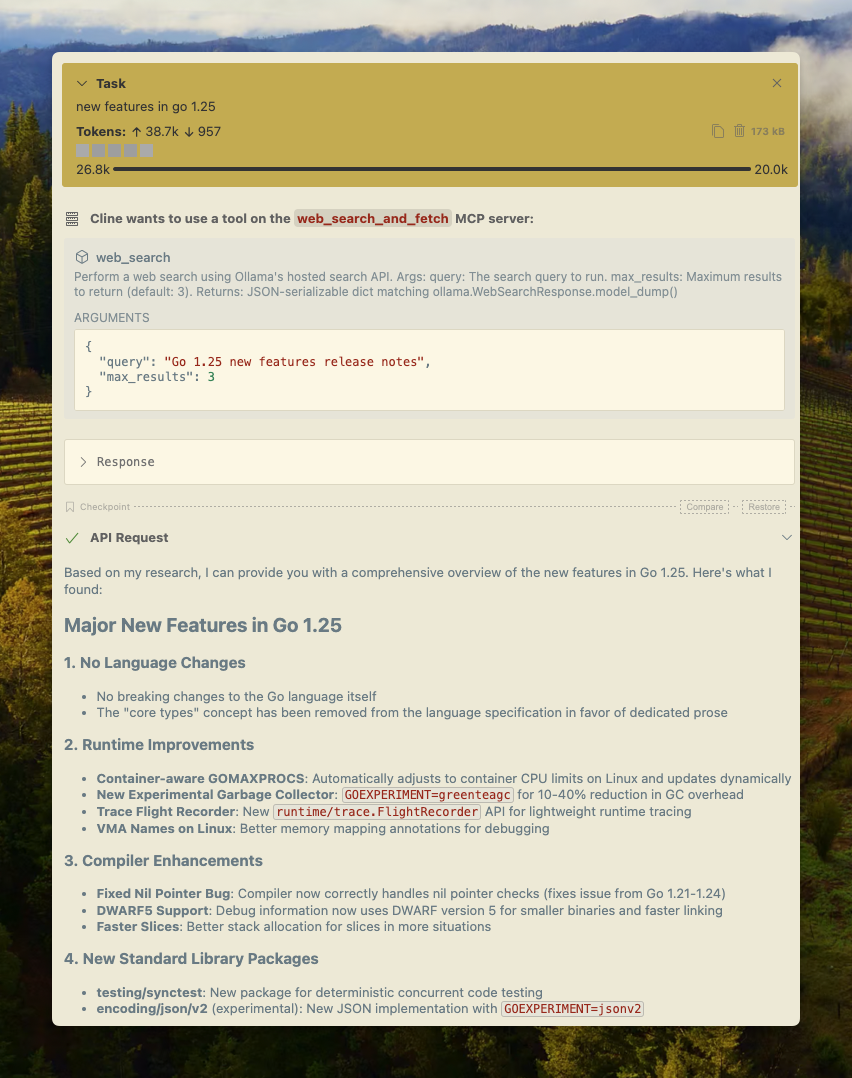
Die Websuche von Ollama kann einfach über die MCP-Server-Konfiguration in Cline integriert werden.
MCP-Server verwalten > MCP-Server konfigurieren > Fügen Sie die folgende Konfiguration hinzu:
json
{
  "mcpServers": {
    "web_search_and_fetch": {
      "type": "stdio",
      "command": "uv",
      "args": ["run", "path/to/web-search-mcp.py"],
      "env": { "OLLAMA_API_KEY": "your_api_key_here" }
    }
  }
}
Codex
Ollama funktioniert gut mit dem Codex-Tool von OpenAI.
Fügen Sie die folgende Konfiguration zu ~/.codex/config.toml hinzu
python
[mcp_servers.web_search]
command = "uv"
args = ["run", "path/to/web-search-mcp.py"]
env = { "OLLAMA_API_KEY" = "your_api_key_here" }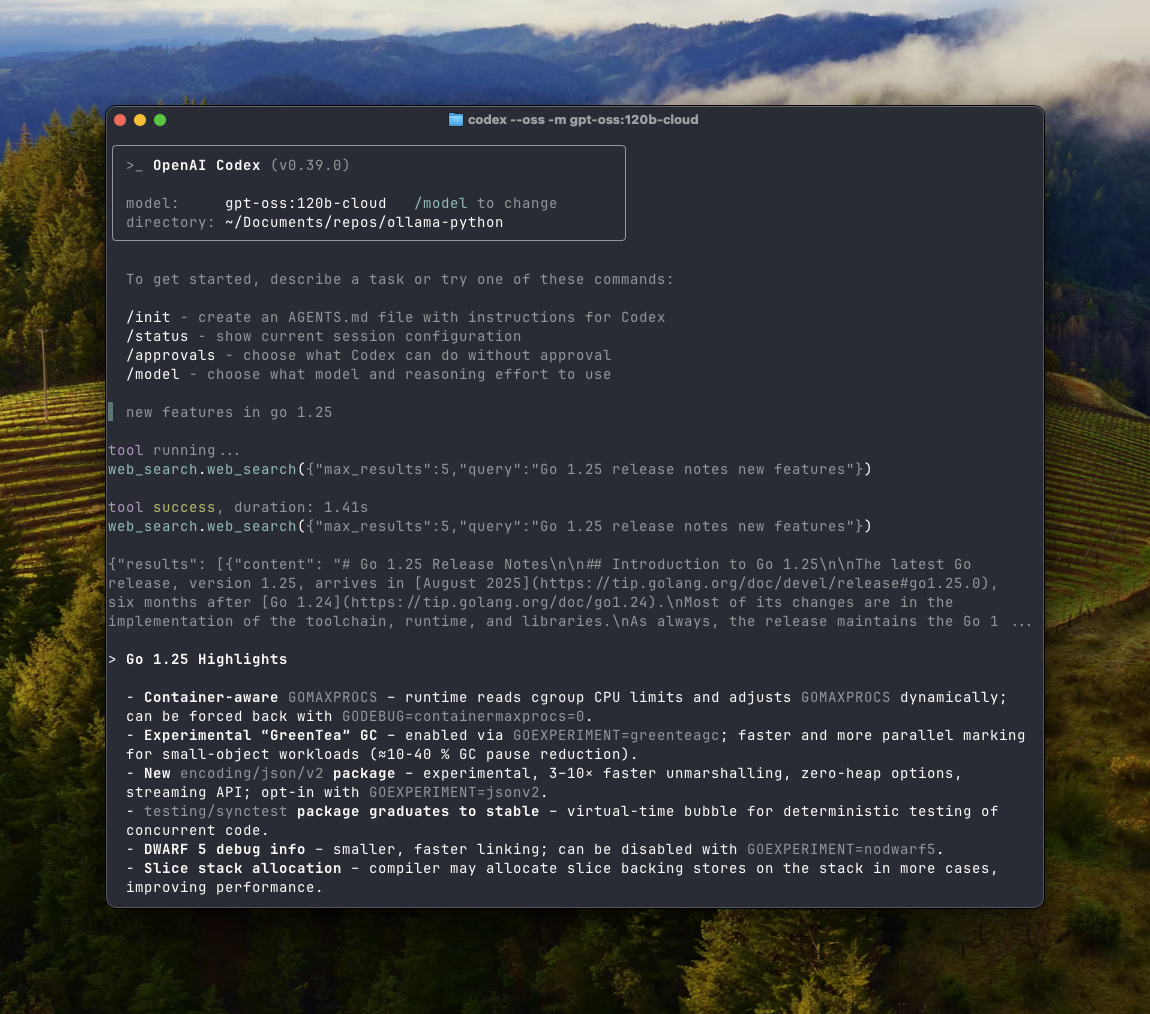
Goose
Ollama kann über die MCP-Funktion in Goose integriert werden.
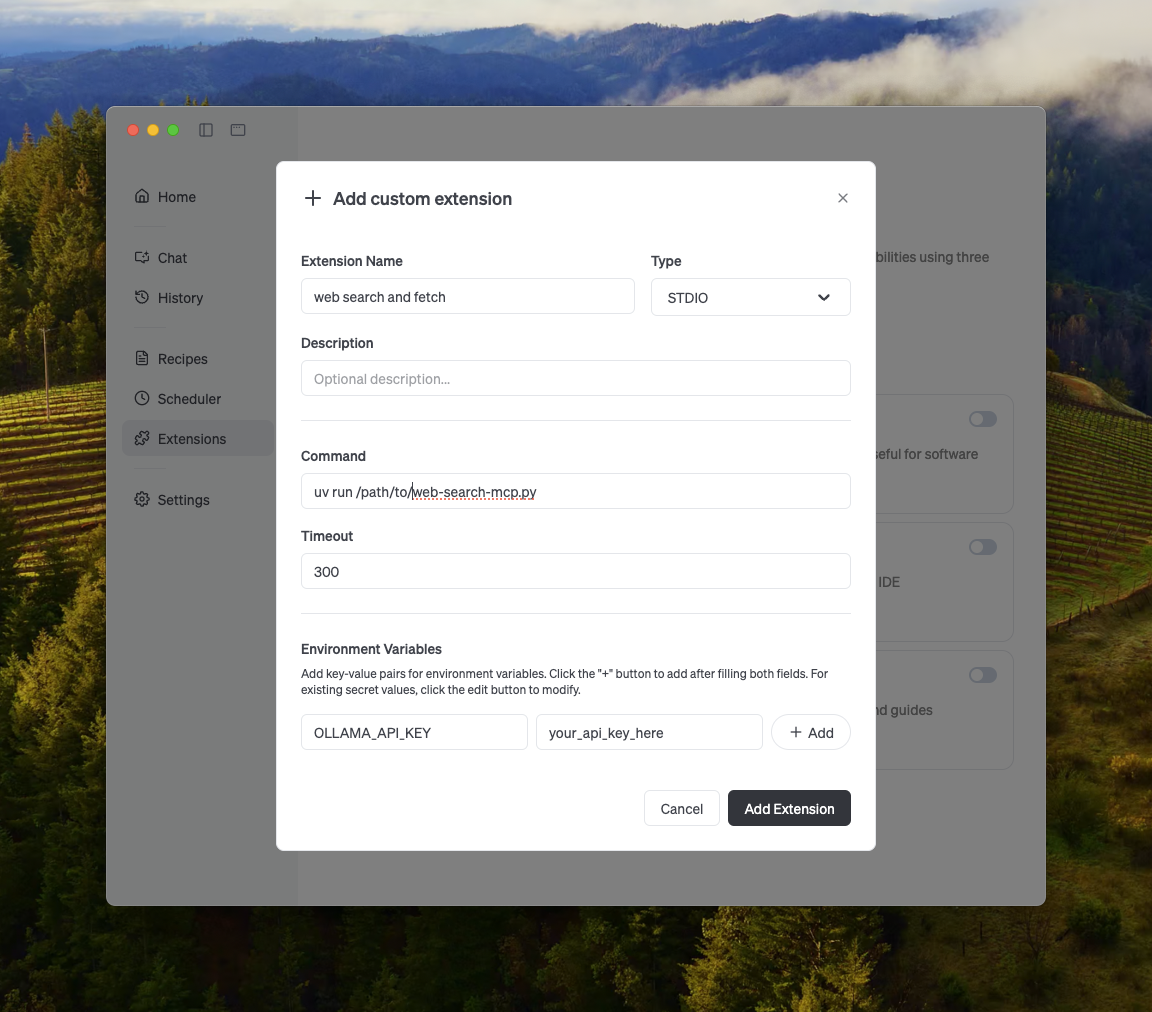
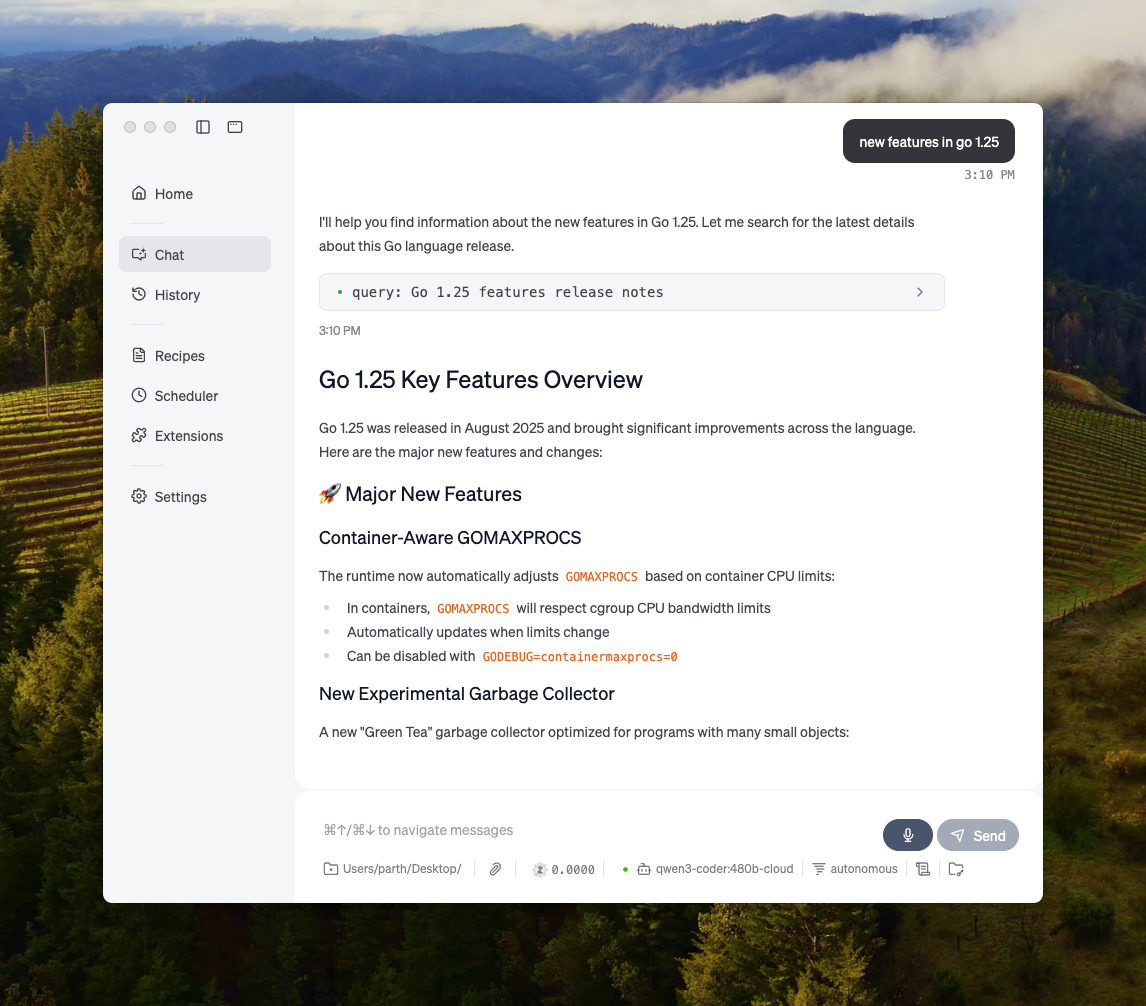
Weitere Integrationen
Ollama kann in die meisten verfügbaren Tools integriert werden, entweder über die direkte Integration der Ollama-API, Python-/JavaScript-Bibliotheken, der OpenAI-kompatiblen API oder der MCP-Server-Integration.