Ollama's web search API kan worden gebruikt om modellen aan te vullen met de nieuwste informatie om hallucinaties te verminderen en de nauwkeurigheid te verbeteren.
Web zoeken wordt geleverd als een REST API met diepere toolintegraties in de Python- en JavaScript-bibliotheken. Dit maakt het ook mogelijk dat modellen zoals OpenAI's gpt-oss-modellen langdurige onderzoektaken uitvoeren.
Authenticatie
Voor toegang tot de web search API van Ollama, maak je een API-sleutel. Een gratis Ollama-account is vereist.
Web zoek-API
Voert een webzoekopdracht uit voor een enkele query en geeft relevante resultaten terug.
Request
POST https://ollama.com/api/web_search
query(string, vereist): de zoekopdrachtreeksmax_results(integer, optioneel): maximaal aantal resultaten om terug te geven (standaard 5, max 10)
Response
Retourneert een object dat bevat:
results(array): array van zoekresultaatobjecten, elk met:title(string): de titel van de webpaginaurl(string): de URL van de webpaginacontent(string): relevante inhoudsfragment van de webpagina
Examples
Opmerking
Zorg ervoor dat OLLAMA_API_KEY is ingesteld of dat deze moet worden doorgegeven in de Authorization-header.
cURL-verzoek
bash
curl https://ollama.com/api/web_search \
  --header "Authorization: Bearer $OLLAMA_API_KEY" \
	-d '{
	  "query":"what is ollama?"
	}'
Antwoord
json
{
  "results": [
    {
      "title": "Ollama",
      "url": "https://ollama.com/",
      "content": "Cloud models are now available..."
    },
    {
      "title": "What is Ollama? Introduction to the AI model management tool",
      "url": "https://www.hostinger.com/tutorials/what-is-ollama",
      "content": "Ariffud M. 6min Read..."
    },
    {
      "title": "Ollama Explained: Transforming AI Accessibility and Language ...",
      "url": "https://www.geeksforgeeks.org/artificial-intelligence/ollama-explained-transforming-ai-accessibility-and-language-processing/",
      "content": "Data Science Data Science Projects Data Analysis..."
    }
  ]
}
Python-bibliotheek
python
response = ollama.web_search("What is Ollama?")
print(response)
Voorbeelduitvoer
python
results = [
    {
        "title": "Ollama",
        "url": "https://ollama.com/",
        "content": "Cloud models are now available in Ollama..."
    },
    {
        "title": "What is Ollama? Features, Pricing, and Use Cases - Walturn",
        "url": "https://www.walturn.com/insights/what-is-ollama-features-pricing-and-use-cases",
        "content": "Our services..."
    },
    {
        "title": "Complete Ollama Guide: Installation, Usage & Code Examples",
        "url": "https://collabnix.com/complete-ollama-guide-installation-usage-code-examples",
        "content": "Join our Discord Server..."
    }
]
Meer Ollama Python-voorbeeld
JavaScript-bibliotheek
tsx
const client = new Ollama();
const results = await client.webSearch("what is ollama?");
console.log(JSON.stringify(results, null, 2));
Voorbeelduitvoer
json
{
  "results": [
    {
      "title": "Ollama",
      "url": "https://ollama.com/",
      "content": "Cloud models are now available..."
    },
    {
      "title": "What is Ollama? Introduction to the AI model management tool",
      "url": "https://www.hostinger.com/tutorials/what-is-ollama",
      "content": "Ollama is an open-source tool..."
    },
    {
      "title": "Ollama Explained: Transforming AI Accessibility and Language Processing",
      "url": "https://www.geeksforgeeks.org/artificial-intelligence/ollama-explained-transforming-ai-accessibility-and-language-processing/",
      "content": "Ollama is a groundbreaking..."
    }
  ]
}
Meer Ollama JavaScript-voorbeeld
Web ophaal-API
Haalt een enkele webpagina op via URL en geeft de inhoud terug.
Request
POST https://ollama.com/api/web_fetch
url(string, vereist): de URL om op te halen
Response
Retourneert een object dat bevat:
title(string): de titel van de webpaginacontent(string): de hoofdinhoud van de webpaginalinks(array): array van links die op de pagina zijn gevonden
Examples
cURL-verzoek
python
curl --request POST \
  --url https://ollama.com/api/web_fetch \
  --header "Authorization: Bearer $OLLAMA_API_KEY" \
  --header 'Content-Type: application/json' \
  --data '{
      "url": "ollama.com"
  }'
Antwoord
json
{
  "title": "Ollama",
  "content": "[Cloud models](https://ollama.com/blog/cloud-models) are now available in Ollama...",
  "links": [
    "http://ollama.com/",
    "http://ollama.com/models",
    "https://github.com/ollama/ollama"
  ]

}
Python SDK
python
from ollama import web_fetch

result = web_fetch('https://ollama.com')
print(result)
Resultaat
python
WebFetchResponse(
    title='Ollama',
    content='[Cloud models](https://ollama.com/blog/cloud-models) are now available in Ollama\n\n**Chat & build
with open models**\n\n[Download](https://ollama.com/download) [Explore
models](https://ollama.com/models)\n\nAvailable for macOS, Windows, and Linux',
    links=['https://ollama.com/', 'https://ollama.com/models', 'https://github.com/ollama/ollama']
)
JavaScript SDK
tsx
const client = new Ollama();
const fetchResult = await client.webFetch("https://ollama.com");
console.log(JSON.stringify(fetchResult, null, 2));
Resultaat
json
{
  "title": "Ollama",
  "content": "[Cloud models](https://ollama.com/blog/cloud-models) are now available in Ollama...",
  "links": [
    "https://ollama.com/",
    "https://ollama.com/models",
    "https://github.com/ollama/ollama"
  ]
}
Een zoekagent bouwen
Gebruik de web search API van Ollama als een tool om een mini zoekagent te bouwen.
Dit voorbeeld gebruikt het Qwen 3-model van Alibaba met 4B parameters.
bash
ollama pull qwen3:4bpython
from ollama import chat, web_fetch, web_search

available_tools = {'web_search': web_search, 'web_fetch': web_fetch}

messages = [{'role': 'user', 'content': "what is ollama's new engine"}]

while True:
  response = chat(
    model='qwen3:4b',
    messages=messages,
    tools=[web_search, web_fetch],
    think=True
    )
  if response.message.thinking:
    print('Thinking: ', response.message.thinking)
  if response.message.content:
    print('Content: ', response.message.content)
  messages.append(response.message)
  if response.message.tool_calls:
    print('Tool calls: ', response.message.tool_calls)
    for tool_call in response.message.tool_calls:
      function_to_call = available_tools.get(tool_call.function.name)
      if function_to_call:
        args = tool_call.function.arguments
        result = function_to_call(**args)
        print('Result: ', str(result)[:200]+'...')
        # Resultaat is afgekort vanwege beperkte contextlengtes
        messages.append({'role': 'tool', 'content': str(result)[:2000 * 4], 'tool_name': tool_call.function.name})
      else:
        messages.append({'role': 'tool', 'content': f'Tool {tool_call.function.name} not found', 'tool_name': tool_call.function.name})
  else:
    break
Resultaat
Thinking:  Okay, the user is asking about Ollama's new engine. I need to figure out what they're referring to. Ollama is a company that develops large language models, so maybe they've released a new model or an updated version of their existing engine....

Tool calls:  [ToolCall(function=Function(name='web_search', arguments={'max_results': 3, 'query': 'Ollama new engine'}))]
Result:  results=[WebSearchResult(content='# New model scheduling\n\n## September 23, 2025\n\nOllama now includes a significantly improved model scheduling system. Ahead of running a model, Ollama’s new engine

Thinking:  Okay, the user asked about Ollama's new engine. Let me look at the search results.

First result is from September 23, 2025, talking about new model scheduling. It mentions improved memory management, reduced crashes, better GPU utilization, and multi-GPU performance. Examples show speed improvements and accurate memory reporting. Supported models include gemma3, llama4, qwen3, etc...

Content:  Ollama has introduced two key updates to its engine, both released in 2025:

1. **Enhanced Model Scheduling (September 23, 2025)**
   - **Precision Memory Management**: Exact memory allocation reduces out-of-memory crashes and optimizes GPU utilization.
   - **Performance Gains**: Examples show significant speed improvements (e.g., 85.54 tokens/s vs 52.02 tokens/s) and full GPU layer utilization.
   - **Multi-GPU Support**: Improved efficiency across multiple GPUs, with accurate memory reporting via tools like `nvidia-smi`.
   - **Supported Models**: Includes `gemma3`, `llama4`, `qwen3`, `mistral-small3.2`, and more.

2. **Multimodal Engine (May 15, 2025)**
   - **Vision Support**: First-class support for vision models, including `llama4:scout` (109B parameters), `gemma3`, `qwen2.5vl`, and `mistral-small3.1`.
   - **Multimodal Tasks**: Examples include identifying animals in multiple images, answering location-based questions from videos, and document scanning.

These updates highlight Ollama's focus on efficiency, performance, and expanded capabilities for both text and vision tasks.
Contextlengte en agenten
Webzoekresultaten kunnen duizenden tokens retourneren. Het wordt aanbevolen om de contextlengte van het model te verhogen tot ten minste ~32000 tokens. Zoekagenten werken het beste met volledige contextlengte. Ollama's cloud modellen draaien op de volledige contextlengte.
MCP-server
Je kunt web zoeken inschakelen in elke MCP-client via de Python MCP-server.
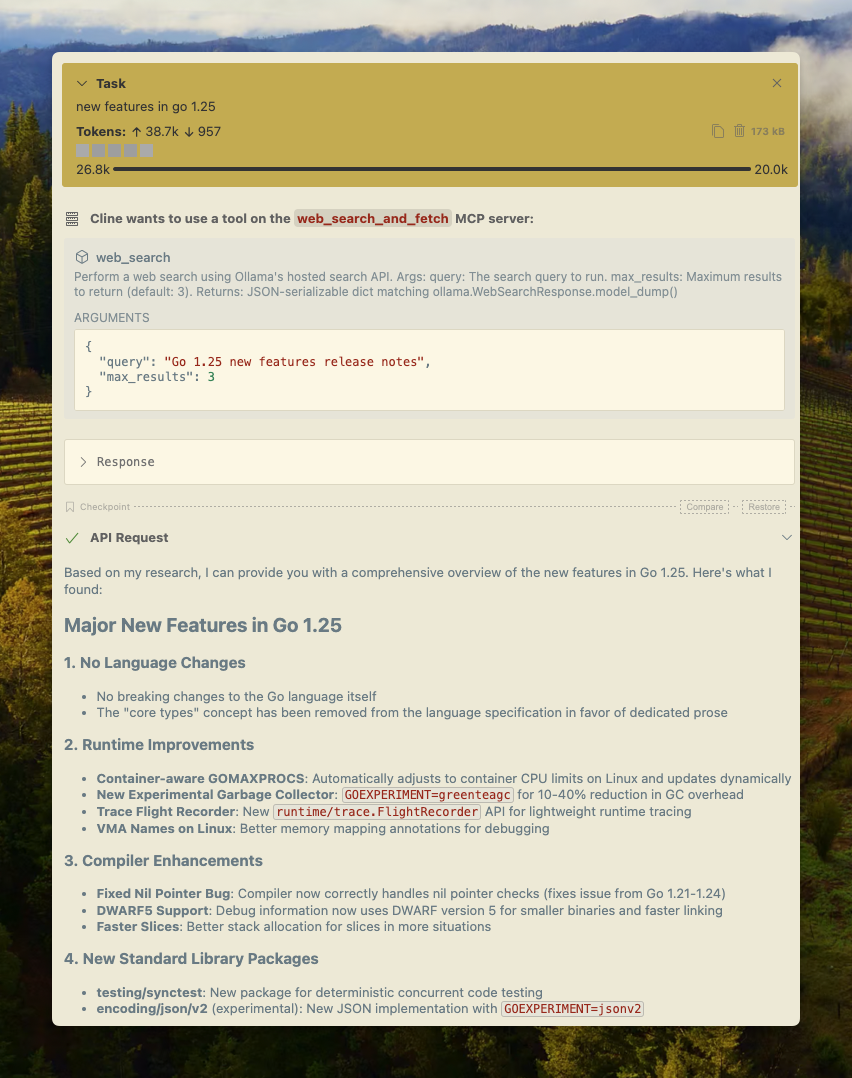
Cline
Ollama's web zoeken kan eenvoudig worden geïntegreerd met Cline via de MCP-serverconfiguratie.
Manage MCP Servers > Configure MCP Servers > Voeg de volgende configuratie toe:
json
{
  "mcpServers": {
    "web_search_and_fetch": {
      "type": "stdio",
      "command": "uv",
      "args": ["run", "path/to/web-search-mcp.py"],
      "env": { "OLLAMA_API_KEY": "your_api_key_here" }
    }
  }
}
Codex
Ollama werkt goed met OpenAI's Codex-tool.
Voeg de volgende configuratie toe aan ~/.codex/config.toml
python
[mcp_servers.web_search]
command = "uv"
args = ["run", "path/to/web-search-mcp.py"]
env = { "OLLAMA_API_KEY" = "your_api_key_here" }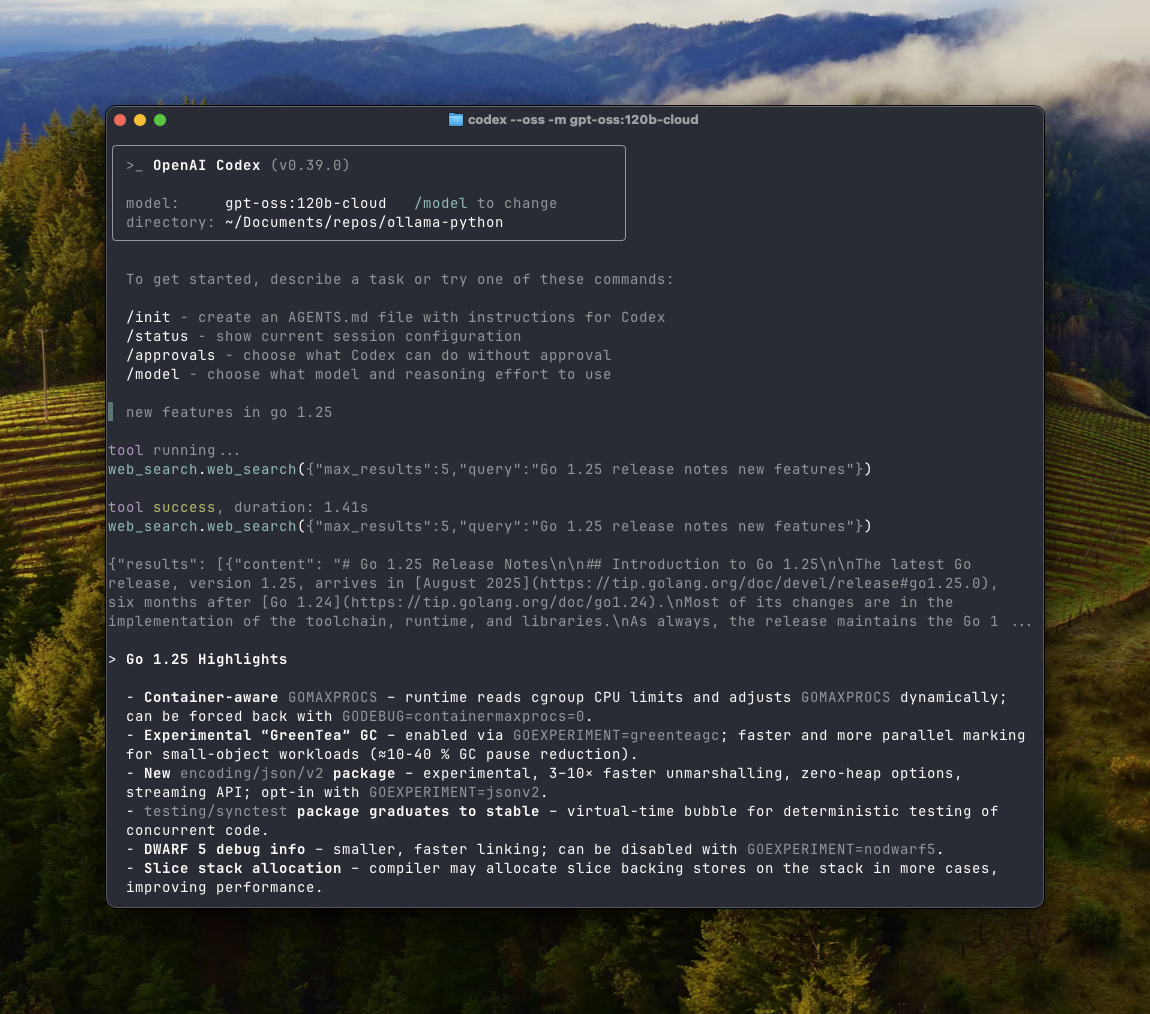
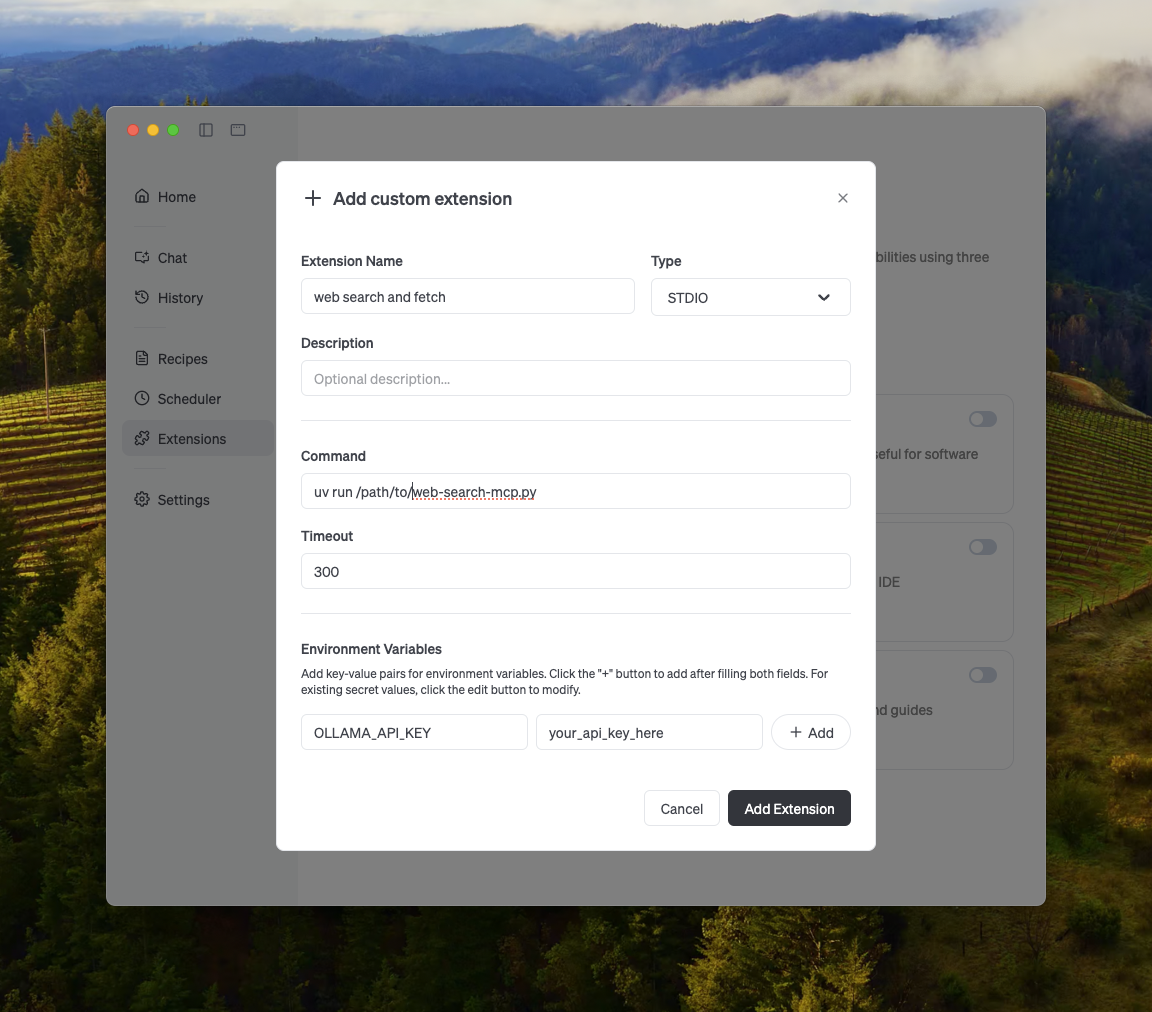
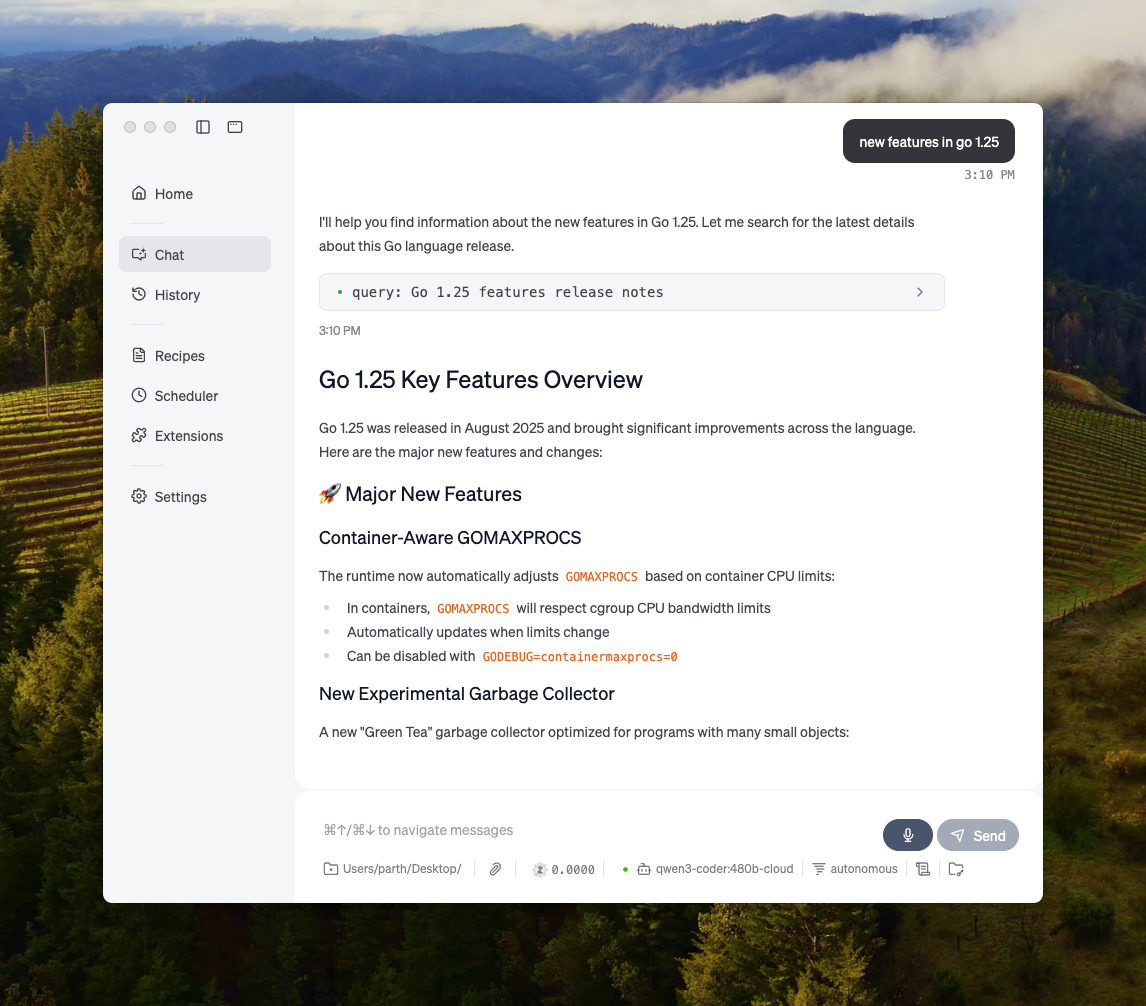
Goose
Ollama kan worden geïntegreerd met Goose via de MCP-functie.
Overige integraties
Ollama kan worden geïntegreerd in de meeste beschikbare tools, hetzij via directe integratie van de API van Ollama, Python-/JavaScript-bibliotheken, OpenAI-compatibele API, en MCP-serverintegratie.