OllamaのWeb検索APIは、最新の情報でモデルを拡張し、幻覚を減らして精度を向上させるために使用できます。
Web検索はREST APIとして提供され、PythonおよびJavaScriptライブラリでより深いツール統合が可能です。これにより、OpenAIのgpt-ossモデルなどのモデルが長時間の調査タスクを実行できるようになります。
認証
OllamaのWeb検索APIにアクセスするには、APIキーを作成してください。無料のOllamaアカウントが必要です。
Web検索API
単一のクエリでWeb検索を実行し、関連する結果を返します。
リクエスト
POST https://ollama.com/api/web_search
query(string, 必須): 検索クエリ文字列max_results(integer, オプション): 返す結果の最大数(デフォルト5、最大10)
レスポンス
以下の内容を含むオブジェクトを返します:
results(array): 検索結果オブジェクトの配列。各オブジェクトには以下が含まれます:title(string): Webページのタイトルurl(string): WebページのURLcontent(string): Webページからの関連コンテンツスニペット
例
注意
OLLAMA_API_KEYが設定されているか、Authorizationヘッダーで渡す必要があります。
cURLリクエスト
bash
curl https://ollama.com/api/web_search \
  --header "Authorization: Bearer $OLLAMA_API_KEY" \
	-d '{
	  "query":"what is ollama?"
	}'
レスポンス
json
{
  "results": [
    {
      "title": "Ollama",
      "url": "https://ollama.com/",
      "content": "Cloud models are now available..."
    },
    {
      "title": "What is Ollama? Introduction to the AI model management tool",
      "url": "https://www.hostinger.com/tutorials/what-is-ollama",
      "content": "Ariffud M. 6min Read..."
    },
    {
      "title": "Ollama Explained: Transforming AI Accessibility and Language ...",
      "url": "https://www.geeksforgeeks.org/artificial-intelligence/ollama-explained-transforming-ai-accessibility-and-language-processing/",
      "content": "Data Science Data Science Projects Data Analysis..."
    }
  ]
}
Pythonライブラリ
python
response = ollama.web_search("What is Ollama?")
print(response)
出力例
python
results = [
    {
        "title": "Ollama",
        "url": "https://ollama.com/",
        "content": "Cloud models are now available in Ollama..."
    },
    {
        "title": "What is Ollama? Features, Pricing, and Use Cases - Walturn",
        "url": "https://www.walturn.com/insights/what-is-ollama-features-pricing-and-use-cases",
        "content": "Our services..."
    },
    {
        "title": "Complete Ollama Guide: Installation, Usage & Code Examples",
        "url": "https://collabnix.com/complete-ollama-guide-installation-usage-code-examples",
        "content": "Join our Discord Server..."
    }
]
More Ollama Pythonの例
JavaScriptライブラリ
tsx
const client = new Ollama();
const results = await client.webSearch("what is ollama?");
console.log(JSON.stringify(results, null, 2));
出力例
json
{
  "results": [
    {
      "title": "Ollama",
      "url": "https://ollama.com/",
      "content": "Cloud models are now available..."
    },
    {
      "title": "What is Ollama? Introduction to the AI model management tool",
      "url": "https://www.hostinger.com/tutorials/what-is-ollama",
      "content": "Ollama is an open-source tool..."
    },
    {
      "title": "Ollama Explained: Transforming AI Accessibility and Language Processing",
      "url": "https://www.geeksforgeeks.org/artificial-intelligence/ollama-explained-transforming-ai-accessibility-and-language-processing/",
      "content": "Ollama is a groundbreaking..."
    }
  ]
}
More Ollama JavaScriptの例
Web取得API
URLを指定して単一のWebページを取得し、そのコンテンツを返します。
リクエスト
POST https://ollama.com/api/web_fetch
url(string, 必須): 取得するURL
レスポンス
以下の内容を含むオブジェクトを返します:
title(string): Webページのタイトルcontent(string): Webページのメインコンテンツlinks(array): ページで見つかったリンクの配列
例
cURLリクエスト
python
curl --request POST \
  --url https://ollama.com/api/web_fetch \
  --header "Authorization: Bearer $OLLAMA_API_KEY" \
  --header 'Content-Type: application/json' \
  --data '{
      "url": "ollama.com"
  }'
レスポンス
json
{
  "title": "Ollama",
  "content": "[Cloud models](https://ollama.com/blog/cloud-models) are now available in Ollama...",
  "links": [
    "http://ollama.com/",
    "http://ollama.com/models",
    "https://github.com/ollama/ollama"
  ]
Python SDK
python
from ollama import web_fetch

result = web_fetch('https://ollama.com')
print(result)
結果
python
WebFetchResponse(
    title='Ollama',
    content='[Cloud models](https://ollama.com/blog/cloud-models) are now available in Ollama\n\n**Chat & build
with open models**\n\n[Download](https://ollama.com/download) [Explore
models](https://ollama.com/models)\n\nAvailable for macOS, Windows, and Linux',
    links=['https://ollama.com/', 'https://ollama.com/models', 'https://github.com/ollama/ollama']
)
JavaScript SDK
tsx
const client = new Ollama();
const fetchResult = await client.webFetch("https://ollama.com");
console.log(JSON.stringify(fetchResult, null, 2));
結果
json
{
  "title": "Ollama",
  "content": "[Cloud models](https://ollama.com/blog/cloud-models) are now available in Ollama...",
  "links": [
    "https://ollama.com/",
    "https://ollama.com/models",
    "https://github.com/ollama/ollama"
  ]
}
検索エージェントの構築
OllamaのWeb検索APIをツールとして使用して、ミニ検索エージェントを構築します。
この例では、AlibabaのQwen 3モデル(4Bパラメータ)を使用します。
bash
ollama pull qwen3:4bpython
from ollama import chat, web_fetch, web_search

available_tools = {'web_search': web_search, 'web_fetch': web_fetch}

messages = [{'role': 'user', 'content': "what is ollama's new engine"}]

while True:
  response = chat(
    model='qwen3:4b',
    messages=messages,
    tools=[web_search, web_fetch],
    think=True
    )
  if response.message.thinking:
    print('Thinking: ', response.message.thinking)
  if response.message.content:
    print('Content: ', response.message.content)
  messages.append(response.message)
  if response.message.tool_calls:
    print('Tool calls: ', response.message.tool_calls)
    for tool_call in response.message.tool_calls:
      function_to_call = available_tools.get(tool_call.function.name)
      if function_to_call:
        args = tool_call.function.arguments
        result = function_to_call(**args)
        print('Result: ', str(result)[:200]+'...')
        # Result is truncated for limited context lengths
        messages.append({'role': 'tool', 'content': str(result)[:2000 * 4], 'tool_name': tool_call.function.name})
      else:
        messages.append({'role': 'tool', 'content': f'Tool {tool_call.function.name} not found', 'tool_name': tool_call.function.name})
  else:
    break
結果
Thinking:  Okay, the user is asking about Ollama's new engine. I need to figure out what they're referring to. Ollama is a company that develops large language models, so maybe they've released a new model or an updated version of their existing engine....

Tool calls:  [ToolCall(function=Function(name='web_search', arguments={'max_results': 3, 'query': 'Ollama new engine'}))]
Result:  results=[WebSearchResult(content='# New model scheduling\n\n## September 23, 2025\n\nOllama now includes a significantly improved model scheduling system. Ahead of running a model, Ollama’s new engine

Thinking:  Okay, the user asked about Ollama's new engine. Let me look at the search results.

First result is from September 23, 2025, talking about new model scheduling. It mentions improved memory management, reduced crashes, better GPU utilization, and multi-GPU performance. Examples show speed improvements and accurate memory reporting. Supported models include gemma3, llama4, qwen3, etc...

Content:  Ollama has introduced two key updates to its engine, both released in 2025:

1. **Enhanced Model Scheduling (September 23, 2025)**
   - **Precision Memory Management**: Exact memory allocation reduces out-of-memory crashes and optimizes GPU utilization.
   - **Performance Gains**: Examples show significant speed improvements (e.g., 85.54 tokens/s vs 52.02 tokens/s) and full GPU layer utilization.
   - **Multi-GPU Support**: Improved efficiency across multiple GPUs, with accurate memory reporting via tools like `nvidia-smi`.
   - **Supported Models**: Includes `gemma3`, `llama4`, `qwen3`, `mistral-small3.2`, and more.

2. **Multimodal Engine (May 15, 2025)**
   - **Vision Support**: First-class support for vision models, including `llama4:scout` (109B parameters), `gemma3`, `qwen2.5vl`, and `mistral-small3.1`.
   - **Multimodal Tasks**: Examples include identifying animals in multiple images, answering location-based questions from videos, and document scanning.

These updates highlight Ollama's focus on efficiency, performance, and expanded capabilities for both text and vision tasks.
コンテキスト長とエージェント
Web検索結果は数千のトークンを返すことがあります。モデルのコンテキスト長を少なくとも約32000トークンに増やすことを推奨します。検索エージェントは、コンテキスト長が最大の場合に最もよく機能します。Ollamaのクラウドモデルは、フルコンテキスト長で実行されます。
MCPサーバー
Python MCPサーバーを介して、任意のMCPクライアントでWeb検索を有効にできます。
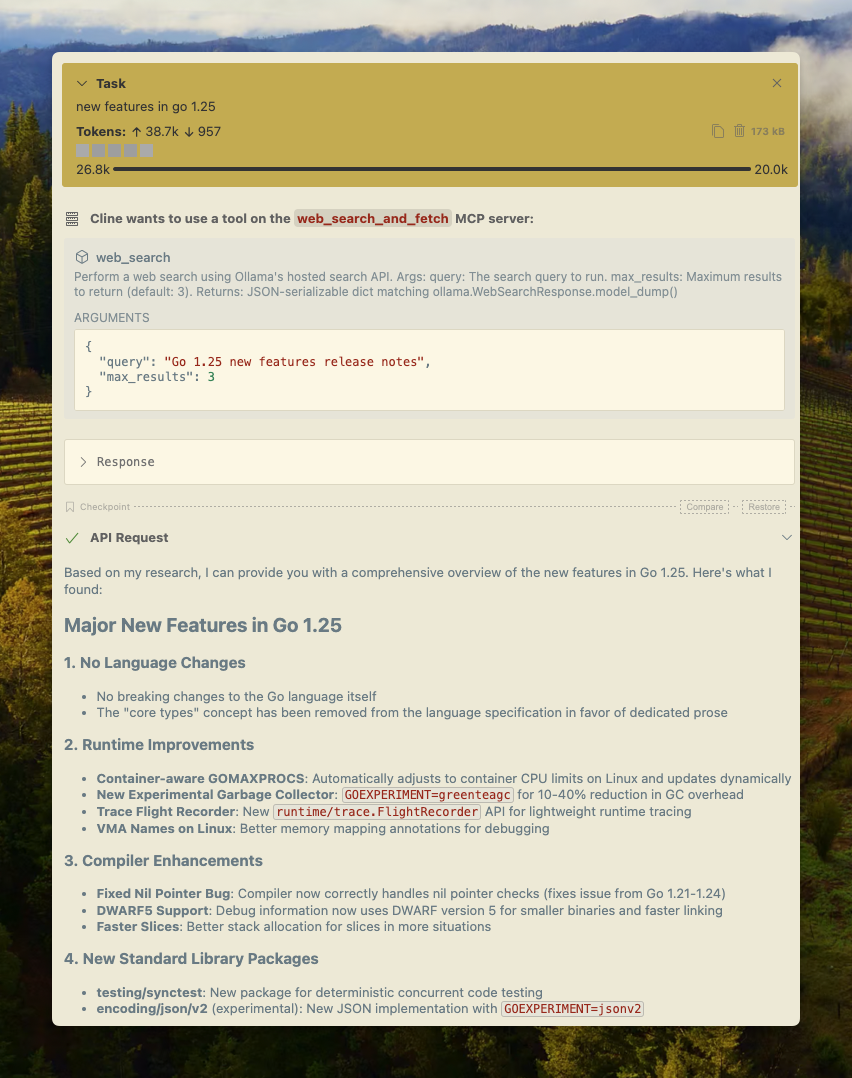
Cline
OllamaのWeb検索は、MCPサーバー設定を使用してClineと簡単に統合できます。
MCPサーバーの管理 > MCPサーバーの設定 > 以下の設定を追加:
json
{
  "mcpServers": {
    "web_search_and_fetch": {
      "type": "stdio",
      "command": "uv",
      "args": ["run", "path/to/web-search-mcp.py"],
      "env": { "OLLAMA_API_KEY": "your_api_key_here" }
    }
  }
}
Codex
OllamaはOpenAIのCodexツールとよく連携します。
~/.codex/config.tomlに以下の設定を追加:
python
[mcp_servers.web_search]
command = "uv"
args = ["run", "path/to/web-search-mcp.py"]
env = { "OLLAMA_API_KEY" = "your_api_key_here" }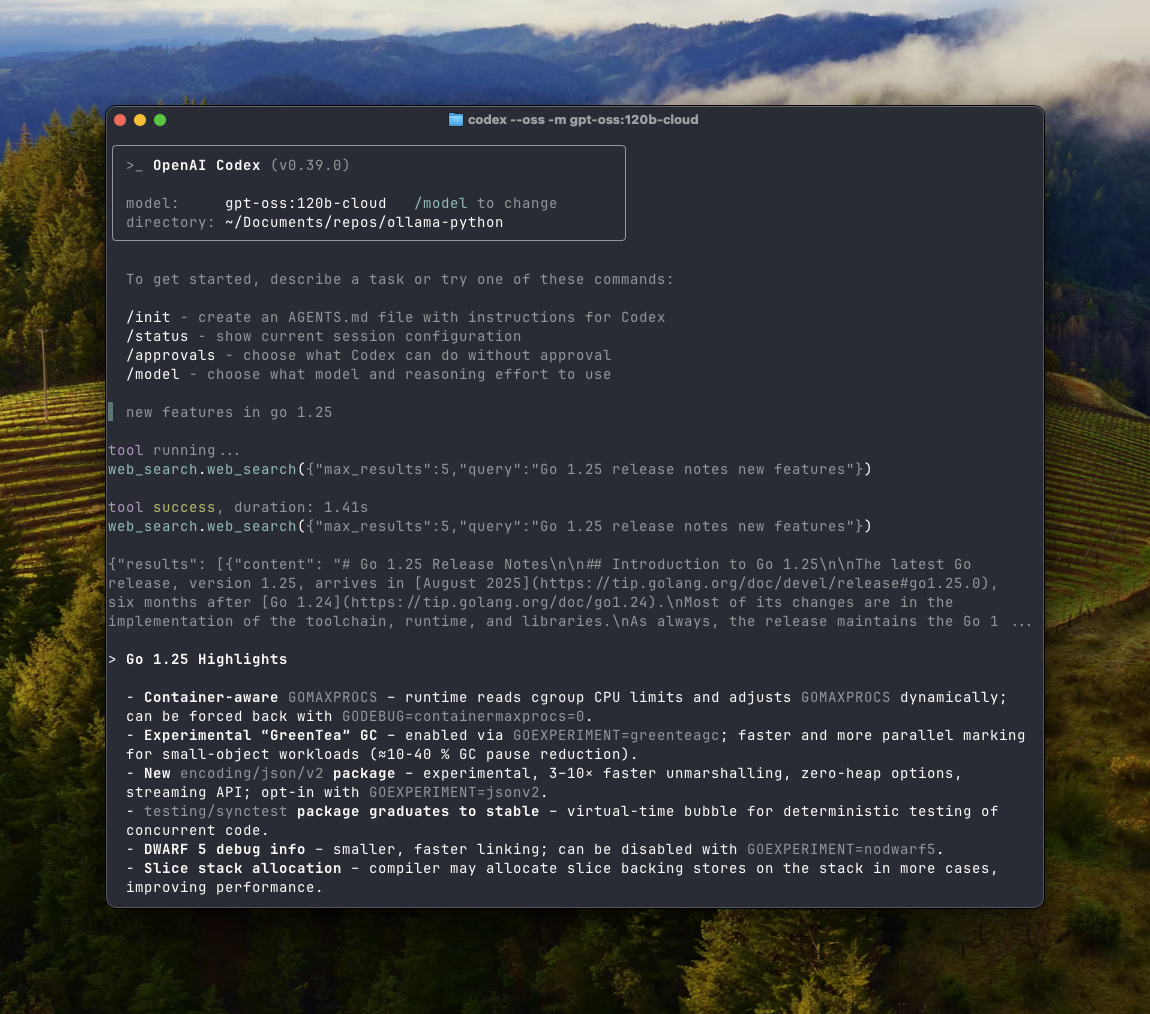
Goose
Ollamaは、MCP機能を介してGooseと統合できます。
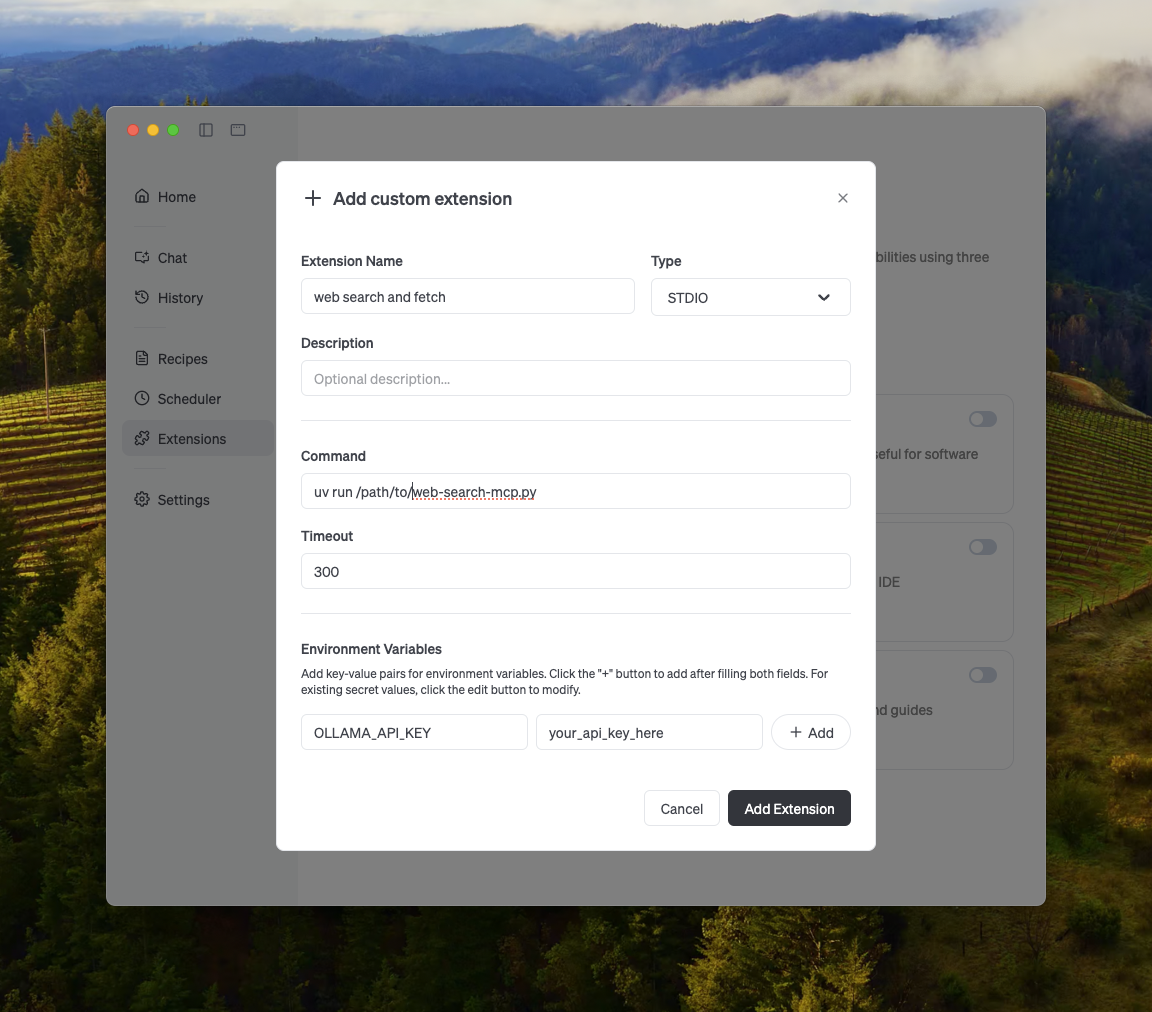
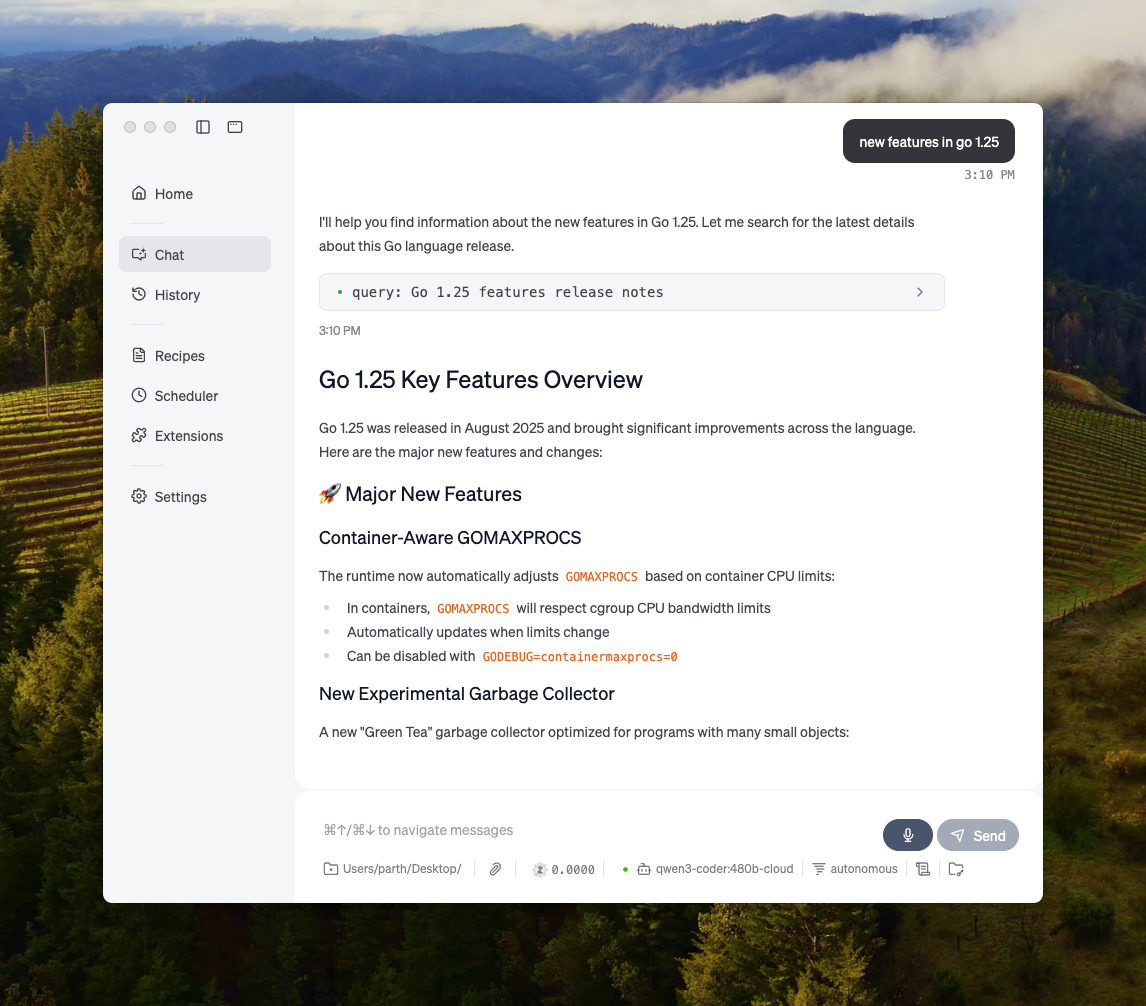
その他の統合
Ollamaは、OllamaのAPI、Python/JavaScriptライブラリ、OpenAI互換API、MCPサーバー統合の直接統合、またはこれらの組み合わせを通じて、ほとんどの利用可能なツールに統合できます。