A API de pesquisa na web do Ollama pode ser usada para complementar modelos com as informações mais recentes, reduzindo alucinações e melhorando a precisão.
A pesquisa na web é disponibilizada como uma API REST, com integrações de ferramentas mais profundas nas bibliotecas Python e JavaScript. Isso também permite que modelos como os modelos gpt-oss da OpenAI realizem tarefas de pesquisa de longa duração.
Autenticação
Para acessar a API de pesquisa na web do Ollama, crie uma chave de API. É necessária uma conta gratuita do Ollama.
API de pesquisa na web
Realiza uma pesquisa na web para uma única consulta e retorna resultados relevantes.
Requisição
POST https://ollama.com/api/web_search
query(string, obrigatório): a string da consulta de pesquisamax_results(inteiro, opcional): número máximo de resultados a retornar (padrão 5, máximo 10)
Resposta
Retorna um objeto contendo:
results(array): array de objetos de resultado de pesquisa, cada um contendo:title(string): o título da página weburl(string): o URL da página webcontent(string): trecho de conteúdo relevante da página web
Exemplos
Nota
Certifique-se de que a variável OLLAMA_API_KEY está definida, ou que ela é passada no cabeçalho Authorization.
Requisição cURL
bash
curl https://ollama.com/api/web_search \
  --header "Authorization: Bearer $OLLAMA_API_KEY" \
	-d '{
	  "query":"what is ollama?"
	}'
Resposta
json
{
  "results": [
    {
      "title": "Ollama",
      "url": "https://ollama.com/",
      "content": "Cloud models are now available..."
    },
    {
      "title": "What is Ollama? Introduction to the AI model management tool",
      "url": "https://www.hostinger.com/tutorials/what-is-ollama",
      "content": "Ariffud M. 6min Read..."
    },
    {
      "title": "Ollama Explained: Transforming AI Accessibility and Language ...",
      "url": "https://www.geeksforgeeks.org/artificial-intelligence/ollama-explained-transforming-ai-accessibility-and-language-processing/",
      "content": "Data Science Data Science Projects Data Analysis..."
    }
  ]
}
Biblioteca Python
python
response = ollama.web_search("What is Ollama?")
print(response)
Exemplo de saída
python
results = [
    {
        "title": "Ollama",
        "url": "https://ollama.com/",
        "content": "Cloud models are now available in Ollama..."
    },
    {
        "title": "What is Ollama? Features, Pricing, and Use Cases - Walturn",
        "url": "https://www.walturn.com/insights/what-is-ollama-features-pricing-and-use-cases",
        "content": "Our services..."
    },
    {
        "title": "Complete Ollama Guide: Installation, Usage & Code Examples",
        "url": "https://collabnix.com/complete-ollama-guide-installation-usage-code-examples",
        "content": "Join our Discord Server..."
    }
]
Mais exemplos do Ollama exemplo em Python
Biblioteca JavaScript
tsx
const client = new Ollama();
const results = await client.webSearch("what is ollama?");
console.log(JSON.stringify(results, null, 2));
Exemplo de saída
json
{
  "results": [
    {
      "title": "Ollama",
      "url": "https://ollama.com/",
      "content": "Cloud models are now available..."
    },
    {
      "title": "What is Ollama? Introduction to the AI model management tool",
      "url": "https://www.hostinger.com/tutorials/what-is-ollama",
      "content": "Ollama is an open-source tool..."
    },
    {
      "title": "Ollama Explained: Transforming AI Accessibility and Language Processing",
      "url": "https://www.geeksforgeeks.org/artificial-intelligence/ollama-explained-transforming-ai-accessibility-and-language-processing/",
      "content": "Ollama is a groundbreaking..."
    }
  ]
}
Mais exemplos do Ollama exemplo em JavaScript
API de busca de páginas web
Busca uma única página web por URL e retorna seu conteúdo.
Requisição
POST https://ollama.com/api/web_fetch
url(string, obrigatório): o URL a ser buscado
Resposta
Retorna um objeto contendo:
title(string): o título da página webcontent(string): o conteúdo principal da página weblinks(array): array de links encontrados na página
Exemplos
Requisição cURL
python
curl --request POST \
  --url https://ollama.com/api/web_fetch \
  --header "Authorization: Bearer $OLLAMA_API_KEY" \
  --header 'Content-Type: application/json' \
  --data '{
      "url": "ollama.com"
  }'
Resposta
json
{
  "title": "Ollama",
  "content": "[Cloud models](https://ollama.com/blog/cloud-models) are now available in Ollama...",
  "links": [
    "http://ollama.com/",
    "http://ollama.com/models",
    "https://github.com/ollama/ollama"
  ]

}
SDK Python
python
from ollama import web_fetch

result = web_fetch('https://ollama.com')
print(result)
Resultado
python
WebFetchResponse(
    title='Ollama',
    content='[Cloud models](https://ollama.com/blog/cloud-models) are now available in Ollama\n\n**Chat & build
with open models**\n\n[Download](https://ollama.com/download) [Explore
models](https://ollama.com/models)\n\nAvailable for macOS, Windows, and Linux',
    links=['https://ollama.com/', 'https://ollama.com/models', 'https://github.com/ollama/ollama']
)
SDK JavaScript
tsx
const client = new Ollama();
const fetchResult = await client.webFetch("https://ollama.com");
console.log(JSON.stringify(fetchResult, null, 2));
Resultado
json
{
  "title": "Ollama",
  "content": "[Cloud models](https://ollama.com/blog/cloud-models) are now available in Ollama...",
  "links": [
    "https://ollama.com/",
    "https://ollama.com/models",
    "https://github.com/ollama/ollama"
  ]
}
Construindo um agente de pesquisa
Use a API de pesquisa na web do Ollama como uma ferramenta para construir um mini agente de pesquisa.
Este exemplo usa o modelo Qwen 3 da Alibaba com 4B de parâmetros.
bash
ollama pull qwen3:4bpython
from ollama import chat, web_fetch, web_search

available_tools = {'web_search': web_search, 'web_fetch': web_fetch}

messages = [{'role': 'user', 'content': "what is ollama's new engine"}]

while True:
  response = chat(
    model='qwen3:4b',
    messages=messages,
    tools=[web_search, web_fetch],
    think=True
    )
  if response.message.thinking:
    print('Thinking: ', response.message.thinking)
  if response.message.content:
    print('Content: ', response.message.content)
  messages.append(response.message)
  if response.message.tool_calls:
    print('Tool calls: ', response.message.tool_calls)
    for tool_call in response.message.tool_calls:
      function_to_call = available_tools.get(tool_call.function.name)
      if function_to_call:
        args = tool_call.function.arguments
        result = function_to_call(**args)
        print('Result: ', str(result)[:200]+'...')
        # O resultado é truncado devido a comprimentos de contexto limitados
        messages.append({'role': 'tool', 'content': str(result)[:2000 * 4], 'tool_name': tool_call.function.name})
      else:
        messages.append({'role': 'tool', 'content': f'Tool {tool_call.function.name} not found', 'tool_name': tool_call.function.name})
  else:
    break
Resultado
Thinking:  Okay, the user is asking about Ollama's new engine. I need to figure out what they're referring to. Ollama is a company that develops large language models, so maybe they've released a new model or an updated version of their existing engine....

Tool calls:  [ToolCall(function=Function(name='web_search', arguments={'max_results': 3, 'query': 'Ollama new engine'}))]
Result:  results=[WebSearchResult(content='# New model scheduling\n\n## September 23, 2025\n\nOllama now includes a significantly improved model scheduling system. Ahead of running a model, Ollama’s new engine

Thinking:  Okay, the user asked about Ollama's new engine. Let me look at the search results.

First result is from September 23, 2025, talking about new model scheduling. It mentions improved memory management, reduced crashes, better GPU utilization, and multi-GPU performance. Examples show speed improvements and accurate memory reporting. Supported models include gemma3, llama4, qwen3, etc...

Content:  Ollama has introduced two key updates to its engine, both released in 2025:

1. **Enhanced Model Scheduling (September 23, 2025)**
   - **Precision Memory Management**: Exact memory allocation reduces out-of-memory crashes and optimizes GPU utilization.
   - **Performance Gains**: Examples show significant speed improvements (e.g., 85.54 tokens/s vs 52.02 tokens/s) and full GPU layer utilization.
   - **Multi-GPU Support**: Improved efficiency across multiple GPUs, with accurate memory reporting via tools like `nvidia-smi`.
   - **Supported Models**: Includes `gemma3`, `llama4`, `qwen3`, `mistral-small3.2`, and more.

2. **Multimodal Engine (May 15, 2025)**
   - **Vision Support**: First-class support for vision models, including `llama4:scout` (109B parameters), `gemma3`, `qwen2.5vl`, and `mistral-small3.1`.
   - **Multimodal Tasks**: Examples include identifying animals in multiple images, answering location-based questions from videos, and document scanning.

These updates highlight Ollama's focus on efficiency, performance, and expanded capabilities for both text and vision tasks.
Comprimento de contexto e agentes
Os resultados de pesquisa na web podem retornar milhares de tokens. Recomenda-se aumentar o comprimento de contexto do modelo para pelo menos ~32000 tokens. Os agentes de pesquisa funcionam melhor com o comprimento de contexto completo. Os modelos de nuvem do Ollama são executados com o comprimento de contexto completo.
Servidor MCP
Você pode habilitar a pesquisa na web em qualquer cliente MCP por meio do servidor MCP Python.
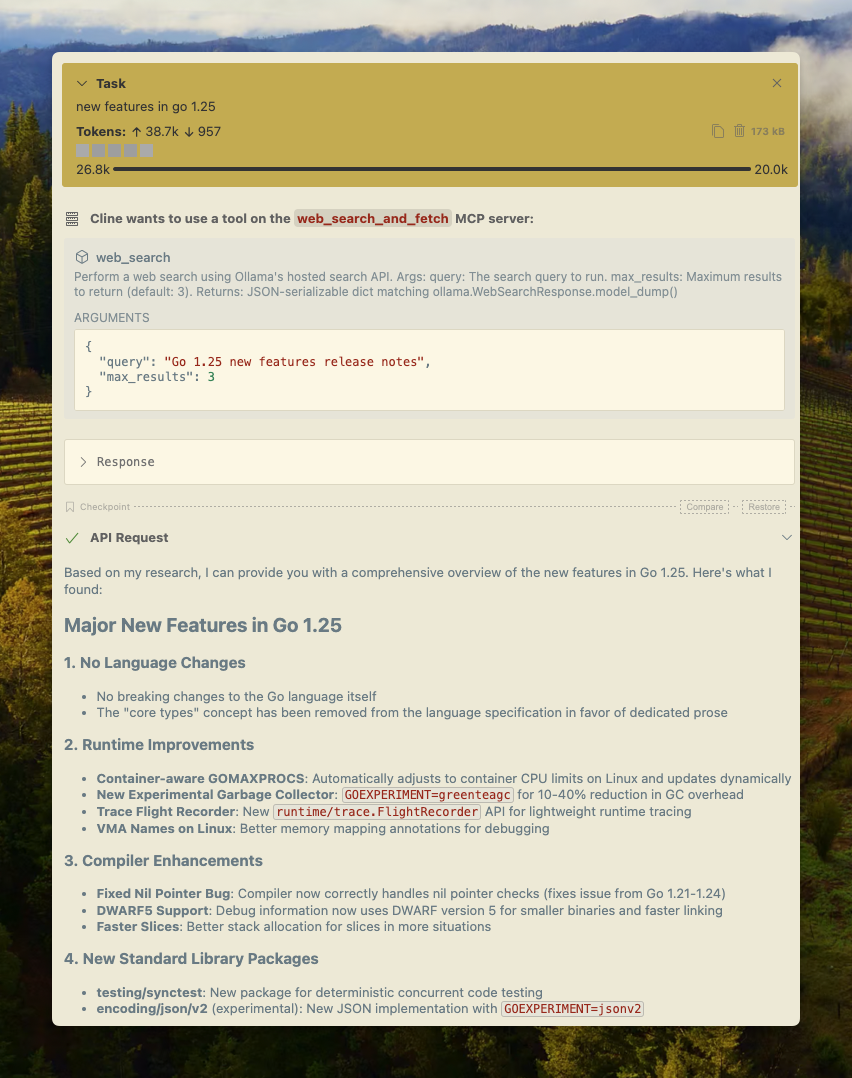
Cline
A pesquisa na web do Ollama pode ser integrada ao Cline facilmente usando a configuração do servidor MCP.
Gerenciar servidores MCP > Configurar servidores MCP > Adicione a seguinte configuração:
json
{
  "mcpServers": {
    "web_search_and_fetch": {
      "type": "stdio",
      "command": "uv",
      "args": ["run", "path/to/web-search-mcp.py"],
      "env": { "OLLAMA_API_KEY": "your_api_key_here" }
    }
  }
}
Codex
Ollama funciona bem com a ferramenta Codex da OpenAI.
Adicione a seguinte configuração ao arquivo ~/.codex/config.toml
python
[mcp_servers.web_search]
command = "uv"
args = ["run", "path/to/web-search-mcp.py"]
env = { "OLLAMA_API_KEY" = "your_api_key_here" }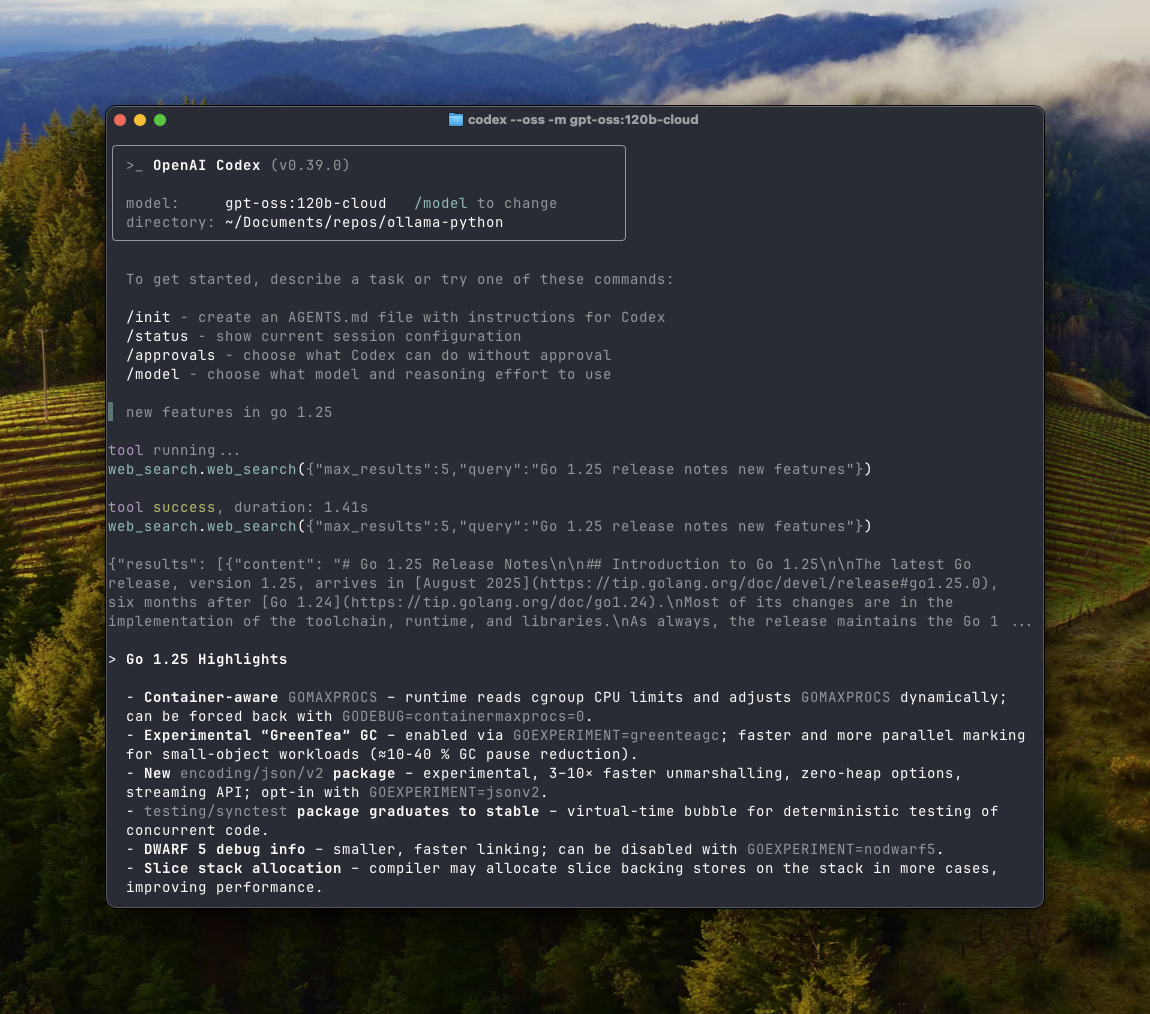
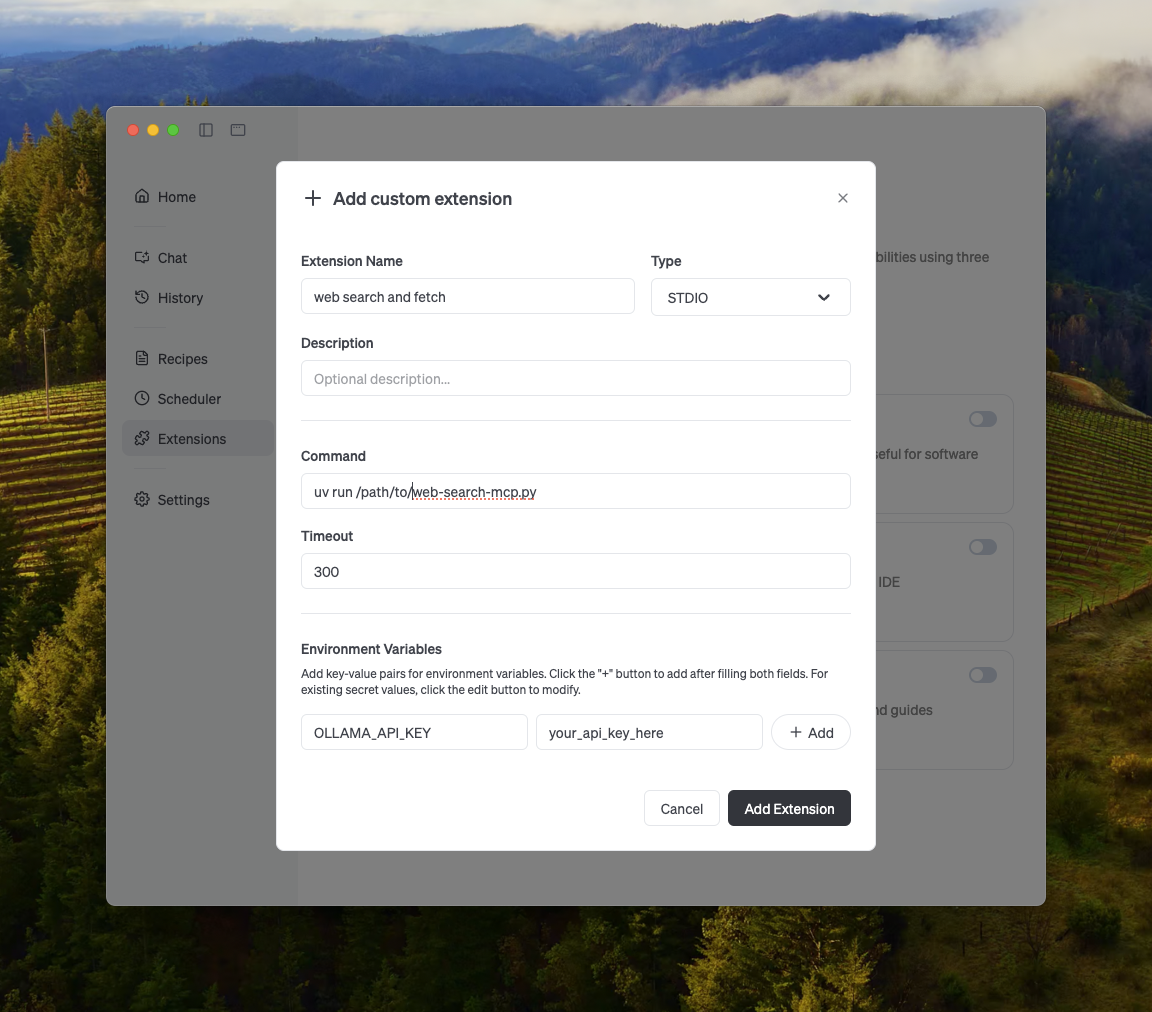
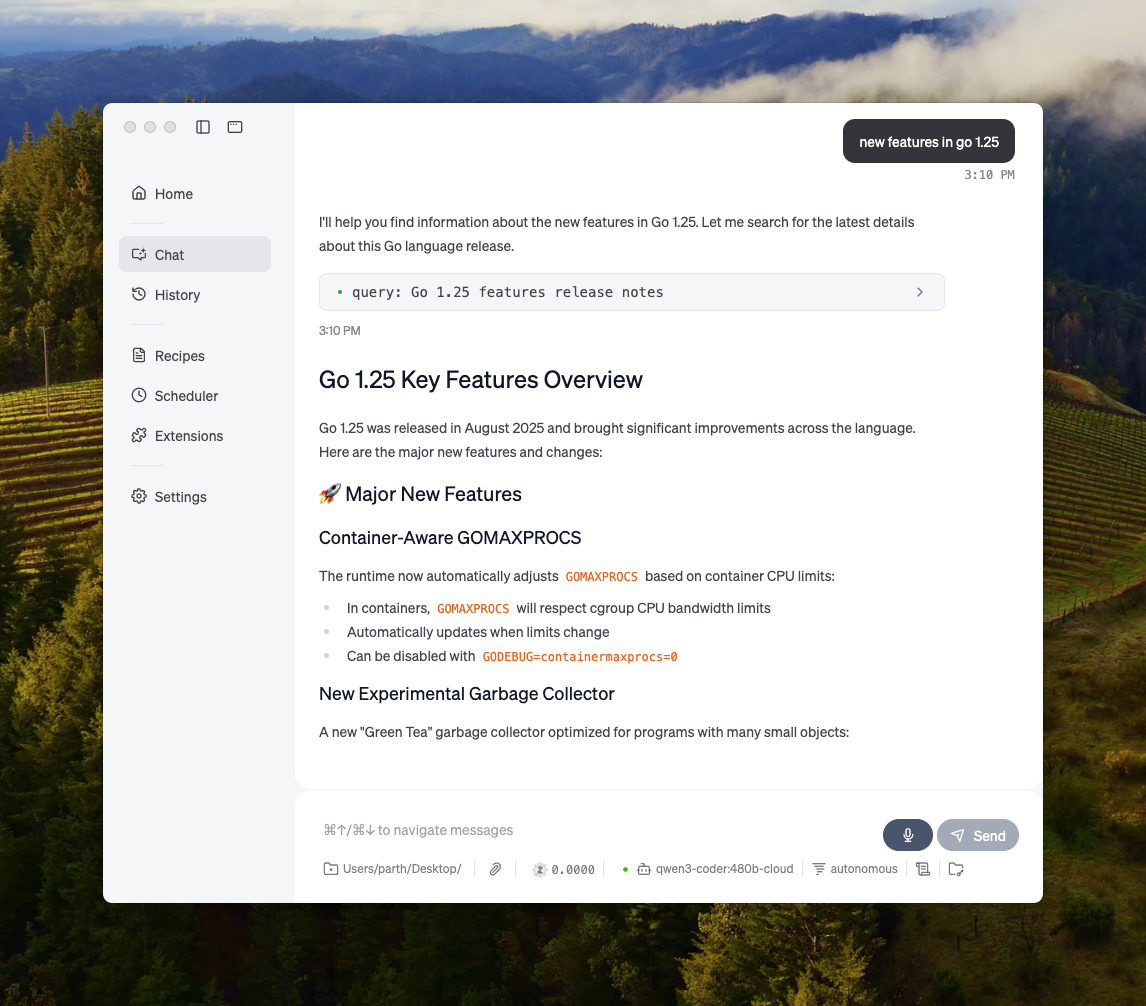
Goose
Ollama pode ser integrado ao Goose por meio de seu recurso MCP.
Outras integrações
Ollama pode ser integrado à maioria das ferramentas disponíveis, seja por meio de integração direta com a API do Ollama, bibliotecas Python/JavaScript, API compatível com a OpenAI ou integração com servidor MCP.