L'API di ricerca web di Ollama può essere utilizzata per arricchire i modelli con le informazioni più recenti, ridurre le allucinazioni e migliorare l'accuratezza.
La ricerca web è fornita come API REST con integrazioni di strumenti più approfondite nelle librerie Python e JavaScript. Questo consente inoltre a modelli come i modelli gpt-oss di OpenAI di svolgere attività di ricerca di lunga durata.
Autenticazione
Per accedere all'API di ricerca web di Ollama, crea una chiave API. È richiesto un account Ollama gratuito.
API di ricerca web
Esegue una ricerca web per una singola query e restituisce i risultati pertinenti.
Richiesta
POST https://ollama.com/api/web_search
query(stringa, obbligatorio): la stringa della query di ricercamax_results(intero, opzionale): numero massimo di risultati da restituire (predefinito 5, massimo 10)
Risposta
Restituisce un oggetto contenente:
results(array): array di oggetti di risultato di ricerca, ognuno contenente:title(stringa): il titolo della pagina weburl(stringa): l'URL della pagina webcontent(stringa): frammento di contenuto pertinente estratto dalla pagina web
Esempi
Nota
Assicurati che OLLAMA_API_KEY sia impostato o che venga passato nell'intestazione Authorization.
Richiesta cURL
bash
curl https://ollama.com/api/web_search \
  --header "Authorization: Bearer $OLLAMA_API_KEY" \
	-d '{
	  "query":"what is ollama?"
	}'
Response
json
{
  "results": [
    {
      "title": "Ollama",
      "url": "https://ollama.com/",
      "content": "Cloud models are now available..."
    },
    {
      "title": "What is Ollama? Introduction to the AI model management tool",
      "url": "https://www.hostinger.com/tutorials/what-is-ollama",
      "content": "Ariffud M. 6min Read..."
    },
    {
      "title": "Ollama Explained: Transforming AI Accessibility and Language ...",
      "url": "https://www.geeksforgeeks.org/artificial-intelligence/ollama-explained-transforming-ai-accessibility-and-language-processing/",
      "content": "Data Science Data Science Projects Data Analysis..."
    }
  ]
}
Libreria Python
python
response = ollama.web_search("What is Ollama?")
print(response)
Example output
python
results = [
    {
        "title": "Ollama",
        "url": "https://ollama.com/",
        "content": "Cloud models are now available in Ollama..."
    },
    {
        "title": "What is Ollama? Features, Pricing, and Use Cases - Walturn",
        "url": "https://www.walturn.com/insights/what-is-ollama-features-pricing-and-use-cases",
        "content": "Our services..."
    },
    {
        "title": "Complete Ollama Guide: Installation, Usage & Code Examples",
        "url": "https://collabnix.com/complete-ollama-guide-installation-usage-code-examples",
        "content": "Join our Discord Server..."
    }
]
Maggiori esempi per Ollama Python example
Libreria JavaScript
tsx
const client = new Ollama();
const results = await client.webSearch("what is ollama?");
console.log(JSON.stringify(results, null, 2));
Example output
json
{
  "results": [
    {
      "title": "Ollama",
      "url": "https://ollama.com/",
      "content": "Cloud models are now available..."
    },
    {
      "title": "What is Ollama? Introduction to the AI model management tool",
      "url": "https://www.hostinger.com/tutorials/what-is-ollama",
      "content": "Ollama is an open-source tool..."
    },
    {
      "title": "Ollama Explained: Transforming AI Accessibility and Language Processing",
      "url": "https://www.geeksforgeeks.org/artificial-intelligence/ollama-explained-transforming-ai-accessibility-and-language-processing/",
      "content": "Ollama is a groundbreaking..."
    }
  ]
}
Maggiori esempi per Ollama JavaScript example
API di recupero web
Recupera una singola pagina web tramite URL e ne restituisce il contenuto.
Richiesta
POST https://ollama.com/api/web_fetch
url(stringa, obbligatorio): l'URL da recuperare
Risposta
Restituisce un oggetto contenente:
title(stringa): il titolo della pagina webcontent(stringa): il contenuto principale della pagina weblinks(array): array di link trovati nella pagina
Esempi
Richiesta cURL
python
curl --request POST \
  --url https://ollama.com/api/web_fetch \
  --header "Authorization: Bearer $OLLAMA_API_KEY" \
  --header 'Content-Type: application/json' \
  --data '{
      "url": "ollama.com"
  }'
Response
json
{
  "title": "Ollama",
  "content": "[Cloud models](https://ollama.com/blog/cloud-models) are now available in Ollama...",
  "links": [
    "http://ollama.com/",
    "http://ollama.com/models",
    "https://github.com/ollama/ollama"
  ]
SDK Python
python
from ollama import web_fetch

result = web_fetch('https://ollama.com')
print(result)
Result
python
WebFetchResponse(
    title='Ollama',
    content='[Cloud models](https://ollama.com/blog/cloud-models) are now available in Ollama\n\n**Chat & build
with open models**\n\n[Download](https://ollama.com/download) [Explore
models](https://ollama.com/models)\n\nAvailable for macOS, Windows, and Linux',
    links=['https://ollama.com/', 'https://ollama.com/models', 'https://github.com/ollama/ollama']
)
SDK JavaScript
tsx
const client = new Ollama();
const fetchResult = await client.webFetch("https://ollama.com");
console.log(JSON.stringify(fetchResult, null, 2));
Result
json
{
  "title": "Ollama",
  "content": "[Cloud models](https://ollama.com/blog/cloud-models) are now available in Ollama...",
  "links": [
    "https://ollama.com/",
    "https://ollama.com/models",
    "https://github.com/ollama/ollama"
  ]
}
Creazione di un agente di ricerca
Utilizza l'API di ricerca web di Ollama come strumento per creare un mini agente di ricerca.
Questo esempio utilizza il modello Qwen 3 di Alibaba con 4B di parametri.
bash
ollama pull qwen3:4bpython
from ollama import chat, web_fetch, web_search

available_tools = {'web_search': web_search, 'web_fetch': web_fetch}

messages = [{'role': 'user', 'content': "what is ollama's new engine"}]

while True:
  response = chat(
    model='qwen3:4b',
    messages=messages,
    tools=[web_search, web_fetch],
    think=True
    )
  if response.message.thinking:
    print('Thinking: ', response.message.thinking)
  if response.message.content:
    print('Content: ', response.message.content)
  messages.append(response.message)
  if response.message.tool_calls:
    print('Tool calls: ', response.message.tool_calls)
    for tool_call in response.message.tool_calls:
      function_to_call = available_tools.get(tool_call.function.name)
      if function_to_call:
        args = tool_call.function.arguments
        result = function_to_call(**args)
        print('Result: ', str(result)[:200]+'...')
        # Result is truncated for limited context lengths
        messages.append({'role': 'tool', 'content': str(result)[:2000 * 4], 'tool_name': tool_call.function.name})
      else:
        messages.append({'role': 'tool', 'content': f'Tool {tool_call.function.name} not found', 'tool_name': tool_call.function.name})
  else:
    break
Result
Thinking:  Okay, the user is asking about Ollama's new engine. I need to figure out what they're referring to. Ollama is a company that develops large language models, so maybe they've released a new model or an updated version of their existing engine....

Tool calls:  [ToolCall(function=Function(name='web_search', arguments={'max_results': 3, 'query': 'Ollama new engine'}))]
Result:  results=[WebSearchResult(content='# New model scheduling\n\n## September 23, 2025\n\nOllama now includes a significantly improved model scheduling system. Ahead of running a model, Ollama’s new engine

Thinking:  Okay, the user asked about Ollama's new engine. Let me look at the search results.

First result is from September 23, 2025, talking about new model scheduling. It mentions improved memory management, reduced crashes, better GPU utilization, and multi-GPU performance. Examples show speed improvements and accurate memory reporting. Supported models include gemma3, llama4, qwen3, etc...

Content:  Ollama has introduced two key updates to its engine, both released in 2025:

1. **Enhanced Model Scheduling (September 23, 2025)**
   - **Precision Memory Management**: Exact memory allocation reduces out-of-memory crashes and optimizes GPU utilization.
   - **Performance Gains**: Examples show significant speed improvements (e.g., 85.54 tokens/s vs 52.02 tokens/s) and full GPU layer utilization.
   - **Multi-GPU Support**: Improved efficiency across multiple GPUs, with accurate memory reporting via tools like `nvidia-smi`.
   - **Supported Models**: Includes `gemma3`, `llama4`, `qwen3`, `mistral-small3.2`, and more.

2. **Multimodal Engine (May 15, 2025)**
   - **Vision Support**: First-class support for vision models, including `llama4:scout` (109B parameters), `gemma3`, `qwen2.5vl`, and `mistral-small3.1`.
   - **Multimodal Tasks**: Examples include identifying animals in multiple images, answering location-based questions from videos, and document scanning.

These updates highlight Ollama's focus on efficiency, performance, and expanded capabilities for both text and vision tasks.
Lunghezza del contesto e agenti
I risultati della ricerca web possono restituire migliaia di token. Si consiglia di aumentare la lunghezza del contesto del modello ad almeno ~32000 token. Gli agenti di ricerca funzionano meglio con la lunghezza di contesto completa. I modelli cloud di Ollama funzionano con la lunghezza di contesto completa.
Server MCP
Puoi abilitare la ricerca web in qualsiasi client MCP tramite il server MCP Python.
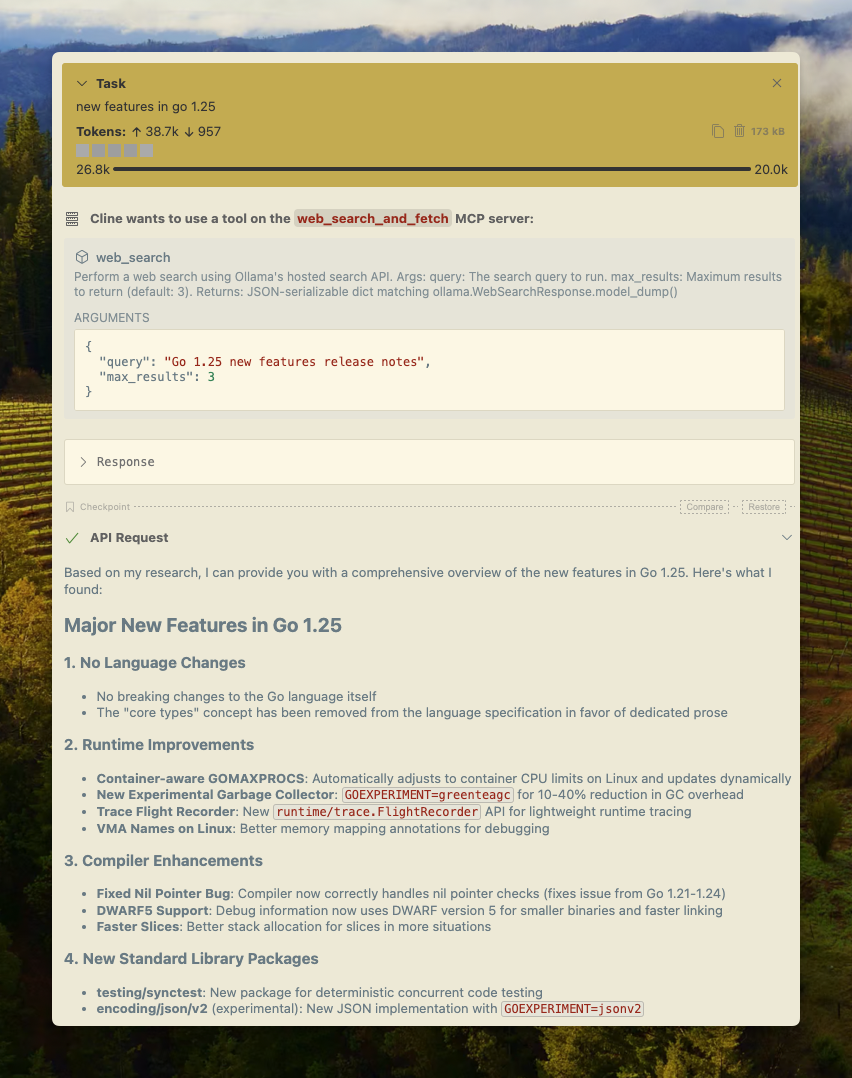
Cline
La ricerca web di Ollama può essere integrata con Cline facilmente utilizzando la configurazione del server MCP.
Gestisci server MCP > Configura server MCP > Aggiungi la seguente configurazione:
json
{
  "mcpServers": {
    "web_search_and_fetch": {
      "type": "stdio",
      "command": "uv",
      "args": ["run", "path/to/web-search-mcp.py"],
      "env": { "OLLAMA_API_KEY": "your_api_key_here" }
    }
  }
}
Codex
Ollama funziona bene con lo strumento Codex di OpenAI.
Aggiungi la seguente configurazione a ~/.codex/config.toml
python
[mcp_servers.web_search]
command = "uv"
args = ["run", "path/to/web-search-mcp.py"]
env = { "OLLAMA_API_KEY" = "your_api_key_here" }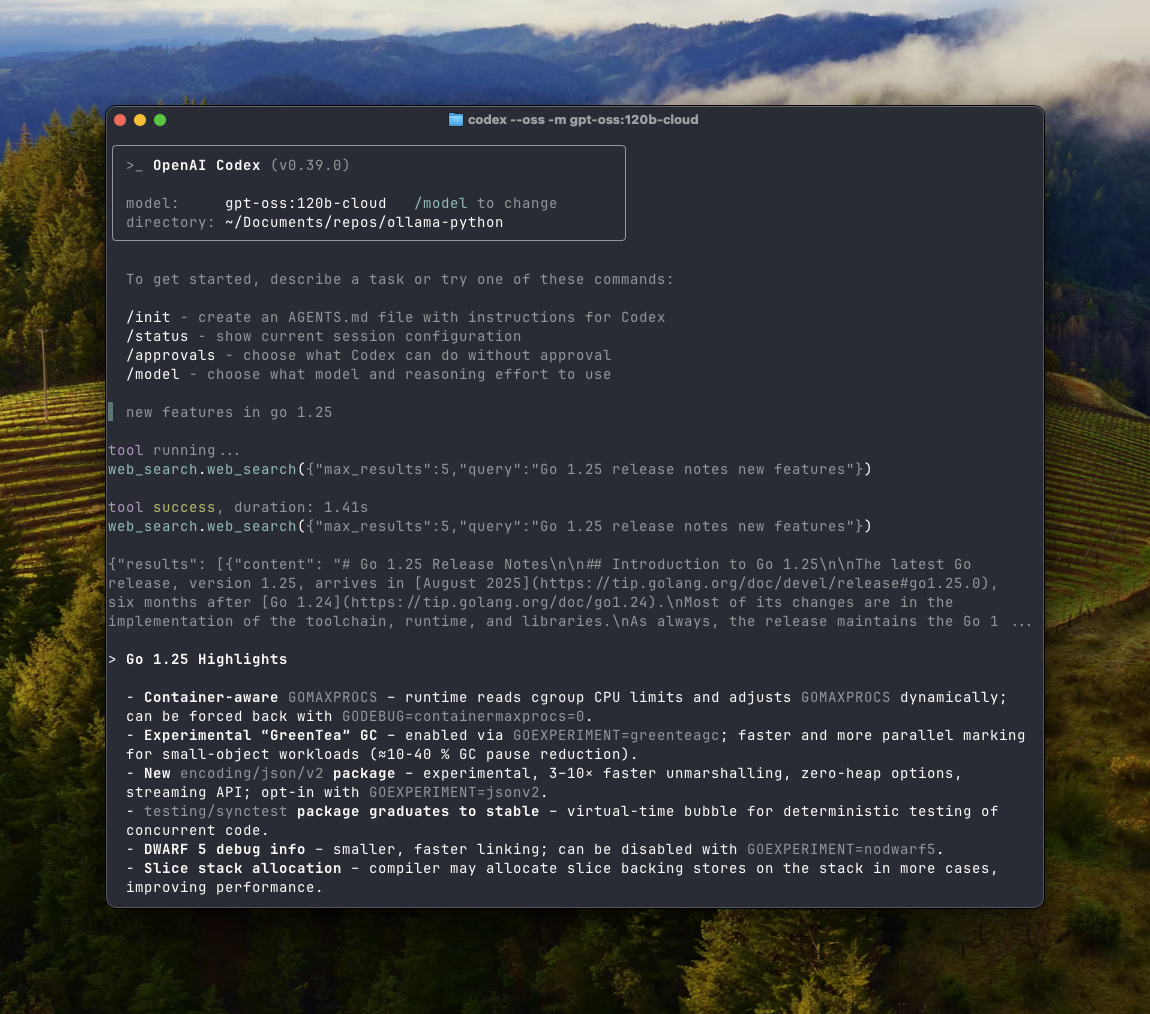
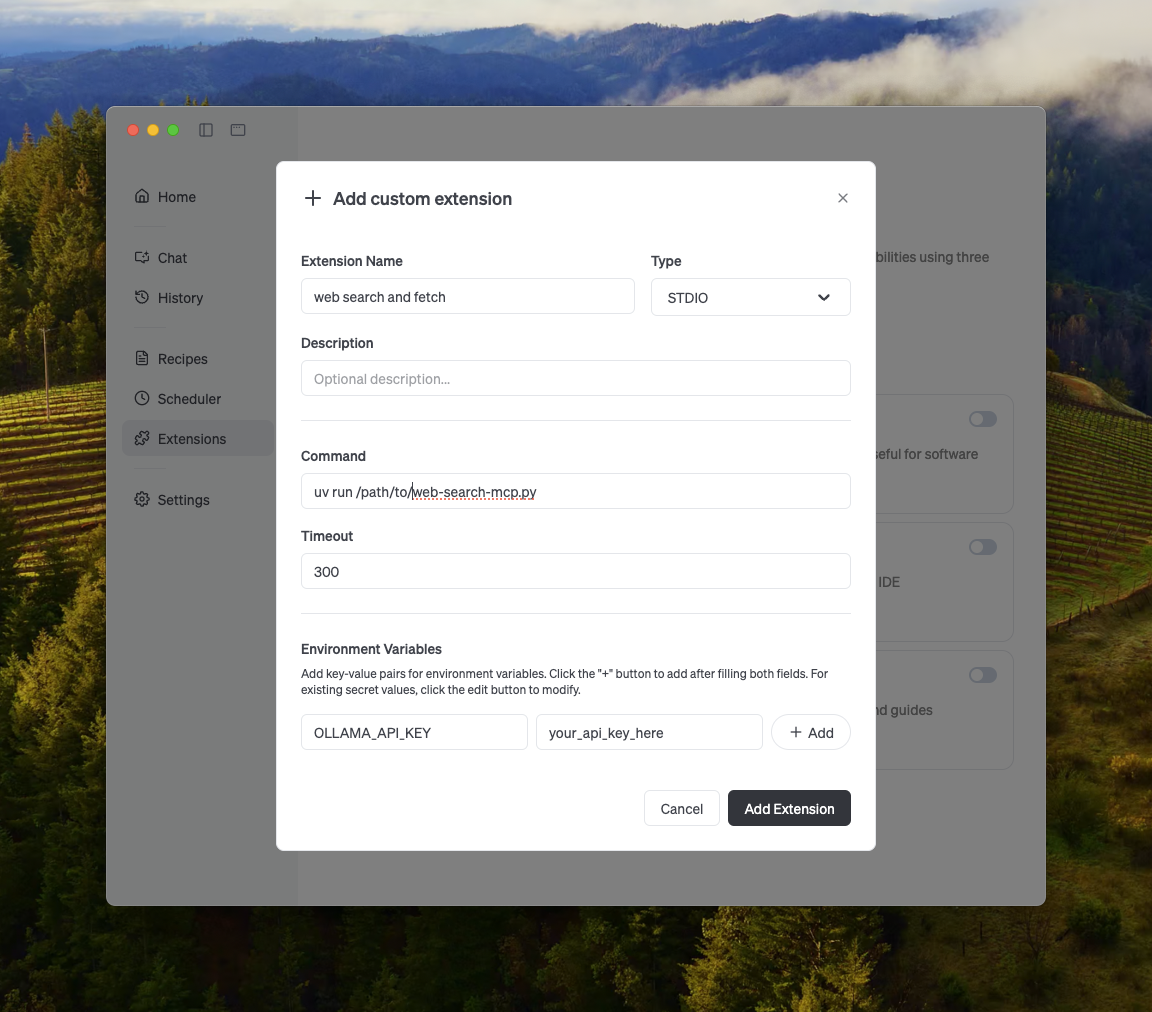
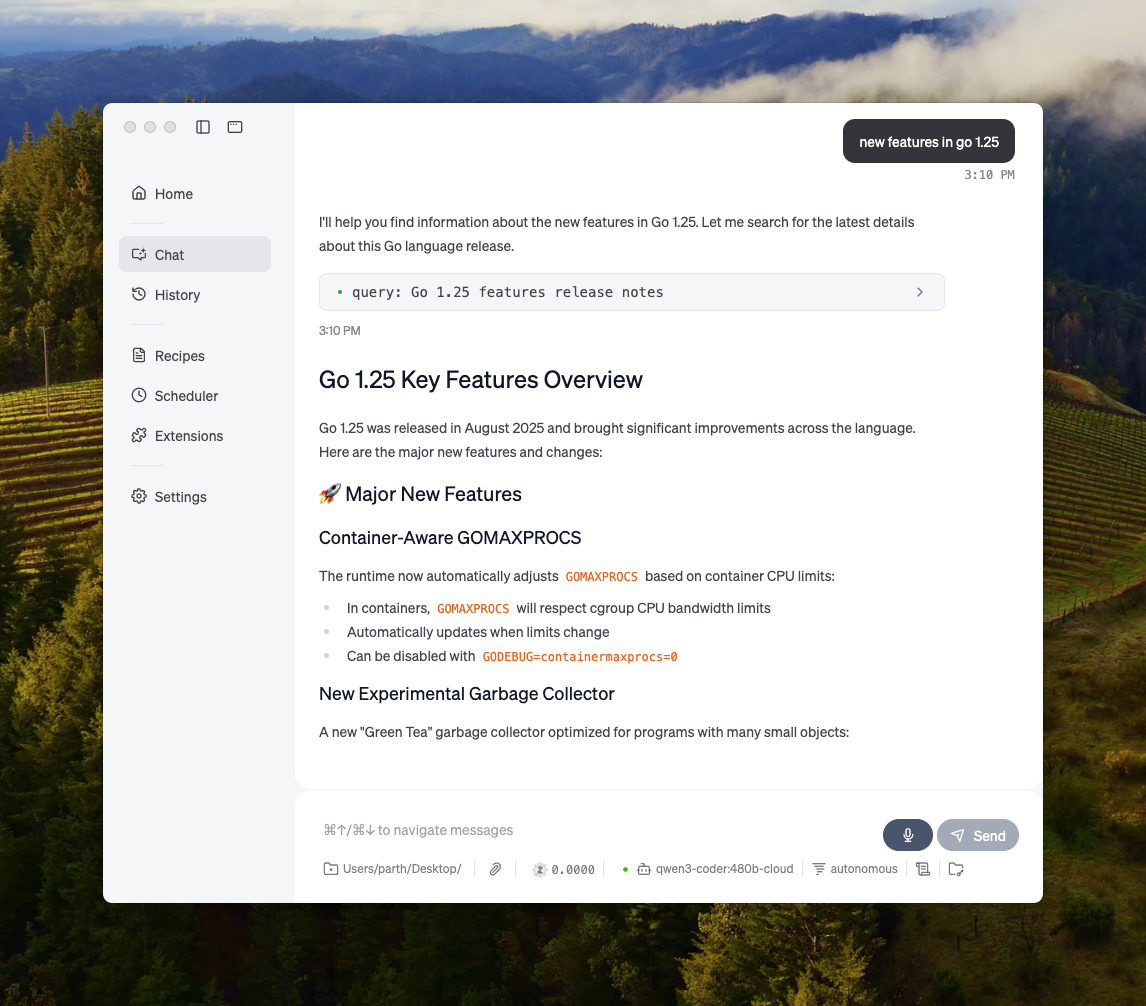
Goose
Ollama può integrarsi con Goose tramite la sua funzionalità MCP.
Altre integrazioni
Ollama può essere integrato nella maggior parte degli strumenti disponibili sia tramite integrazione diretta dell'API di Ollama, delle librerie Python/JavaScript, dell'API compatibile con OpenAI e tramite integrazione del server MCP.