Ollama 的網路搜尋 API 可用來為模型補充最新資訊,以減少幻覺並提升準確度。
網路搜尋以 REST API 的形式提供,並在 Python 與 JavaScript 函式庫中提供更完善的工具整合。這也使得如 OpenAI 的 gpt-oss 模型能夠執行長時間的研究任務。
身份驗證
若要存取 Ollama 的網路搜尋 API,請建立一個 API key。您需要一個免費的 Ollama 帳戶。
網頁搜尋 API
對單一查詢執行網路搜尋並傳回相關結果。
請求
POST https://ollama.com/api/web_search
query(字串,必要):搜尋查詢字串max_results(整數,選用):要傳回的最大結果數(預設為 5,最大值為 10)
回應
傳回包含以下內容的物件:
results(陣列):搜尋結果物件的陣列,每個物件包含:title(字串):網頁的標題url(字串):網頁的 URLcontent(字串):從網頁擷取的相關內容片段
範例
注意
請確保已設定 OLLAMA_API_KEY,否則必須在 Authorization 標頭中傳遞。
cURL 請求
bash
curl https://ollama.com/api/web_search \
  --header "Authorization: Bearer $OLLAMA_API_KEY" \
	-d '{
	  "query":"what is ollama?"
	}'
回應
json
{
  "results": [
    {
      "title": "Ollama",
      "url": "https://ollama.com/",
      "content": "Cloud models are now available..."
    },
    {
      "title": "What is Ollama? Introduction to the AI model management tool",
      "url": "https://www.hostinger.com/tutorials/what-is-ollama",
      "content": "Ariffud M. 6min Read..."
    },
    {
      "title": "Ollama Explained: Transforming AI Accessibility and Language ...",
      "url": "https://www.geeksforgeeks.org/artificial-intelligence/ollama-explained-transforming-ai-accessibility-and-language-processing/",
      "content": "Data Science Data Science Projects Data Analysis..."
    }
  ]
}
Python 函式庫
python
response = ollama.web_search("What is Ollama?")
print(response)
範例輸出
python
results = [
    {
        "title": "Ollama",
        "url": "https://ollama.com/",
        "content": "Cloud models are now available in Ollama..."
    },
    {
        "title": "What is Ollama? Features, Pricing, and Use Cases - Walturn",
        "url": "https://www.walturn.com/insights/what-is-ollama-features-pricing-and-use-cases",
        "content": "Our services..."
    },
    {
        "title": "Complete Ollama Guide: Installation, Usage & Code Examples",
        "url": "https://collabnix.com/complete-ollama-guide-installation-usage-code-examples",
        "content": "Join our Discord Server..."
    }
]
更多 Ollama Python 範例
JavaScript 函式庫
tsx
const client = new Ollama();
const results = await client.webSearch("what is ollama?");
console.log(JSON.stringify(results, null, 2));
範例輸出
json
{
  "results": [
    {
      "title": "Ollama",
      "url": "https://ollama.com/",
      "content": "Cloud models are now available..."
    },
    {
      "title": "What is Ollama? Introduction to the AI model management tool",
      "url": "https://www.hostinger.com/tutorials/what-is-ollama",
      "content": "Ollama is an open-source tool..."
    },
    {
      "title": "Ollama Explained: Transforming AI Accessibility and Language Processing",
      "url": "https://www.geeksforgeeks.org/artificial-intelligence/ollama-explained-transforming-ai-accessibility-and-language-processing/",
      "content": "Ollama is a groundbreaking..."
    }
  ]
}
更多 Ollama JavaScript 範例
網頁擷取 API
透過 URL 擷取單一網頁並傳回其內容。
請求
POST https://ollama.com/api/web_fetch
url(字串,必要):要擷取的 URL
回應
傳回包含以下內容的物件:
title(字串):網頁的標題content(字串):網頁的主要內容links(陣列):在頁面上找到的連結陣列
範例
cURL 請求
python
curl --request POST \
  --url https://ollama.com/api/web_fetch \
  --header "Authorization: Bearer $OLLAMA_API_KEY" \
  --header 'Content-Type: application/json' \
  --data '{
      "url": "ollama.com"
  }'
回應
json
{
  "title": "Ollama",
  "content": "[Cloud models](https://ollama.com/blog/cloud-models) are now available in Ollama...",
  "links": [
    "http://ollama.com/",
    "http://ollama.com/models",
    "https://github.com/ollama/ollama"
  ]
Python SDK
python
from ollama import web_fetch

result = web_fetch('https://ollama.com')
print(result)
結果
python
WebFetchResponse(
    title='Ollama',
    content='[Cloud models](https://ollama.com/blog/cloud-models) are now available in Ollama\n\n**Chat & build
with open models**\n\n[Download](https://ollama.com/download) [Explore
models](https://ollama.com/models)\n\nAvailable for macOS, Windows, and Linux',
    links=['https://ollama.com/', 'https://ollama.com/models', 'https://github.com/ollama/ollama']
)
JavaScript SDK
tsx
const client = new Ollama();
const fetchResult = await client.webFetch("https://ollama.com");
console.log(JSON.stringify(fetchResult, null, 2));
結果
json
{
  "title": "Ollama",
  "content": "[Cloud models](https://ollama.com/blog/cloud-models) are now available in Ollama...",
  "links": [
    "https://ollama.com/",
    "https://ollama.com/models",
    "https://github.com/ollama/ollama"
  ]
}
建構搜尋代理程式
將 Ollama 的網頁搜尋 API 作為工具來建構一個迷你搜尋代理程式。
此範例使用阿里巴巴的 Qwen 3 模型(4B 參數)。
bash
ollama pull qwen3:4bpython
from ollama import chat, web_fetch, web_search

available_tools = {'web_search': web_search, 'web_fetch': web_fetch}

messages = [{'role': 'user', 'content': "what is ollama's new engine"}]

while True:
  response = chat(
    model='qwen3:4b',
    messages=messages,
    tools=[web_search, web_fetch],
    think=True
    )
  if response.message.thinking:
    print('Thinking: ', response.message.thinking)
  if response.message.content:
    print('Content: ', response.message.content)
  messages.append(response.message)
  if response.message.tool_calls:
    print('Tool calls: ', response.message.tool_calls)
    for tool_call in response.message.tool_calls:
      function_to_call = available_tools.get(tool_call.function.name)
      if function_to_call:
        args = tool_call.function.arguments
        result = function_to_call(**args)
        print('Result: ', str(result)[:200]+'...')
        # Result is truncated for limited context lengths
        messages.append({'role': 'tool', 'content': str(result)[:2000 * 4], 'tool_name': tool_call.function.name})
      else:
        messages.append({'role': 'tool', 'content': f'Tool {tool_call.function.name} not found', 'tool_name': tool_call.function.name})
  else:
    break
結果
Thinking:  Okay, the user is asking about Ollama's new engine. I need to figure out what they're referring to. Ollama is a company that develops large language models, so maybe they've released a new model or an updated version of their existing engine....

Tool calls:  [ToolCall(function=Function(name='web_search', arguments={'max_results': 3, 'query': 'Ollama new engine'}))]
Result:  results=[WebSearchResult(content='# New model scheduling\n\n## September 23, 2025\n\nOllama now includes a significantly improved model scheduling system. Ahead of running a model, Ollama’s new engine

Thinking:  Okay, the user asked about Ollama's new engine. Let me look at the search results.

First result is from September 23, 2025, talking about new model scheduling. It mentions improved memory management, reduced crashes, better GPU utilization, and multi-GPU performance. Examples show speed improvements and accurate memory reporting. Supported models include gemma3, llama4, qwen3, etc...

Content:  Ollama has introduced two key updates to its engine, both released in 2025:

1. **Enhanced Model Scheduling (September 23, 2025)**
   - **Precision Memory Management**: Exact memory allocation reduces out-of-memory crashes and optimizes GPU utilization.
   - **Performance Gains**: Examples show significant speed improvements (e.g., 85.54 tokens/s vs 52.02 tokens/s) and full GPU layer utilization.
   - **Multi-GPU Support**: Improved efficiency across multiple GPUs, with accurate memory reporting via tools like `nvidia-smi`.
   - **Supported Models**: Includes `gemma3`, `llama4`, `qwen3`, `mistral-small3.2`, and more.

2. **Multimodal Engine (May 15, 2025)**
   - **Vision Support**: First-class support for vision models, including `llama4:scout` (109B parameters), `gemma3`, `qwen2.5vl`, and `mistral-small3.1`.
   - **Multimodal Tasks**: Examples include identifying animals in multiple images, answering location-based questions from videos, and document scanning.

These updates highlight Ollama's focus on efficiency, performance, and expanded capabilities for both text and vision tasks.
上下文長度與代理程式
網頁搜尋結果可能傳回數千個權杖(tokens)。建議將模型的上下文長度增加至至少約 32000 個權杖。搜尋代理程式在完整上下文長度下運作最佳。Ollama 的雲端模型以完整上下文長度執行。
MCP 伺服器
您可以透過 Python MCP 伺服器 在任何 MCP 用戶端中啟用網頁搜尋。
Cline
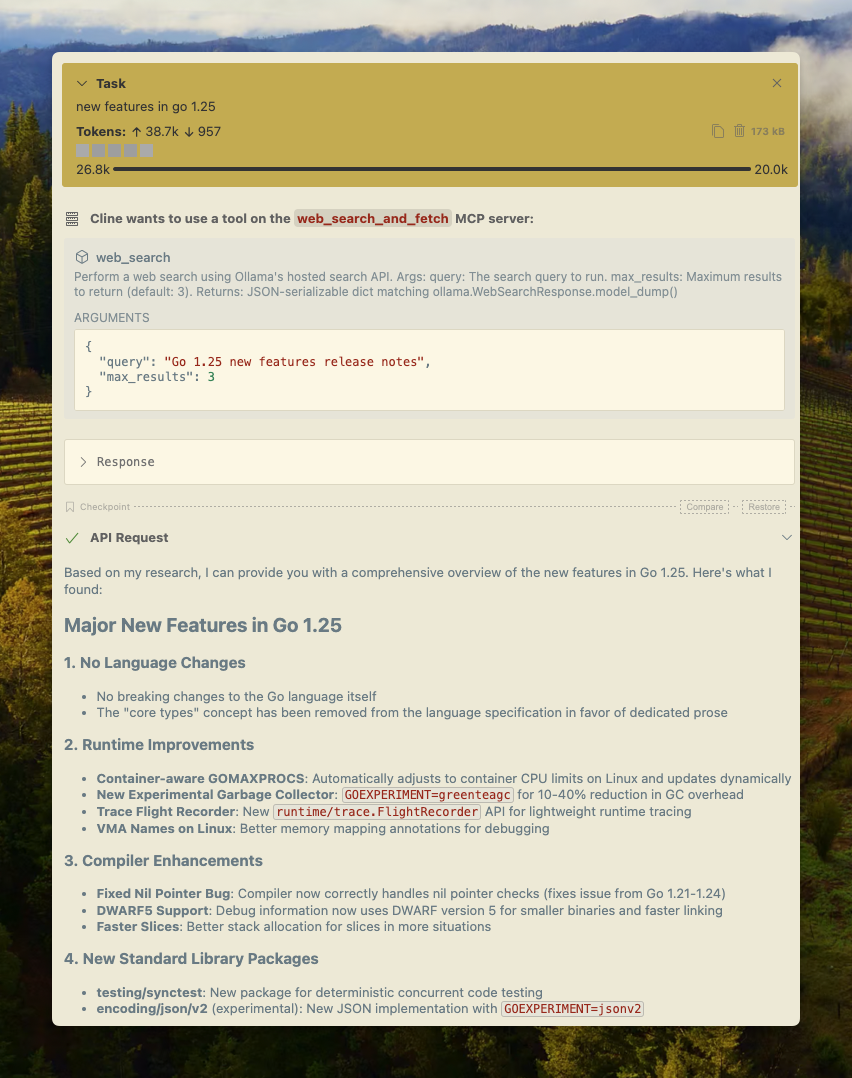
Ollama 的網頁搜尋可以透過 MCP 伺服器設定輕鬆與 Cline 整合。
管理 MCP 伺服器 > 設定 MCP 伺服器 > 新增以下設定:
json
{
  "mcpServers": {
    "web_search_and_fetch": {
      "type": "stdio",
      "command": "uv",
      "args": ["run", "path/to/web-search-mcp.py"],
      "env": { "OLLAMA_API_KEY": "your_api_key_here" }
    }
  }
}
Codex
Ollama 與 OpenAI 的 Codex 工具配合良好。
將以下設定新增至 ~/.codex/config.toml
python
[mcp_servers.web_search]
command = "uv"
args = ["run", "path/to/web-search-mcp.py"]
env = { "OLLAMA_API_KEY" = "your_api_key_here" }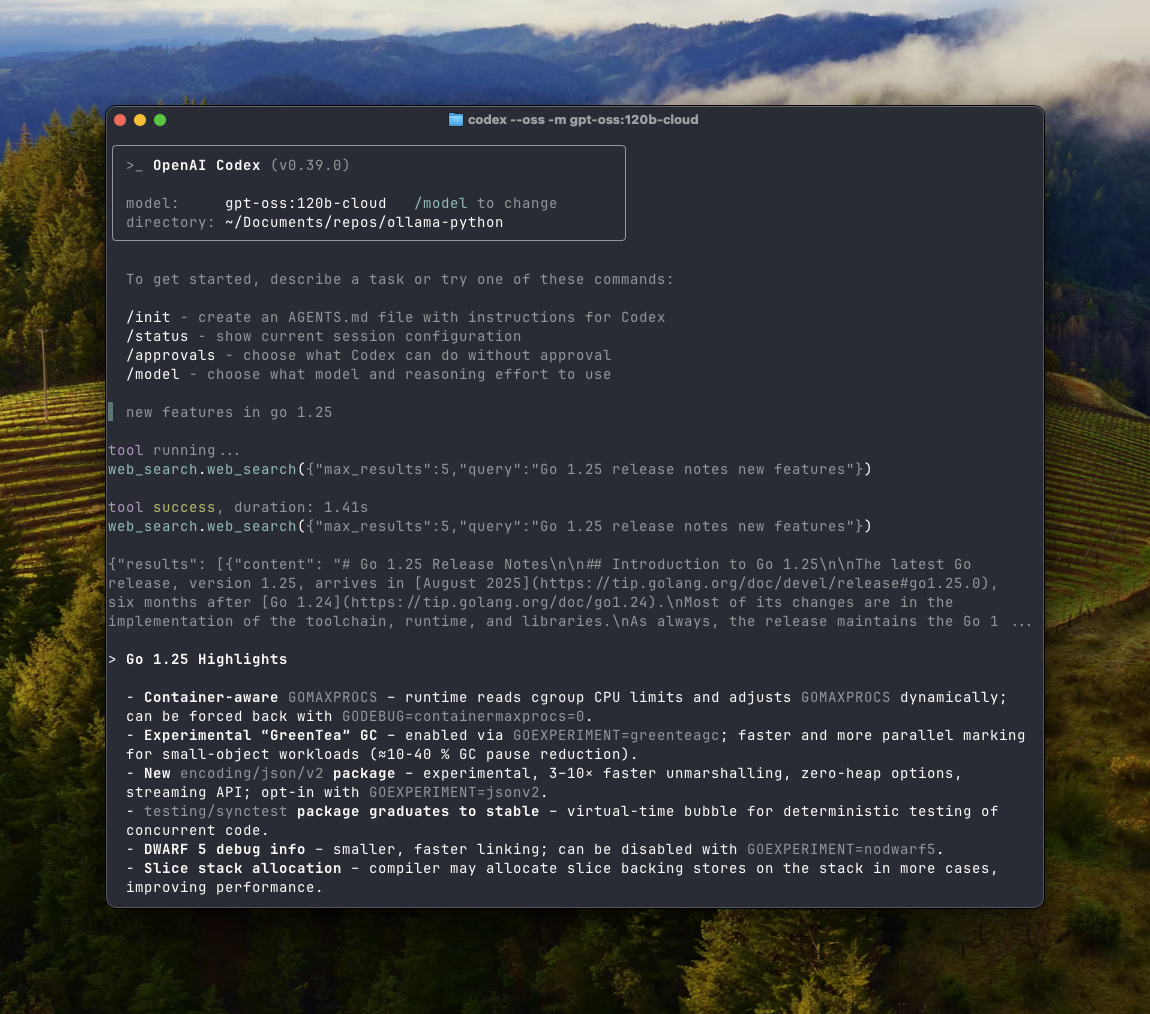
Goose
Ollama 可以透過其 MCP 功能與 Goose 整合。
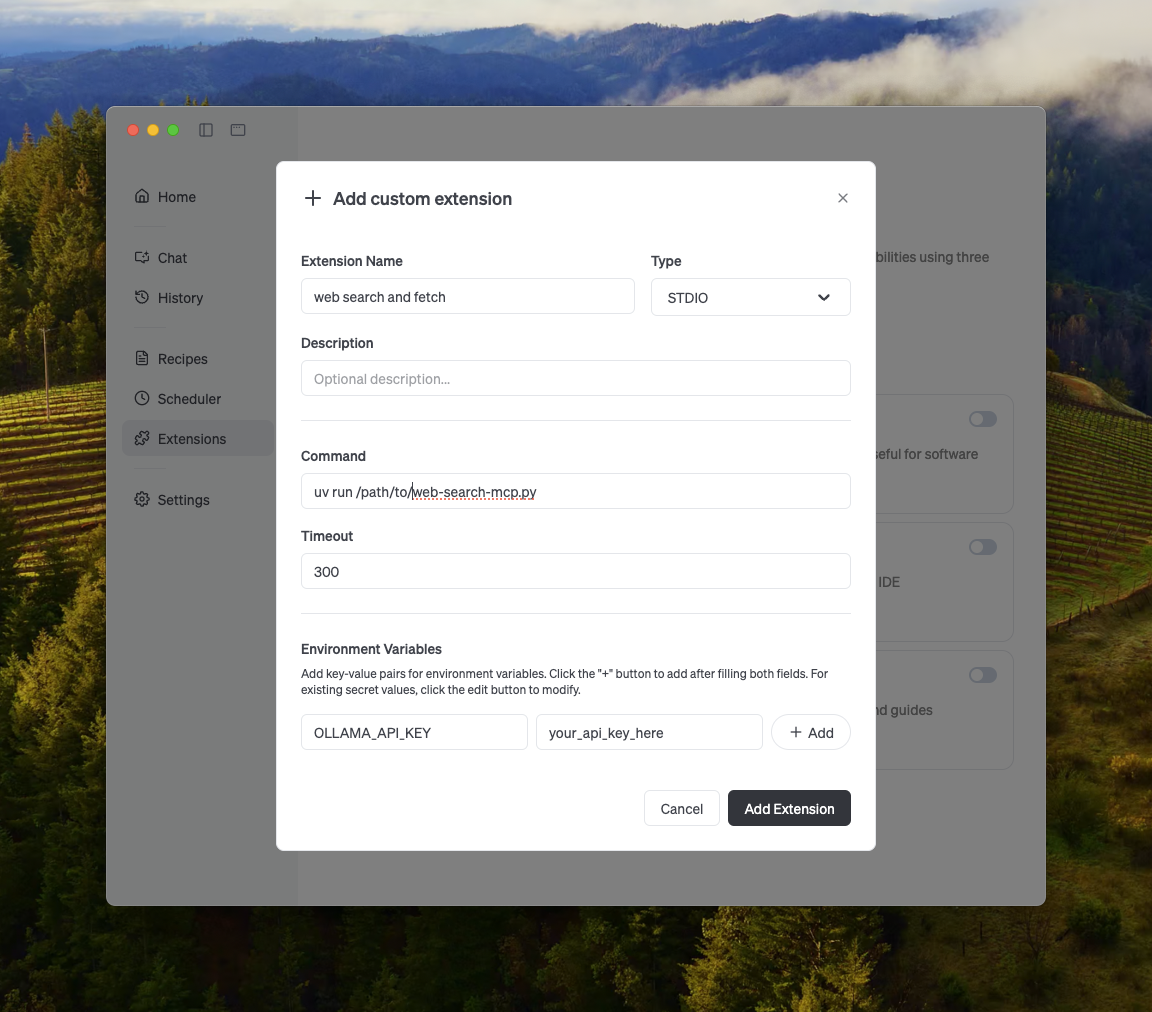
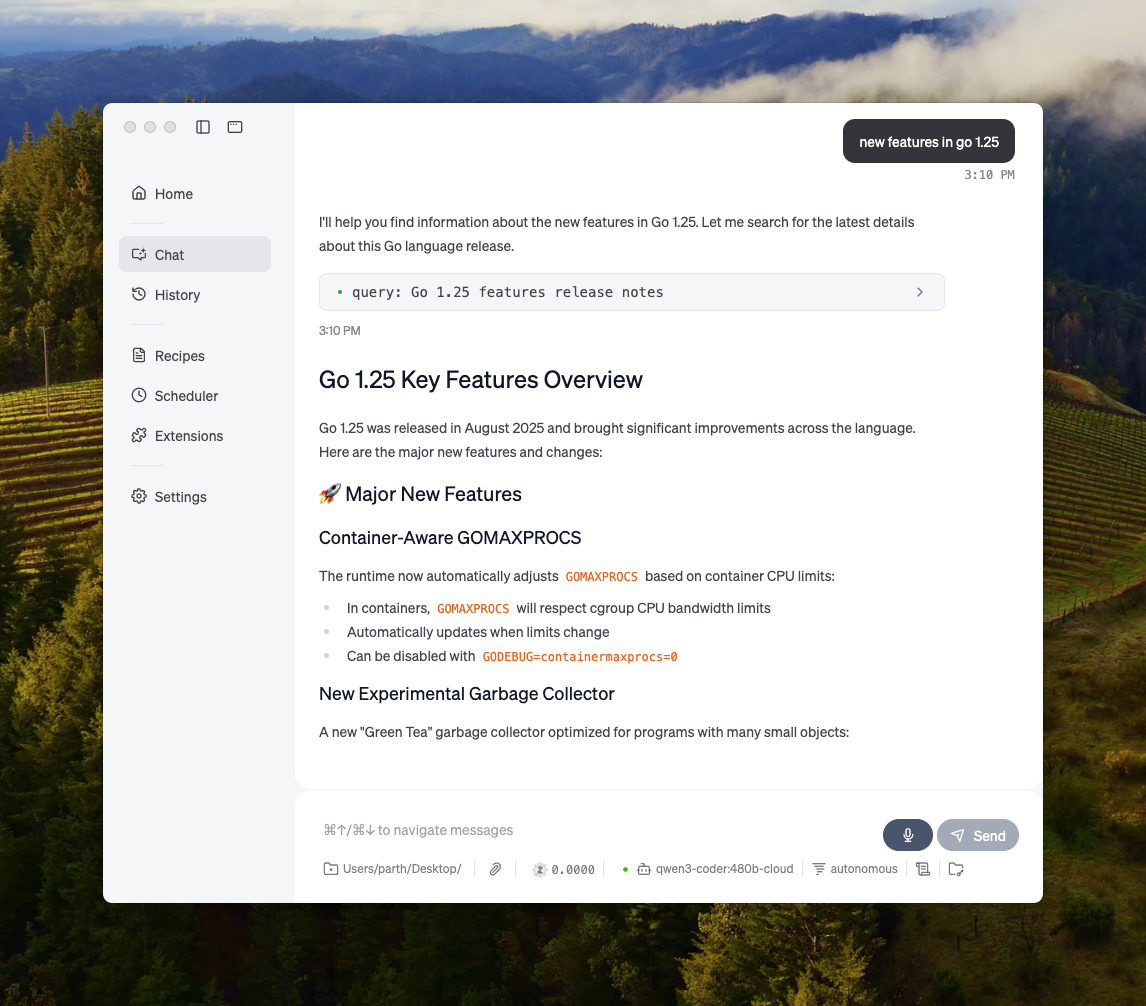
其他整合
Ollama 可以整合到大多數現有的工具中,無論是透過直接整合 Ollama 的 API、Python / JavaScript 函式庫、OpenAI 相容 API,還是 MCP 伺服器整合。