API ค้นหาบนเว็บของ Ollama สามารถใช้เพื่อเสริมสร้างโมเดลด้วยข้อมูลล่าสุดเพื่อลดการสร้างข้อมูลเท็จและปรับปรุงความแม่นยำ
ค้นหาบนเว็บถูกจัดทำให้เป็น REST API พร้อมการผสานรวมเครื่องมือที่ลึกกว่าในไลบรารี Python และ JavaScript สิ่งนี้ยังช่วยให้โมเดลอย่าง gpt-oss ของ OpenAI สามารถดำเนินการงานวิจัยที่ใช้เวลานานได้
การรับรองตัวตน
หากต้องการเข้าถึง API ค้นหาบนเว็บของ Ollama ให้สร้าง API key โดยจำเป็นต้องมีบัญชี Ollama ฟรี
API ค้นหาบนเว็บ
ดำเนินการค้นหาบนเว็บสำหรับคำค้นเดียวและส่งคืนผลลัพธ์ที่เกี่ยวข้อง
การร้องขอ
POST https://ollama.com/api/web_search
query(string, required): สตริงคำค้นmax_results(integer, optional): จำนวนผลลัพธ์สูงสุดที่จะส่งคืน (ค่าเริ่มต้น 5, สูงสุด 10)
การตอบกลับ
ส่งคืนอ็อบเจกต์ที่ประกอบด้วย:
results(array): อาร์เรย์ของอ็อบเจกต์ผลการค้นหา แต่ละรายการประกอบด้วย:title(string): ชื่อเรื่องของหน้าเว็บurl(string): URL ของหน้าเว็บcontent(string): ข้อความที่เกี่ยวข้องจากหน้าเว็บ
ตัวอย่าง
หมายเหตุ
ตรวจสอบว่า OLLAMA_API_KEY ถูกตั้งค่าแล้วหรือไม่ หรือต้องส่งผ่านส่วนหัว Authorization
การร้องขอ cURL
bash
curl https://ollama.com/api/web_search \
  --header "Authorization: Bearer $OLLAMA_API_KEY" \
	-d '{
	  "query":"what is ollama?"
	}'
การตอบกลับ
json
{
  "results": [
    {
      "title": "Ollama",
      "url": "https://ollama.com/",
      "content": "Cloud models are now available..."
    },
    {
      "title": "What is Ollama? Introduction to the AI model management tool",
      "url": "https://www.hostinger.com/tutorials/what-is-ollama",
      "content": "Ariffud M. 6min Read..."
    },
    {
      "title": "Ollama Explained: Transforming AI Accessibility and Language ...",
      "url": "https://www.geeksforgeeks.org/artificial-intelligence/ollama-explained-transforming-ai-accessibility-and-language-processing/",
      "content": "Data Science Data Science Projects Data Analysis..."
    }
  ]
}
ไลบรารี Python
python
response = ollama.web_search("What is Ollama?")
print(response)
ตัวอย่างผลลัพธ์
python
results = [
    {
        "title": "Ollama",
        "url": "https://ollama.com/",
        "content": "Cloud models are now available in Ollama..."
    },
    {
        "title": "What is Ollama? Features, Pricing, and Use Cases - Walturn",
        "url": "https://www.walturn.com/insights/what-is-ollama-features-pricing-and-use-cases",
        "content": "Our services..."
    },
    {
        "title": "Complete Ollama Guide: Installation, Usage & Code Examples",
        "url": "https://collabnix.com/complete-ollama-guide-installation-usage-code-examples",
        "content": "Join our Discord Server..."
    }
]
ตัวอย่าง Ollama เพิ่มเติม Python example
ไลบรารี JavaScript
tsx
const client = new Ollama();
const results = await client.webSearch("what is ollama?");
console.log(JSON.stringify(results, null, 2));
ตัวอย่างผลลัพธ์
json
{
  "results": [
    {
      "title": "Ollama",
      "url": "https://ollama.com/",
      "content": "Cloud models are now available..."
    },
    {
      "title": "What is Ollama? Introduction to the AI model management tool",
      "url": "https://www.hostinger.com/tutorials/what-is-ollama",
      "content": "Ollama is an open-source tool..."
    },
    {
      "title": "Ollama Explained: Transforming AI Accessibility and Language Processing",
      "url": "https://www.geeksforgeeks.org/artificial-intelligence/ollama-explained-transforming-ai-accessibility-and-language-processing/",
      "content": "Ollama is a groundbreaking..."
    }
  ]
}
ตัวอย่าง Ollama เพิ่มเติม JavaScript example
API การดึงข้อมูลหน้าเว็บ
ดึงข้อมูลหน้าเว็บเดียวตาม URL และส่งคืนเนื้อหา
การร้องขอ
POST https://ollama.com/api/web_fetch
url(string, required): URL ที่ต้องการดึงข้อมูล
การตอบกลับ
ส่งคืนอ็อบเจกต์ที่ประกอบด้วย:
title(string): ชื่อเรื่องของหน้าเว็บcontent(string): เนื้อหาหลักของหน้าเว็บlinks(array): อาร์เรย์ของลิงก์ที่พบในหน้าเว็บ
ตัวอย่าง
การร้องขอ cURL
python
curl --request POST \
  --url https://ollama.com/api/web_fetch \
  --header "Authorization: Bearer $OLLAMA_API_KEY" \
  --header 'Content-Type: application/json' \
  --data '{
      "url": "ollama.com"
  }'
การตอบกลับ
json
{
  "title": "Ollama",
  "content": "[Cloud models](https://ollama.com/blog/cloud-models) are now available in Ollama...",
  "links": [
    "http://ollama.com/",
    "http://ollama.com/models",
    "https://github.com/ollama/ollama"
  ]

}
Python SDK
python
from ollama import web_fetch

result = web_fetch('https://ollama.com')
print(result)
ผลลัพธ์
python
WebFetchResponse(
    title='Ollama',
    content='[Cloud models](https://ollama.com/blog/cloud-models) are now available in Ollama\n\n**Chat & build
with open models**\n\n[Download](https://ollama.com/download) [Explore
models](https://ollama.com/models)\n\nAvailable for macOS, Windows, and Linux',
    links=['https://ollama.com/', 'https://ollama.com/models', 'https://github.com/ollama/ollama']
)
JavaScript SDK
tsx
const client = new Ollama();
const fetchResult = await client.webFetch("https://ollama.com");
console.log(JSON.stringify(fetchResult, null, 2));
ผลลัพธ์
json
{
  "title": "Ollama",
  "content": "[Cloud models](https://ollama.com/blog/cloud-models) are now available in Ollama...",
  "links": [
    "https://ollama.com/",
    "https://ollama.com/models",
    "https://github.com/ollama/ollama"
  ]
}
การสร้าง Search Agent
ใช้ API ค้นหาบนเว็บของ Ollama เป็นเครื่องมือเพื่อสร้าง Search Agent ขนาดเล็ก
ตัวอย่างนี้ใช้โมเดล Qwen 3 ของ Alibaba ที่มีพารามิเตอร์ 4B
bash
ollama pull qwen3:4bpython
from ollama import chat, web_fetch, web_search

available_tools = {'web_search': web_search, 'web_fetch': web_fetch}

messages = [{'role': 'user', 'content': "what is ollama's new engine"}]

while True:
  response = chat(
    model='qwen3:4b',
    messages=messages,
    tools=[web_search, web_fetch],
    think=True
    )
  if response.message.thinking:
    print('Thinking: ', response.message.thinking)
  if response.message.content:
    print('Content: ', response.message.content)
  messages.append(response.message)
  if response.message.tool_calls:
    print('Tool calls: ', response.message.tool_calls)
    for tool_call in response.message.tool_calls:
      function_to_call = available_tools.get(tool_call.function.name)
      if function_to_call:
        args = tool_call.function.arguments
        result = function_to_call(**args)
        print('Result: ', str(result)[:200]+'...')
        # ผลลัพธ์ถูกตัดออกเนื่องจากจำกัดความยาว context
        messages.append({'role': 'tool', 'content': str(result)[:2000 * 4], 'tool_name': tool_call.function.name})
      else:
        messages.append({'role': 'tool', 'content': f'Tool {tool_call.function.name} not found', 'tool_name': tool_call.function.name})
  else:
    break
ผลลัพธ์
Thinking:  Okay, the user is asking about Ollama's new engine. I need to figure out what they're referring to. Ollama is a company that develops large language models, so maybe they've released a new model or an updated version of their existing engine....

Tool calls:  [ToolCall(function=Function(name='web_search', arguments={'max_results': 3, 'query': 'Ollama new engine'}))]
Result:  results=[WebSearchResult(content='# New model scheduling\n\n## September 23, 2025\n\nOllama now includes a significantly improved model scheduling system. Ahead of running a model, Ollama’s new engine

Thinking:  Okay, the user asked about Ollama's new engine. Let me look at the search results.

First result is from September 23, 2025, talking about new model scheduling. It mentions improved memory management, reduced crashes, better GPU utilization, and multi-GPU performance. Examples show speed improvements and accurate memory reporting. Supported models include gemma3, llama4, qwen3, etc...

Content:  Ollama has introduced two key updates to its engine, both released in 2025:

1. **Enhanced Model Scheduling (September 23, 2025)**
   - **Precision Memory Management**: Exact memory allocation reduces out-of-memory crashes and optimizes GPU utilization.
   - **Performance Gains**: Examples show significant speed improvements (e.g., 85.54 tokens/s vs 52.02 tokens/s) and full GPU layer utilization.
   - **Multi-GPU Support**: Improved efficiency across multiple GPUs, with accurate memory reporting via tools like `nvidia-smi`.
   - **Supported Models**: Includes `gemma3`, `llama4`, `qwen3`, `mistral-small3.2`, and more.

2. **Multimodal Engine (May 15, 2025)**
   - **Vision Support**: First-class support for vision models, including `llama4:scout` (109B parameters), `gemma3`, `qwen2.5vl`, and `mistral-small3.1`.
   - **Multimodal Tasks**: Examples include identifying animals in multiple images, answering location-based questions from videos, and document scanning.

These updates highlight Ollama's focus on efficiency, performance, and expanded capabilities for both text and vision tasks.
ความยาว Context และ Agents
ผลการค้นหาบนเว็บสามารถส่งคืนเป็นพันๆ tokens แนะนำให้เพิ่มความยาว context ของโมเดลให้อย่างน้อย ~32000 tokens Search agents ทำงานได้ดีที่สุดเมื่อใช้ความยาว context เต็ม โมเดลคลาวด์ของ Ollama รันที่ความยาว context เต็ม
เซิร์ฟเวอร์ MCP
คุณสามารถเปิดใช้งานการค้นหาบนเว็บในไคลเอนต์ MCP ใดๆ ได้ผ่าน Python MCP server
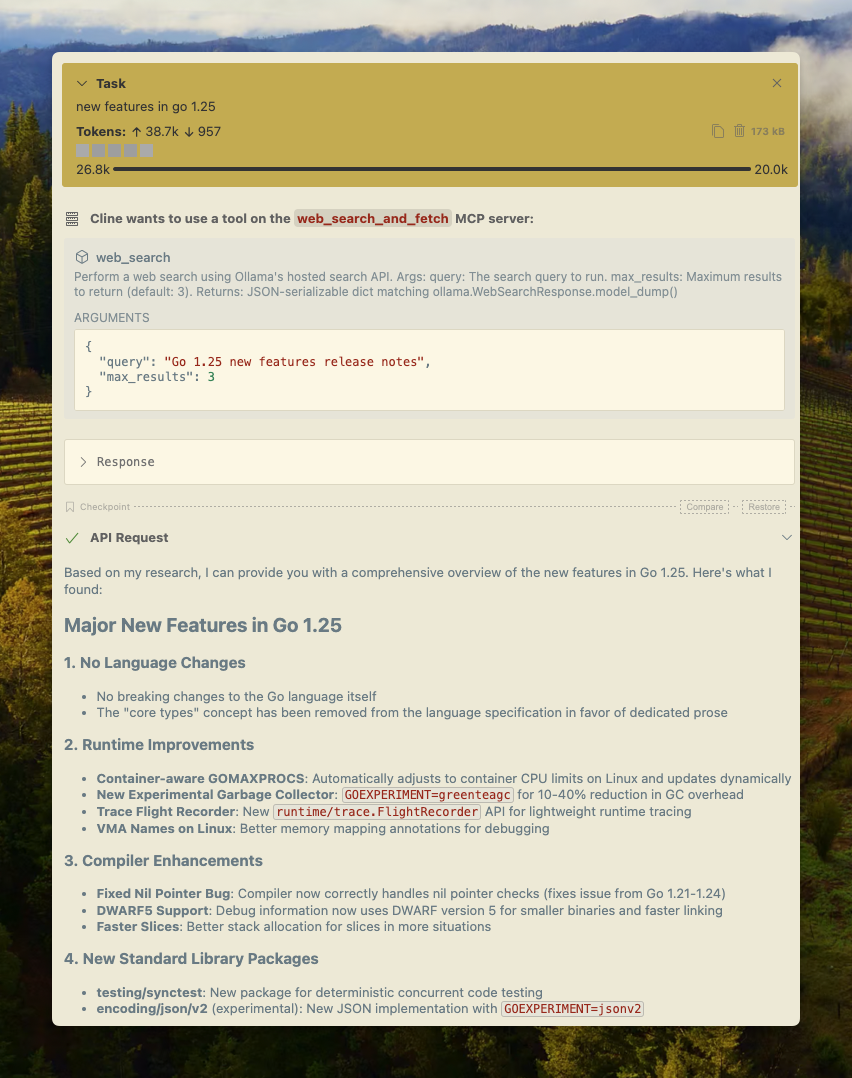
Cline
การค้นหาบนเว็บของ Ollama สามารถผสานรวมกับ Cline ได้อย่างง่ายดายโดยใช้การกำหนดค่าเซิร์ฟเวอร์ MCP
Manage MCP Servers > Configure MCP Servers > เพิ่มการกำหนดค่าต่อไปนี้:
json
{
  "mcpServers": {
    "web_search_and_fetch": {
      "type": "stdio",
      "command": "uv",
      "args": ["run", "path/to/web-search-mcp.py"],
      "env": { "OLLAMA_API_KEY": "your_api_key_here" }
    }
  }
}
Codex
Ollama ทำงานได้ดีกับเครื่องมือ Codex ของ OpenAI
เพิ่มการกำหนดค่าต่อไปนี้ใน ~/.codex/config.toml
python
[mcp_servers.web_search]
command = "uv"
args = ["run", "path/to/web-search-mcp.py"]
env = { "OLLAMA_API_KEY" = "your_api_key_here" }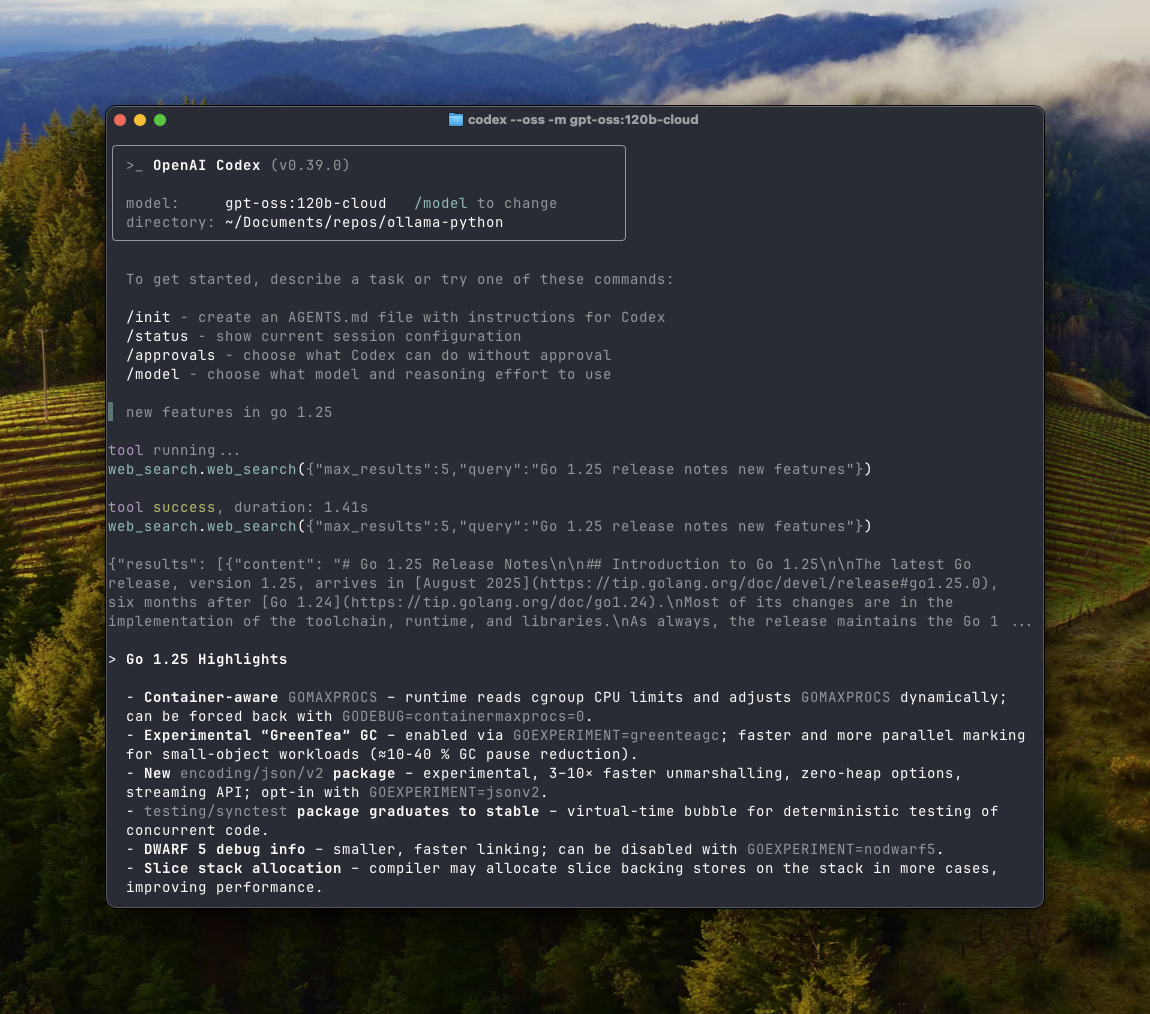
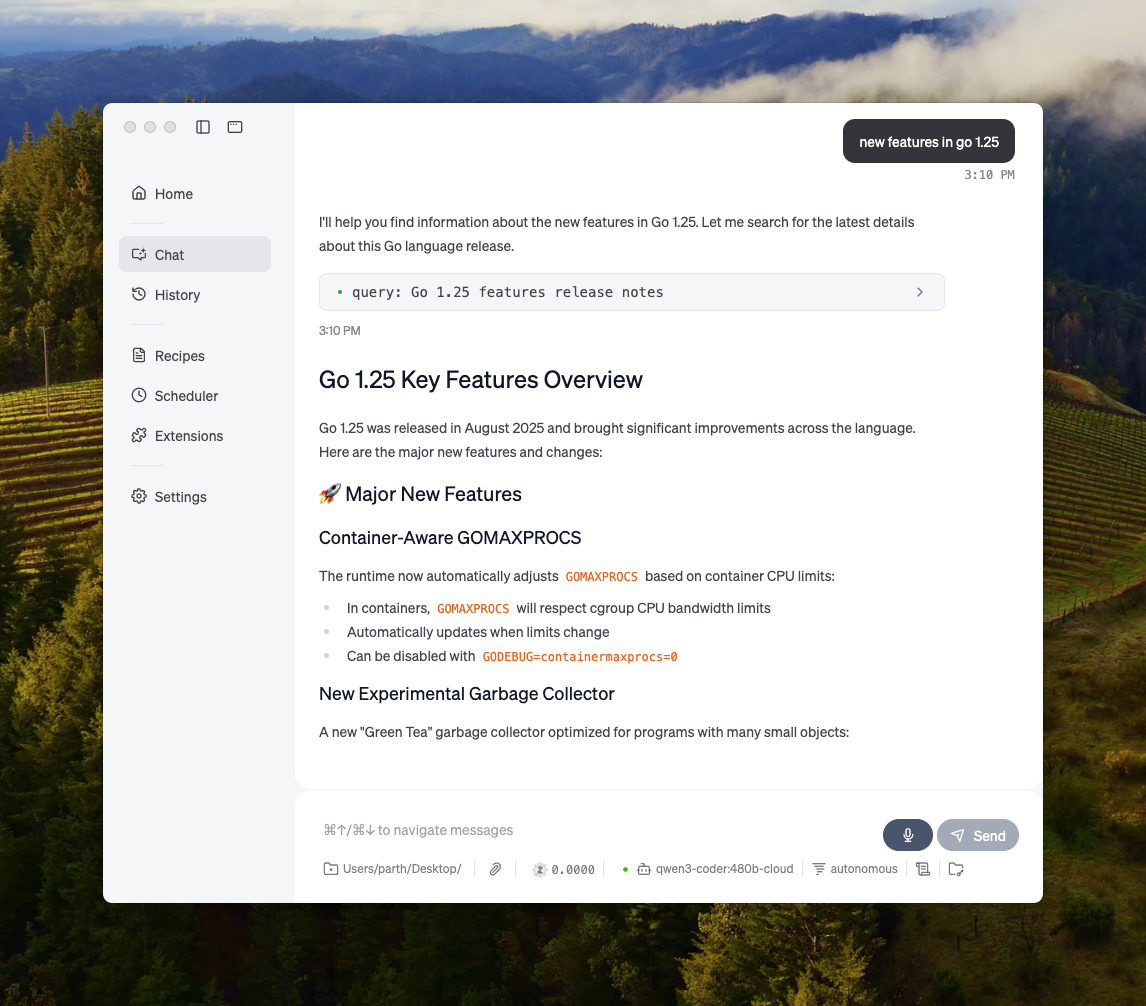
Goose
Ollama สามารถผสานรวมกับ Goose ผ่านฟีเจอร์ MCP ของมัน
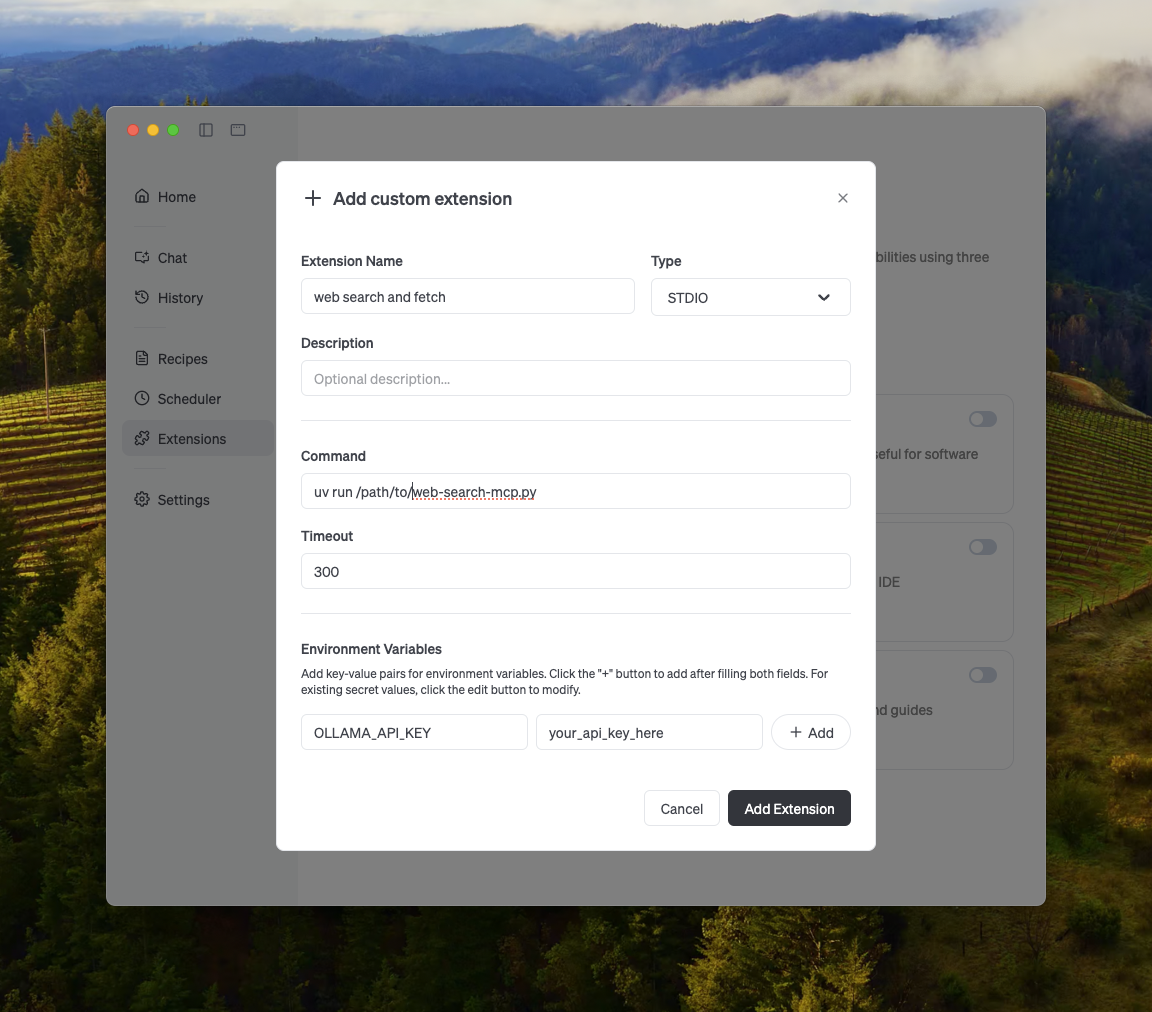
การผสานรวมอื่นๆ
Ollama สามารถผสานรวมกับเครื่องมือส่วนใหญ่ที่มีอยู่ได้ทั้งผ่านการผสานรวมโดยตรงกับ API ของ Ollama, ไลบรารี Python / JavaScript, API ที่เข้ากันได้กับ OpenAI และการผสานรวมกับเซิร์ฟเวอร์ MCP