يمكن استخدام واجهة برمجة التطبيقات للبحث على الويب من Ollama لتعزيز النماذج بأحدث المعلومات لتقليل الهلوسة وتحسين الدقة.
يتم توفير البحث على الويب كواجهة برمجة تطبيقات REST مع تكاملات أدوات أعمق في مكتبات Python و JavaScript. يتيح هذا أيضًا للنماذج مثل نماذج gpt-oss من OpenAI إجراء مهام بحث طويلة الأمد.
المصادقة
للوصول إلى واجهة برمجة التطبيقات للبحث على الويب من Ollama، قم بإنشاء مفتاح API. مطلوب حساب Ollama مجاني.
واجهة برمجة التطبيقات للبحث على الويب
يقوم بإجراء بحث على الويب لاستعلام واحد ويعيد النتائج ذات الصلة.
الطلب
POST https://ollama.com/api/web_search
query(سلسلة نصية، مطلوب): سلسلة نصية للاستعلامmax_results(عدد صحيح، اختياري): الحد الأقصى للنتائج التي سيتم إرجاعها (الافتراضي 5، الحد الأقصى 10)
الاستجابة
يعيد كائنًا يحتوي على:
results(مصفوفة): مصفوفة من كائنات نتائج البحث، كل منها يحتوي على:title(سلسلة نصية): عنوان صفحة الويبurl(سلسلة نصية): عنوان URL لصفحة الويبcontent(سلسلة نصية): مقتطف محتوى ذي صلة من صفحة الويب
الأمثلة
ملاحظة
تأكد من تعيين متغير البيئة OLLAMA_API_KEY أو يجب تمريره في رأس Authorization.
طلب cURL
bash
curl https://ollama.com/api/web_search \
  --header "Authorization: Bearer $OLLAMA_API_KEY" \
	-d '{
	  "query":"what is ollama?"
	}'
الاستجابة
json
{
  "results": [
    {
      "title": "Ollama",
      "url": "https://ollama.com/",
      "content": "Cloud models are now available..."
    },
    {
      "title": "What is Ollama? Introduction to the AI model management tool",
      "url": "https://www.hostinger.com/tutorials/what-is-ollama",
      "content": "Ariffud M. 6min Read..."
    },
    {
      "title": "Ollama Explained: Transforming AI Accessibility and Language ...",
      "url": "https://www.geeksforgeeks.org/artificial-intelligence/ollama-explained-transforming-ai-accessibility-and-language-processing/",
      "content": "Data Science Data Science Projects Data Analysis..."
    }
  ]
}
مكتبة Python
python
response = ollama.web_search("What is Ollama?")
print(response)
مثال على المخرجات
python
results = [
    {
        "title": "Ollama",
        "url": "https://ollama.com/",
        "content": "Cloud models are now available in Ollama..."
    },
    {
        "title": "What is Ollama? Features, Pricing, and Use Cases - Walturn",
        "url": "https://www.walturn.com/insights/what-is-ollama-features-pricing-and-use-cases",
        "content": "Our services..."
    },
    {
        "title": "Complete Ollama Guide: Installation, Usage & Code Examples",
        "url": "https://collabnix.com/complete-ollama-guide-installation-usage-code-examples",
        "content": "Join our Discord Server..."
    }
]
المزيد من الأمثلة من Ollama Python example
مكتبة JavaScript
tsx
const client = new Ollama();
const results = await client.webSearch("what is ollama?");
console.log(JSON.stringify(results, null, 2));
مثال على المخرجات
json
{
  "results": [
    {
      "title": "Ollama",
      "url": "https://ollama.com/",
      "content": "Cloud models are now available..."
    },
    {
      "title": "What is Ollama? Introduction to the AI model management tool",
      "url": "https://www.hostinger.com/tutorials/what-is-ollama",
      "content": "Ollama is an open-source tool..."
    },
    {
      "title": "Ollama Explained: Transforming AI Accessibility and Language Processing",
      "url": "https://www.geeksforgeeks.org/artificial-intelligence/ollama-explained-transforming-ai-accessibility-and-language-processing/",
      "content": "Ollama is a groundbreaking..."
    }
  ]
}
المزيد من الأمثلة من Ollama JavaScript example
واجهة برمجة التطبيقات لجلب الويب
يقوم بجلب صفحة ويب واحدة باستخدام عنوان URL ويعيد محتواها.
الطلب
POST https://ollama.com/api/web_fetch
url(سلسلة نصية، مطلوب): عنوان URL المراد جلب محتواه
الاستجابة
يعيد كائنًا يحتوي على:
title(سلسلة نصية): عنوان صفحة الويبcontent(سلسلة نصية): المحتوى الرئيسي لصفحة الويبlinks(مصفوفة): مصفوفة من الروابط الموجودة على الصفحة
الأمثلة
طلب cURL
python
curl --request POST \
  --url https://ollama.com/api/web_fetch \
  --header "Authorization: Bearer $OLLAMA_API_KEY" \
  --header 'Content-Type: application/json' \
  --data '{
      "url": "ollama.com"
  }'
الاستجابة
json
{
  "title": "Ollama",
  "content": "[Cloud models](https://ollama.com/blog/cloud-models) are now available in Ollama...",
  "links": [
    "http://ollama.com/",
    "http://ollama.com/models",
    "https://github.com/ollama/ollama"
  ]

}
SDK لـ Python
python
from ollama import web_fetch

result = web_fetch('https://ollama.com')
print(result)
النتيجة
python
WebFetchResponse(
    title='Ollama',
    content='[Cloud models](https://ollama.com/blog/cloud-models) are now available in Ollama\n\n**Chat & build
with open models**\n\n[Download](https://ollama.com/download) [Explore
models](https://ollama.com/models)\n\nAvailable for macOS, Windows, and Linux',
    links=['https://ollama.com/', 'https://ollama.com/models', 'https://github.com/ollama/ollama']
)
SDK لـ JavaScript
tsx
const client = new Ollama();
const fetchResult = await client.webFetch("https://ollama.com");
console.log(JSON.stringify(fetchResult, null, 2));
النتيجة
json
{
  "title": "Ollama",
  "content": "[Cloud models](https://ollama.com/blog/cloud-models) are now available in Ollama...",
  "links": [
    "https://ollama.com/",
    "https://ollama.com/models",
    "https://github.com/ollama/ollama"
  ]
}
بناء وكيل بحث
استخدم واجهة برمجة التطبيقات للبحث على الويب من Ollama كأداة لبناء وكيل بحث مصغر.
يستخدم هذا المثال نموذج Qwen 3 من Alibaba مع 4B معامل.
bash
ollama pull qwen3:4bpython
from ollama import chat, web_fetch, web_search

available_tools = {'web_search': web_search, 'web_fetch': web_fetch}

messages = [{'role': 'user', 'content': "what is ollama's new engine"}]

while True:
  response = chat(
    model='qwen3:4b',
    messages=messages,
    tools=[web_search, web_fetch],
    think=True
    )
  if response.message.thinking:
    print('Thinking: ', response.message.thinking)
  if response.message.content:
    print('Content: ', response.message.content)
  messages.append(response.message)
  if response.message.tool_calls:
    print('Tool calls: ', response.message.tool_calls)
    for tool_call in response.message.tool_calls:
      function_to_call = available_tools.get(tool_call.function.name)
      if function_to_call:
        args = tool_call.function.arguments
        result = function_to_call(**args)
        print('Result: ', str(result)[:200]+'...')
        # تم اقتطاع النتيجة بسبب أطوال السياق المحدودة
        messages.append({'role': 'tool', 'content': str(result)[:2000 * 4], 'tool_name': tool_call.function.name})
      else:
        messages.append({'role': 'tool', 'content': f'Tool {tool_call.function.name} not found', 'tool_name': tool_call.function.name})
  else:
    break
النتيجة
Thinking:  Okay, the user is asking about Ollama's new engine. I need to figure out what they're referring to. Ollama is a company that develops large language models, so maybe they've released a new model or an updated version of their existing engine....

Tool calls:  [ToolCall(function=Function(name='web_search', arguments={'max_results': 3, 'query': 'Ollama new engine'}))]
Result:  results=[WebSearchResult(content='# New model scheduling\n\n## September 23, 2025\n\nOllama now includes a significantly improved model scheduling system. Ahead of running a model, Ollama’s new engine

Thinking:  Okay, the user asked about Ollama's new engine. Let me look at the search results.

First result is from September 23, 2025, talking about new model scheduling. It mentions improved memory management, reduced crashes, better GPU utilization, and multi-GPU performance. Examples show speed improvements and accurate memory reporting. Supported models include gemma3, llama4, qwen3, etc...

Content:  Ollama has introduced two key updates to its engine, both released in 2025:

1. **Enhanced Model Scheduling (September 23, 2025)**
   - **Precision Memory Management**: Exact memory allocation reduces out-of-memory crashes and optimizes GPU utilization.
   - **Performance Gains**: Examples show significant speed improvements (e.g., 85.54 tokens/s vs 52.02 tokens/s) and full GPU layer utilization.
   - **Multi-GPU Support**: Improved efficiency across multiple GPUs, with accurate memory reporting via tools like `nvidia-smi`.
   - **Supported Models**: Includes `gemma3`, `llama4`, `qwen3`, `mistral-small3.2`, and more.

2. **Multimodal Engine (May 15, 2025)**
   - **Vision Support**: First-class support for vision models, including `llama4:scout` (109B parameters), `gemma3`, `qwen2.5vl`, and `mistral-small3.1`.
   - **Multimodal Tasks**: Examples include identifying animals in multiple images, answering location-based questions from videos, and document scanning.

These updates highlight Ollama's focus on efficiency, performance, and expanded capabilities for both text and vision tasks.
طول السياق والوكلاء
يمكن أن تعيد نتائج البحث على الويب آلاف الرموز. يوصى بزيادة طول سياق النموذج إلى ما لا يقل عن ~32000 رمزًا. تعمل وكلاء البحث بشكل أفضل مع طول سياق كامل. تعمل نماذج Ollama السحابية بطول سياق كامل.
خادم MCP
يمكنك تفعيل البحث على الويب في أي عميل MCP من خلال خادم MCP لـ Python.
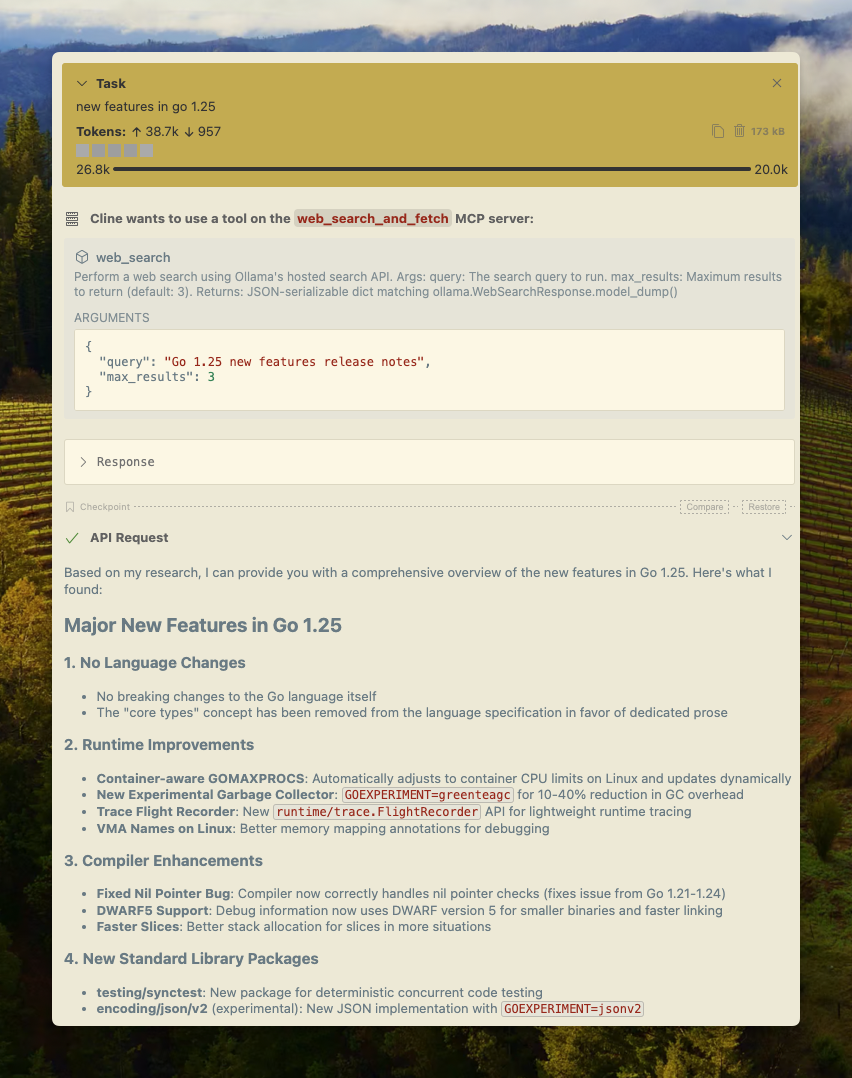
Cline
يمكن دمج البحث على الويب من Ollama مع Cline بسهولة باستخدام تكوين خادم MCP.
إدارة خوادم MCP > تكوين خوادم MCP > أضف التكوين التالي:
json
{
  "mcpServers": {
    "web_search_and_fetch": {
      "type": "stdio",
      "command": "uv",
      "args": ["run", "path/to/web-search-mcp.py"],
      "env": { "OLLAMA_API_KEY": "your_api_key_here" }
    }
  }
}
Codex
يعمل Ollama بشكل جيد مع أداة Codex من OpenAI.
أضف التكوين التالي إلى ~/.codex/config.toml
python
[mcp_servers.web_search]
command = "uv"
args = ["run", "path/to/web-search-mcp.py"]
env = { "OLLAMA_API_KEY" = "your_api_key_here" }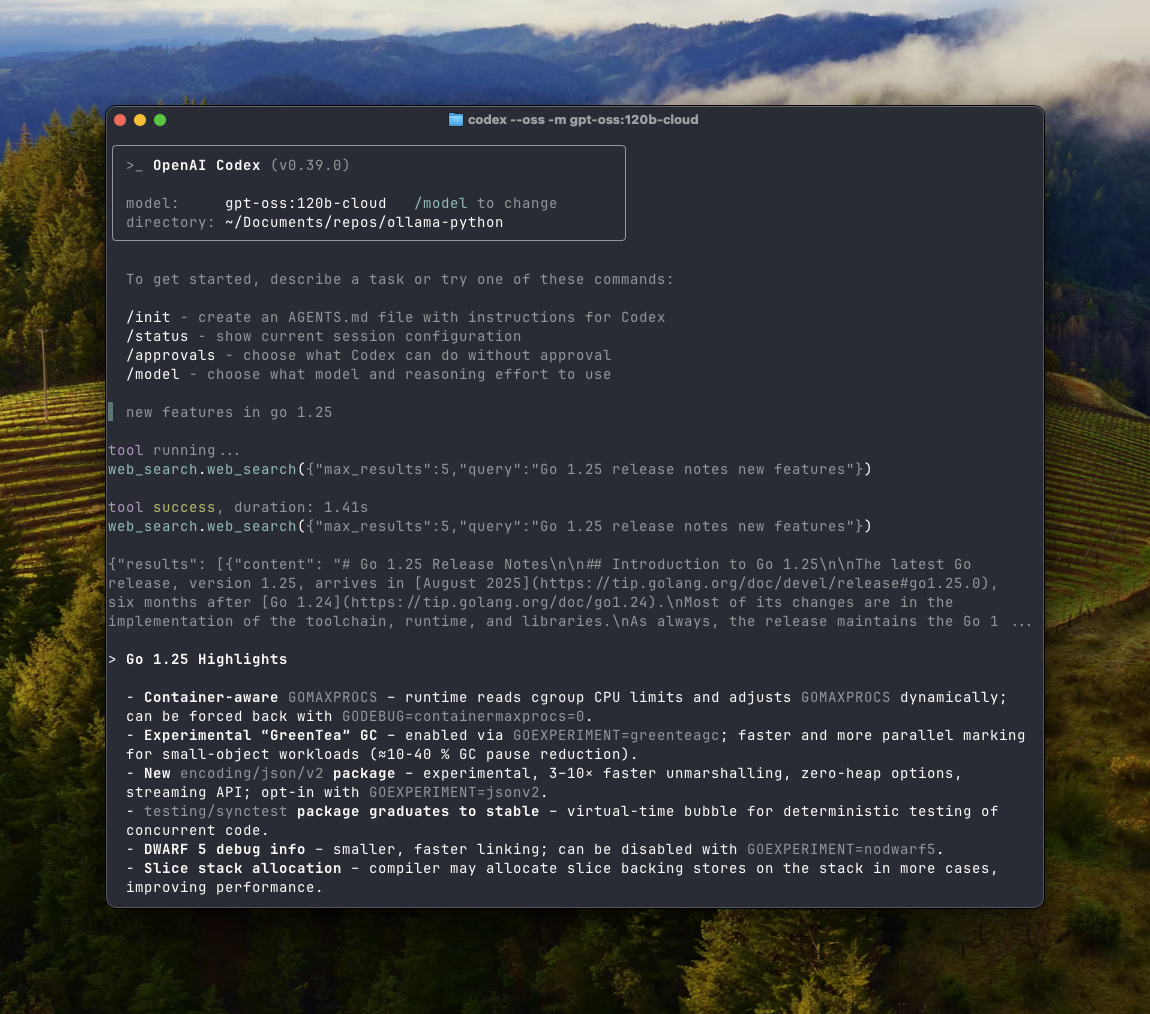
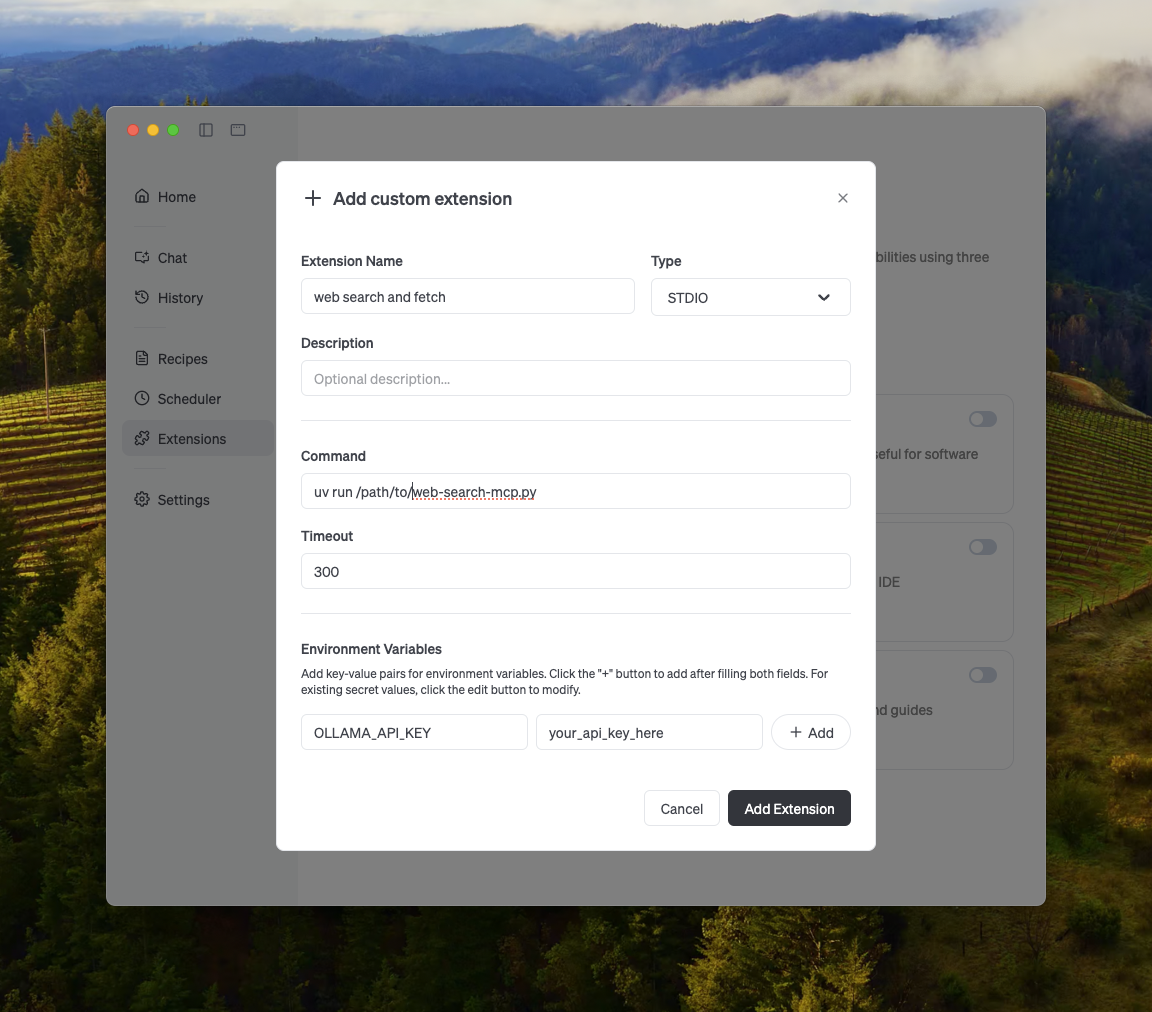
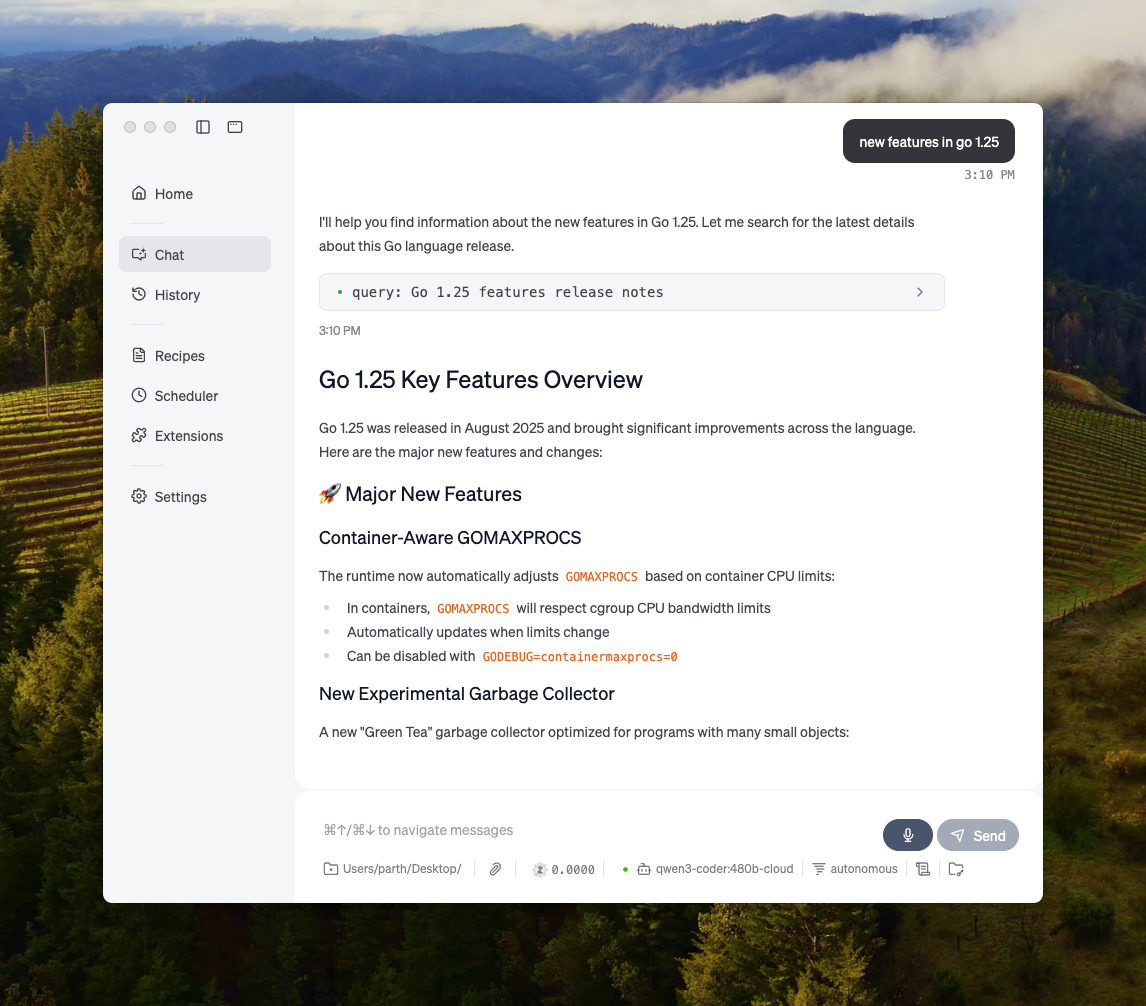
Goose
يمكن لـ Ollama التكامل مع Goose عبر ميزة MCP الخاصة به.
تكاملات أخرى
يمكن دمج Ollama في معظم الأدوات المتاحة إما من خلال التكامل المباشر لواجهة برمجة التطبيقات الخاصة بـ Ollama، أو مكتبات Python / JavaScript، أو واجهة برمجة التطبيقات المتوافقة مع OpenAI، أو تكامل خادم MCP.