API tìm kiếm web của Ollama có thể được sử dụng để bổ sung thông tin mới nhất cho các mô hình, nhằm giảm ảo giác và cải thiện độ chính xác.
Tính năng tìm kiếm web được cung cấp dưới dạng REST API với tích hợp công cụ sâu hơn trong các thư viện Python và JavaScript. Điều này cũng cho phép các mô hình như gpt-oss của OpenAI thực hiện các tác vụ nghiên cứu kéo dài.
Xác thực
Để truy cập API tìm kiếm web của Ollama, hãy tạo một khóa API. Cần có tài khoản Ollama miễn phí.
API tìm kiếm web
Thực hiện tìm kiếm web cho một truy vấn duy nhất và trả về các kết quả liên quan.
Yêu cầu
POST https://ollama.com/api/web_search
query(string, bắt buộc): chuỗi truy vấn tìm kiếmmax_results(integer, tùy chọn): số kết quả tối đa trả về (mặc định 5, tối đa 10)
Phản hồi
Trả về một đối tượng chứa:
results(array): mảng các đối tượng kết quả tìm kiếm, mỗi đối tượng chứa:title(string): tiêu đề của trang weburl(string): URL của trang webcontent(string): đoạn nội dung liên quan từ trang web
Ví dụ
Lưu ý
Đảm bảo OLLAMA_API_KEY đã được đặt hoặc phải được truyền trong tiêu đề Authorization.
Yêu cầu cURL
bash
curl https://ollama.com/api/web_search \
  --header "Authorization: Bearer $OLLAMA_API_KEY" \
	-d '{
	  "query":"what is ollama?"
	}'
Phản hồi
json
{
  "results": [
    {
      "title": "Ollama",
      "url": "https://ollama.com/",
      "content": "Cloud models are now available..."
    },
    {
      "title": "What is Ollama? Introduction to the AI model management tool",
      "url": "https://www.hostinger.com/tutorials/what-is-ollama",
      "content": "Ariffud M. 6min Read..."
    },
    {
      "title": "Ollama Explained: Transforming AI Accessibility and Language ...",
      "url": "https://www.geeksforgeeks.org/artificial-intelligence/ollama-explained-transforming-ai-accessibility-and-language-processing/",
      "content": "Data Science Data Science Projects Data Analysis..."
    }
  ]
}
Thư viện Python
python
response = ollama.web_search("What is Ollama?")
print(response)
Ví dụ đầu ra
python
results = [
    {
        "title": "Ollama",
        "url": "https://ollama.com/",
        "content": "Cloud models are now available in Ollama..."
    },
    {
        "title": "What is Ollama? Features, Pricing, and Use Cases - Walturn",
        "url": "https://www.walturn.com/insights/what-is-ollama-features-pricing-and-use-cases",
        "content": "Our services..."
    },
    {
        "title": "Complete Ollama Guide: Installation, Usage & Code Examples",
        "url": "https://collabnix.com/complete-ollama-guide-installation-usage-code-examples",
        "content": "Join our Discord Server..."
    }
]
Thêm ví dụ Python của Ollama
Thư viện JavaScript
tsx
const client = new Ollama();
const results = await client.webSearch("what is ollama?");
console.log(JSON.stringify(results, null, 2));
Ví dụ đầu ra
json
{
  "results": [
    {
      "title": "Ollama",
      "url": "https://ollama.com/",
      "content": "Cloud models are now available..."
    },
    {
      "title": "What is Ollama? Introduction to the AI model management tool",
      "url": "https://www.hostinger.com/tutorials/what-is-ollama",
      "content": "Ollama is an open-source tool..."
    },
    {
      "title": "Ollama Explained: Transforming AI Accessibility and Language Processing",
      "url": "https://www.geeksforgeeks.org/artificial-intelligence/ollama-explained-transforming-ai-accessibility-and-language-processing/",
      "content": "Ollama is a groundbreaking..."
    }
  ]
}
Thêm ví dụ JavaScript của Ollama
API lấy nội dung web
Lấy nội dung của một trang web đơn lẻ bằng URL và trả về nội dung của nó.
Yêu cầu
POST https://ollama.com/api/web_fetch
url(string, bắt buộc): URL cần lấy
Phản hồi
Trả về một đối tượng chứa:
title(string): tiêu đề của trang webcontent(string): nội dung chính của trang weblinks(array): mảng các liên kết được tìm thấy trên trang
Ví dụ
Yêu cầu cURL
python
curl --request POST \
  --url https://ollama.com/api/web_fetch \
  --header "Authorization: Bearer $OLLAMA_API_KEY" \
  --header 'Content-Type: application/json' \
  --data '{
      "url": "ollama.com"
  }'
Phản hồi
json
{
  "title": "Ollama",
  "content": "[Cloud models](https://ollama.com/blog/cloud-models) are now available in Ollama...",
  "links": [
    "http://ollama.com/",
    "http://ollama.com/models",
    "https://github.com/ollama/ollama"
  ]
SDK Python
python
from ollama import web_fetch

result = web_fetch('https://ollama.com')
print(result)
Kết quả
python
WebFetchResponse(
    title='Ollama',
    content='[Cloud models](https://ollama.com/blog/cloud-models) are now available in Ollama\n\n**Chat & build
with open models**\n\n[Download](https://ollama.com/download) [Explore
models](https://ollama.com/models)\n\nAvailable for macOS, Windows, and Linux',
    links=['https://ollama.com/', 'https://ollama.com/models', 'https://github.com/ollama/ollama']
)
SDK JavaScript
tsx
const client = new Ollama();
const fetchResult = await client.webFetch("https://ollama.com");
console.log(JSON.stringify(fetchResult, null, 2));
Kết quả
json
{
  "title": "Ollama",
  "content": "[Cloud models](https://ollama.com/blog/cloud-models) are now available in Ollama...",
  "links": [
    "https://ollama.com/",
    "https://ollama.com/models",
    "https://github.com/ollama/ollama"
  ]
}
Xây dựng tác nhân tìm kiếm
Sử dụng API tìm kiếm web của Ollama như một công cụ để xây dựng một tác nhân tìm kiếm thu nhỏ.
Ví dụ này sử dụng mô hình Qwen 3 của Alibaba với 4B tham số.
bash
ollama pull qwen3:4bpython
from ollama import chat, web_fetch, web_search

available_tools = {'web_search': web_search, 'web_fetch': web_fetch}

messages = [{'role': 'user', 'content': "what is ollama's new engine"}]

while True:
  response = chat(
    model='qwen3:4b',
    messages=messages,
    tools=[web_search, web_fetch],
    think=True
    )
  if response.message.thinking:
    print('Thinking: ', response.message.thinking)
  if response.message.content:
    print('Content: ', response.message.content)
  messages.append(response.message)
  if response.message.tool_calls:
    print('Tool calls: ', response.message.tool_calls)
    for tool_call in response.message.tool_calls:
      function_to_call = available_tools.get(tool_call.function.name)
      if function_to_call:
        args = tool_call.function.arguments
        result = function_to_call(**args)
        print('Result: ', str(result)[:200]+'...')
        # Kết quả bị cắt ngắn do giới hạn độ dài ngữ cảnh
        messages.append({'role': 'tool', 'content': str(result)[:2000 * 4], 'tool_name': tool_call.function.name})
      else:
        messages.append({'role': 'tool', 'content': f'Tool {tool_call.function.name} not found', 'tool_name': tool_call.function.name})
  else:
    break
Kết quả
Thinking:  Okay, the user is asking about Ollama's new engine. I need to figure out what they're referring to. Ollama is a company that develops large language models, so maybe they've released a new model or an updated version of their existing engine....

Tool calls:  [ToolCall(function=Function(name='web_search', arguments={'max_results': 3, 'query': 'Ollama new engine'}))]
Result:  results=[WebSearchResult(content='# New model scheduling\n\n## September 23, 2025\n\nOllama now includes a significantly improved model scheduling system. Ahead of running a model, Ollama’s new engine

Thinking:  Okay, the user asked about Ollama's new engine. Let me look at the search results.

First result is from September 23, 2025, talking about new model scheduling. It mentions improved memory management, reduced crashes, better GPU utilization, and multi-GPU performance. Examples show speed improvements and accurate memory reporting. Supported models include gemma3, llama4, qwen3, etc...

Content:  Ollama has introduced two key updates to its engine, both released in 2025:

1. **Enhanced Model Scheduling (September 23, 2025)**
   - **Precision Memory Management**: Exact memory allocation reduces out-of-memory crashes and optimizes GPU utilization.
   - **Performance Gains**: Examples show significant speed improvements (e.g., 85.54 tokens/s vs 52.02 tokens/s) and full GPU layer utilization.
   - **Multi-GPU Support**: Improved efficiency across multiple GPUs, with accurate memory reporting via tools like `nvidia-smi`.
   - **Supported Models**: Includes `gemma3`, `llama4`, `qwen3`, `mistral-small3.2`, and more.

2. **Multimodal Engine (May 15, 2025)**
   - **Vision Support**: First-class support for vision models, including `llama4:scout` (109B parameters), `gemma3`, `qwen2.5vl`, and `mistral-small3.1`.
   - **Multimodal Tasks**: Examples include identifying animals in multiple images, answering location-based questions from videos, and document scanning.

These updates highlight Ollama's focus on efficiency, performance, and expanded capabilities for both text and vision tasks.
Độ dài ngữ cảnh và tác nhân
Kết quả tìm kiếm web có thể trả về hàng nghìn token. Khuyến nghị tăng độ dài ngữ cảnh của mô hình lên ít nhất ~32000 token. Các tác nhân tìm kiếm hoạt động tốt nhất với độ dài ngữ cảnh đầy đủ. Các mô hình đám mây của Ollama chạy với độ dài ngữ cảnh đầy đủ.
Máy chủ MCP
Bạn có thể bật tính năng tìm kiếm web trong bất kỳ máy khách MCP nào thông qua máy chủ MCP Python.
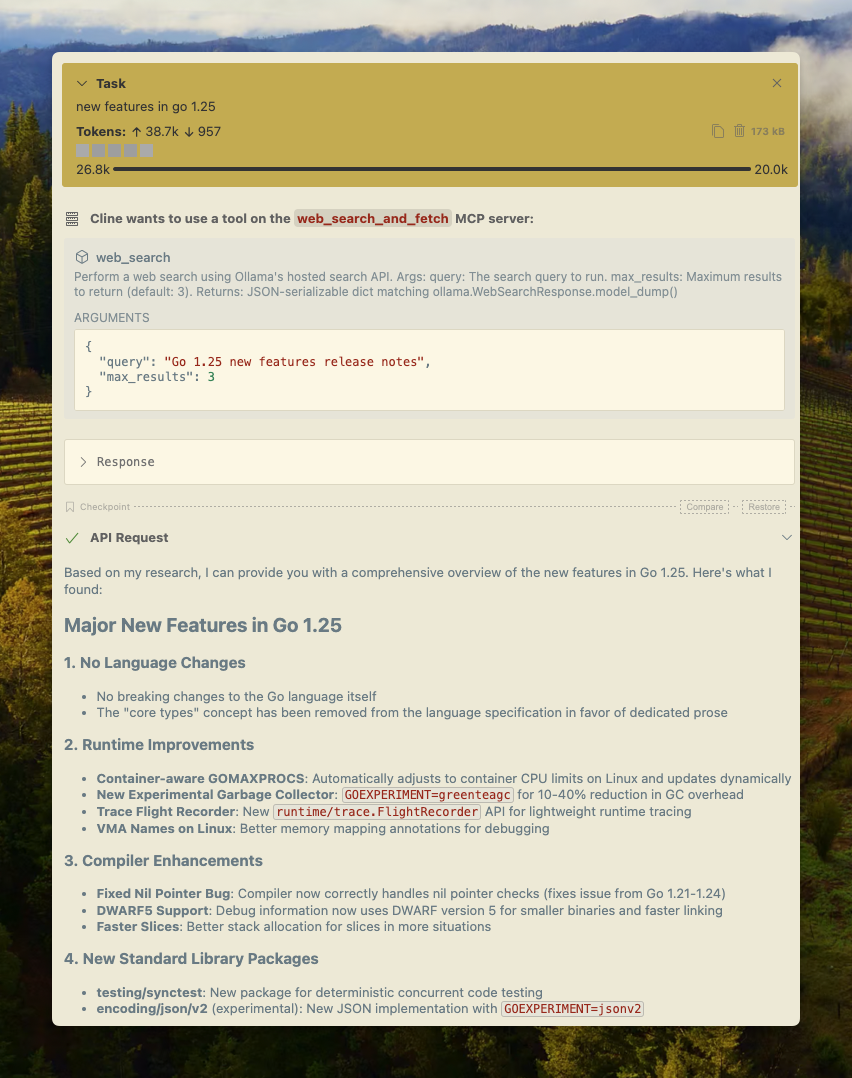
Cline
Tính năng tìm kiếm web của Ollama có thể được tích hợp với Cline một cách dễ dàng bằng cách sử dụng cấu hình máy chủ MCP.
Quản lý máy chủ MCP > Cấu hình máy chủ MCP > Thêm cấu hình sau:
json
{
  "mcpServers": {
    "web_search_and_fetch": {
      "type": "stdio",
      "command": "uv",
      "args": ["run", "path/to/web-search-mcp.py"],
      "env": { "OLLAMA_API_KEY": "your_api_key_here" }
    }
  }
}
Codex
Ollama hoạt động tốt với công cụ Codex của OpenAI.
Thêm cấu hình sau vào ~/.codex/config.toml
python
[mcp_servers.web_search]
command = "uv"
args = ["run", "path/to/web-search-mcp.py"]
env = { "OLLAMA_API_KEY" = "your_api_key_here" }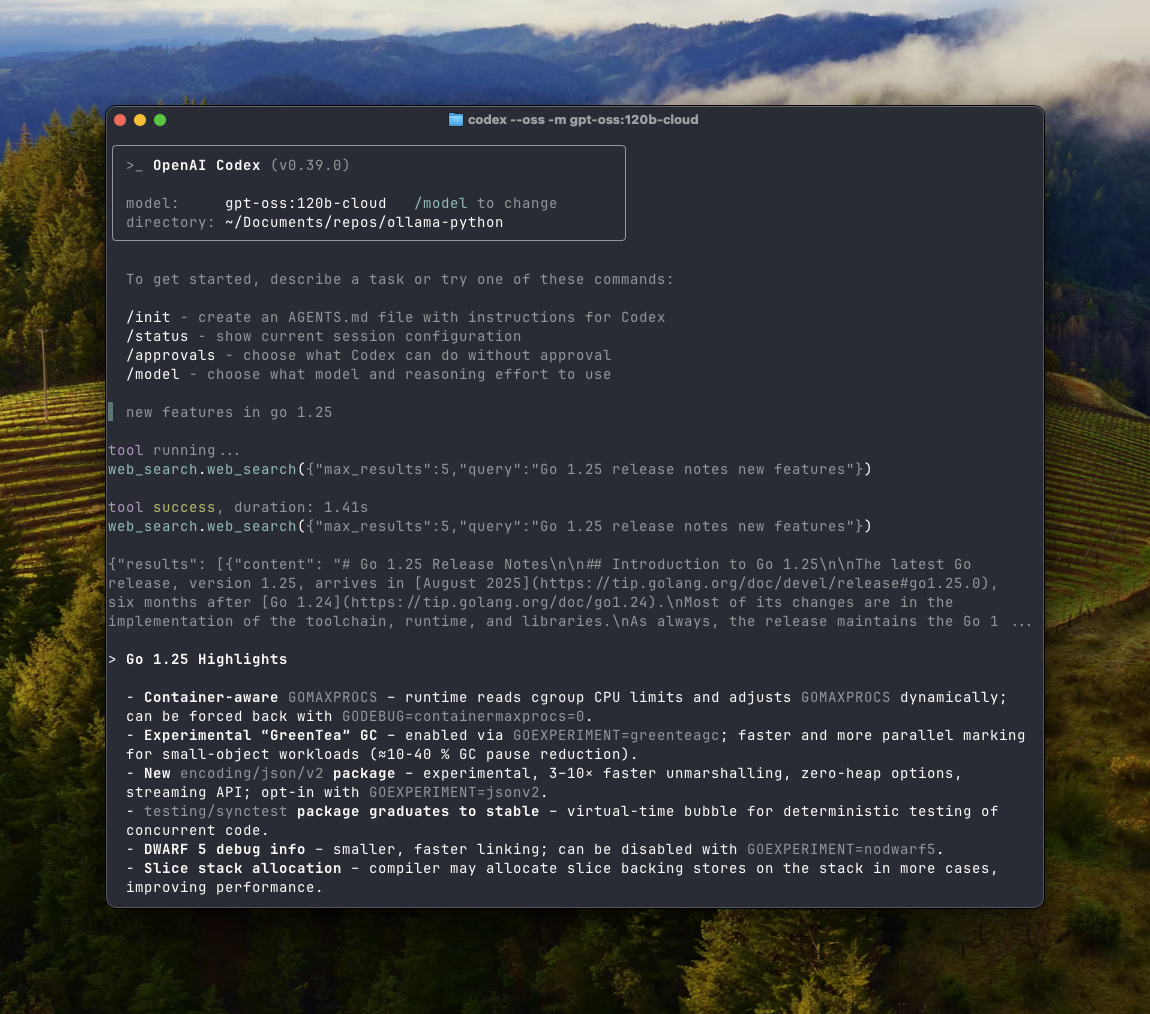
Goose
Ollama có thể tích hợp với Goose thông qua tính năng MCP của nó.
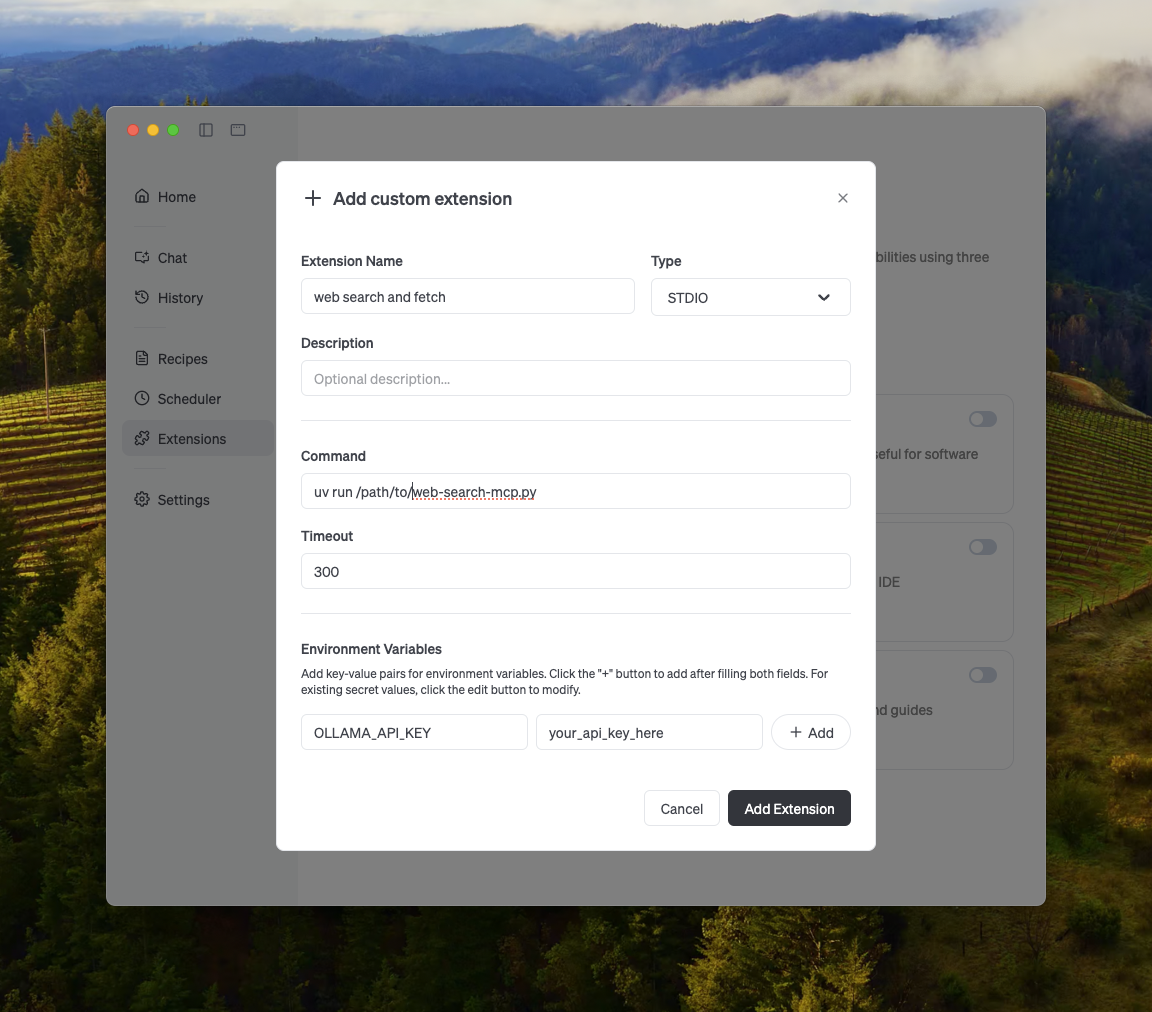
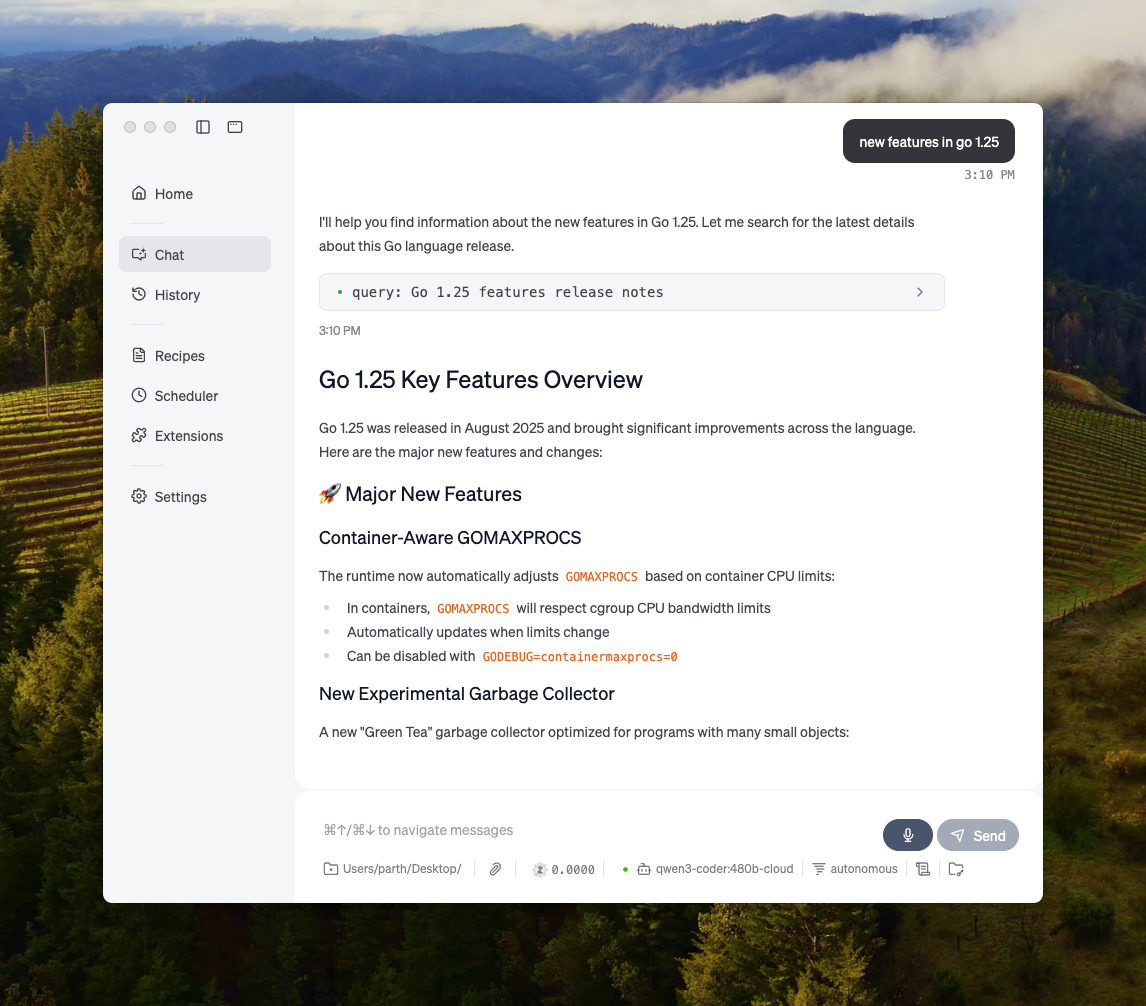
Các tích hợp khác
Ollama có thể được tích hợp vào hầu hết các công cụ có sẵn thông qua tích hợp trực tiếp API của Ollama, các thư viện Python/JavaScript, API tương thích OpenAI và tích hợp máy chủ MCP.